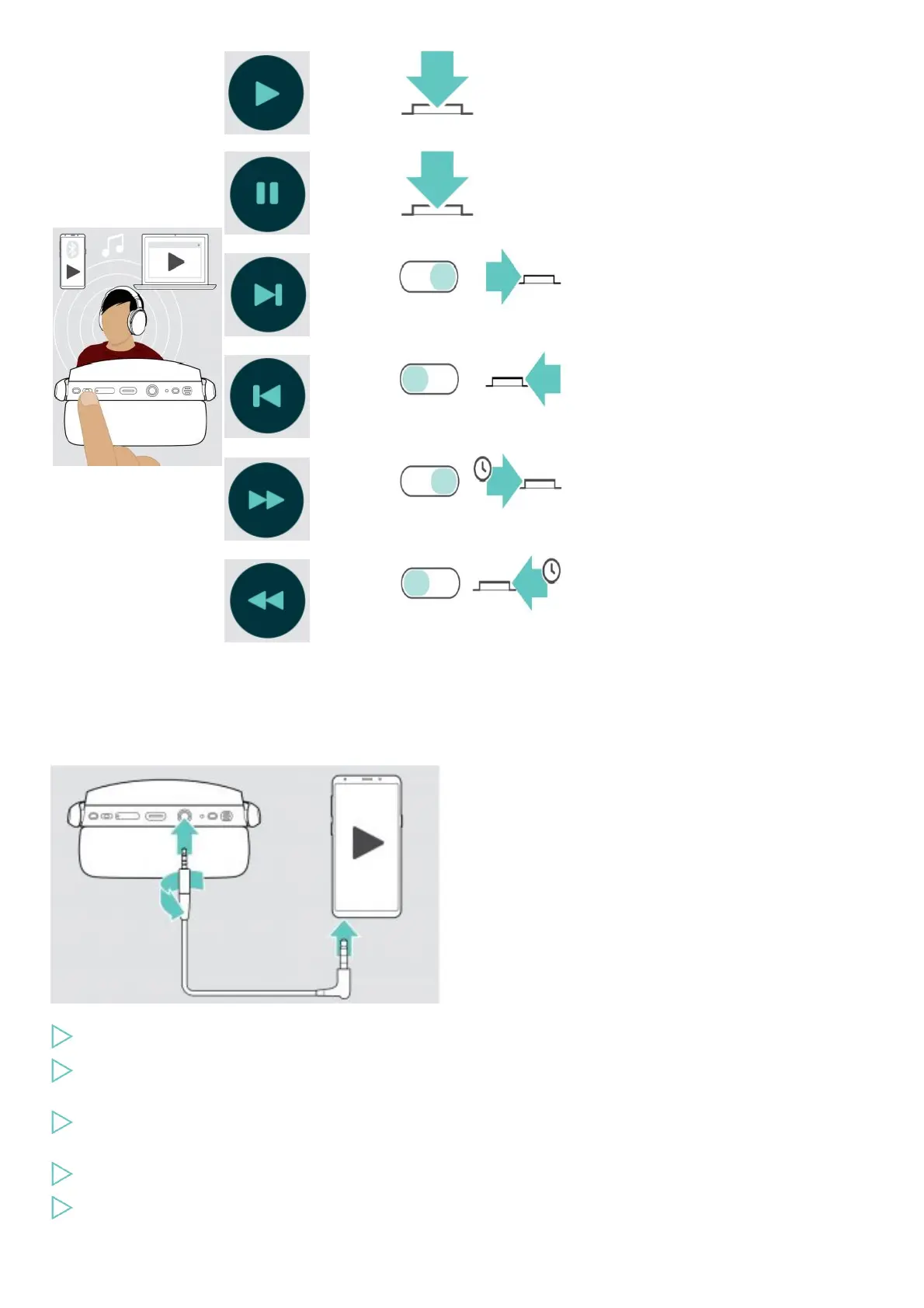
Plays audio
Pauses audio
Plays the next track in the
playlist
Plays the previous track in
the playlist
Fast-forwards the track:
Press and hold the button
Rewinds the track: Press
and hold the button
NOTE: If you receive and accept a call, audio playback is paused and restarts after the call – if supported by the connected device.
Using the audio cable
Use the audio cable for audio playback when the battery is low or when Bluetooth transmission is restricted or not allowed.
Bluetooth immediately turns off once the audio cable is connected to the headset.
Insert the small jack plug into the audio socket of the headset.
Turn the plug clockwise until it locks into place.
Bluetooth is deactivated.
Connect the 3.5 mm jack plug to the audio output of your mobile device.
To disconnect the audio cable:
Turn the plug counterclockwise to unlock it and pull it out of the headset.
Pull the plug out of your mobile device.
The headset automatically tries to connect to available paired Bluetooth devices.











 To Next Page