8
Putting the Set 830 S into operation
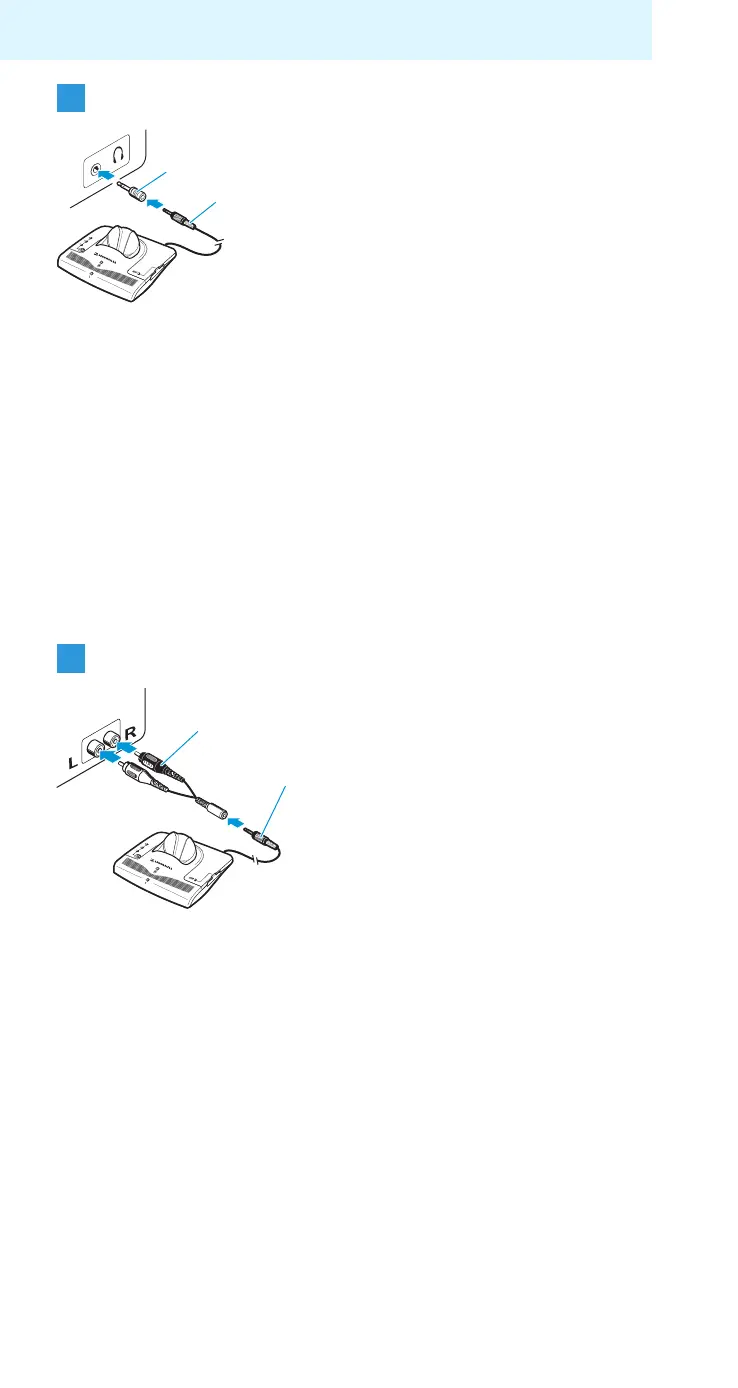
Connecting the transmitter to a headphone socket
왘 Adjust the volume of the headphone socket on your
sound source to a medium level.
This improves the quality of cordless sound transmission.
For detailed information, please refer to the instruction
manual of your sound source (e.g. TV).
Note:
With most TVs, the headphone socket is located at the
front or sides.
Connecting the transmitter to an RCA socket
Notes:
– With most TVs, the RCA socket is located at the rear.
– If your TV has several RCA sockets, use the socket RCA
output.
왘 Plug the other end of the connection
cable I into the head-phone socket
on your sound source.
Is the plug on the connection cable
too small for the headphone socket?
왘 Plug the adapter to ¼“ (6.3 mm) jack
socket J onto the connection cable.
왘 Plug the adapter for RCA
socket K onto the connection
cable I.
왘 Connect the red connector of
the adapter K to the red RCA
socket R of your sound source.
왘 Connect the white connector of
the adapter K to the white
or black RCA socket L of your
sound source.









 To Next Page