www.servware.com
800•768•5953
Service, Installation & Care Manual
IMPORTANT
NEVER CONNECT PRODUCT WITH TANK WITHOUT WATER OR OIL.
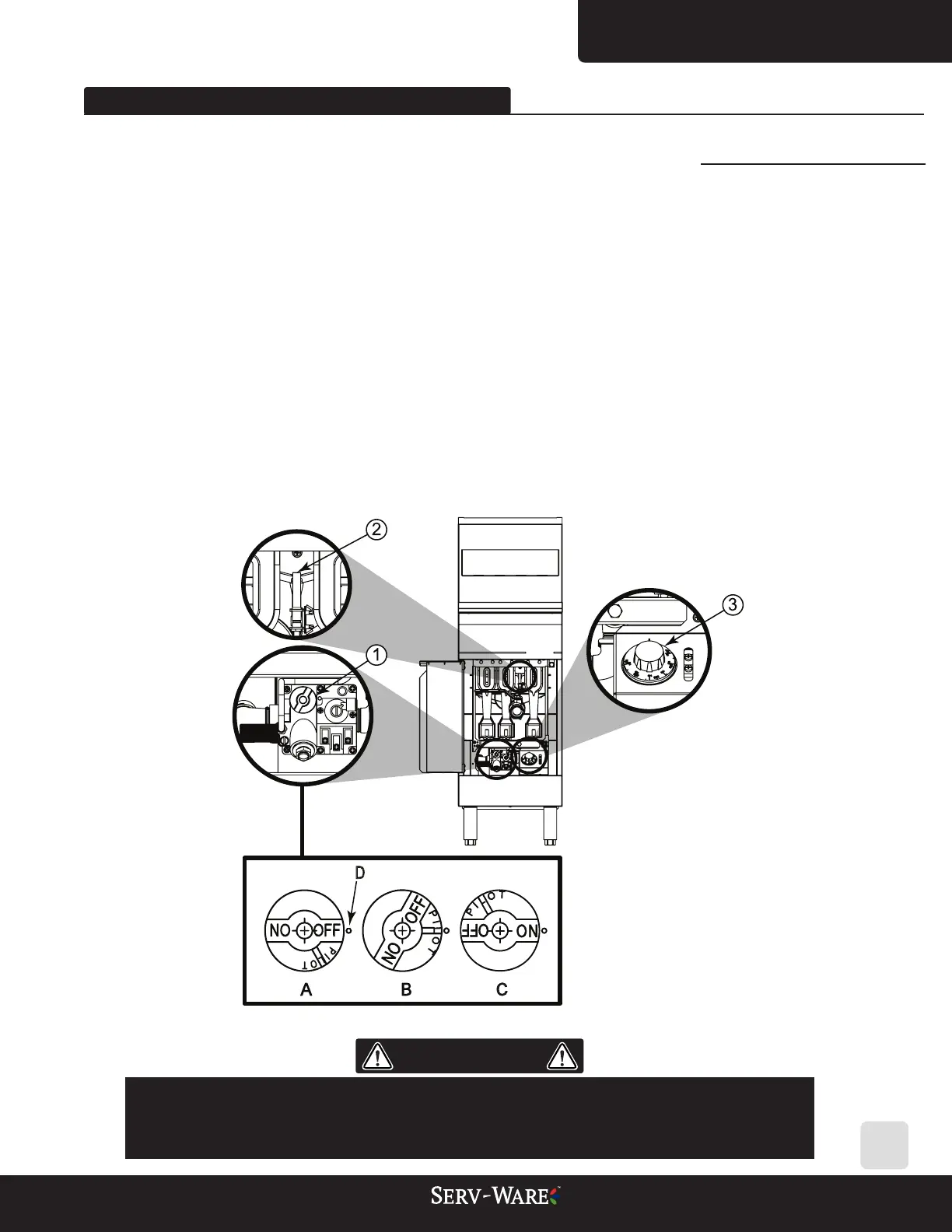
D - Indicator
C - Release Thermostat
B - Pilot mode position
A - Knob
Legend:
13
02. EQUIPMENT INSTALLATION
2.9 Turning on the Equipment - Product Ignition
To operate the equipment, do the following:
1. Open the manual gas supply valve (which will release gas into the equipment).
2. Turn the gas valve knob (1) to pilot mode (B) and squeeze it for 30 seconds to release gas into
the system to complete the ow to the pilot.
3. Put your lighting device (wick) in contact with the pilot (2). Keep the knob squeezed for 15 to
30 seconds.
Note: If after the procedure the pilot ame goes out, repeat steps 2 and 3 until it remains lighted.
4. Turn the knob (1) to the "ON" position (C) and then turn the temperature manipulator (3) to
the desired temperature position.
5. Wait a few seconds, the burner ame will ignite and the valve will ensure the system operates
smoothly with ame cycles to ensure the temperature set in step 3.


 To Next Page