USING THE SHARK MATRIX
™
PLUS 2-IN-1 ROBOTUSING THE SHARK MATRIX
™
PLUS 2-IN-1 ROBOT
VAC & MOP 2-IN-1 SETUPVAC & MOP 2-IN-1 SETUP
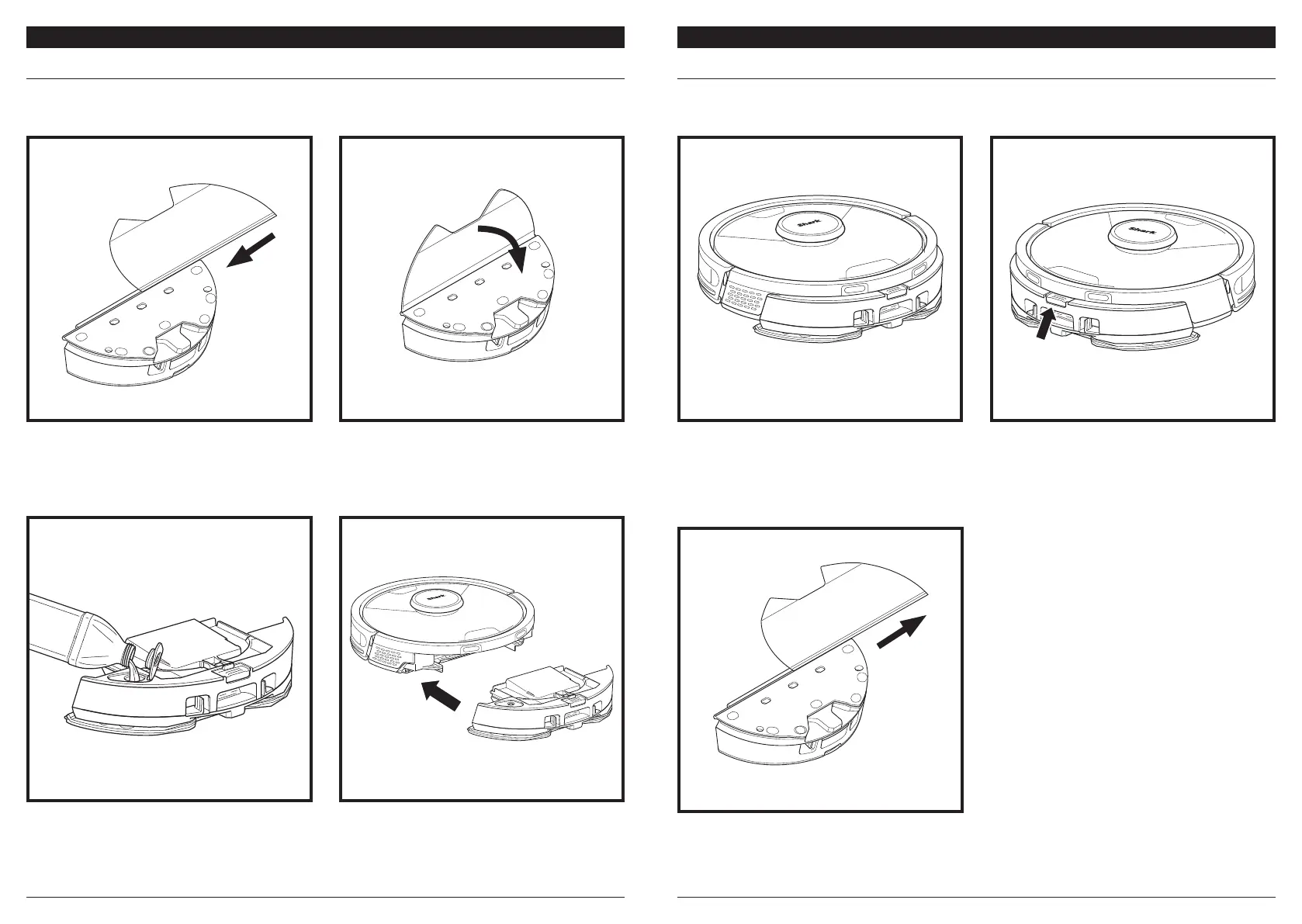
Secure the pad to the pad plate on the Vac & Mop
2-in-2 Dust Bin.
Lift open the fill cap on the top of the reservoir. Add
water then VACMOP™ cleaning solution, to the VACMOP
CLEANER line. Close the cap and make sure it is properly
sealed. We recommend using only Shark VACMOP cleaning
solution and water. Other cleaning solutions may negatively
impact your robot's performance in mopping mode.
Attach the mopping pad by inserting the flat edge of
the pad through the slot in the pad plate on the Vac
& Mop 2-in-2 Dust Bin. Pull the mop pad all the way
through the slot until it is securely inserted.
NOTE: Before it can mop, the robot MUST complete an Explore Run with the pad plate removed.
After the Explore Run, you will have an option to set up Carpet Zones and verify those carpets in the app
with a Carpet Verification Run. This ensures your robot will avoid carpets in mopping mode.
Firmly push the Vac & Mop 2-in-1 Dust Bin into the
back of the robot, and ensure both latches click into
place. The CLEAN button on the robot will illuminate
blue when the Vac & Mop 2-in-1 Dust Bin is inserted
properly.
When the reservoir in the Vac & Mop 2-in-1 Dust Bin
has fluid and is properly installed, with the mopping
pad attached, the robot is ready to vacuum and mop
simultaneously. Press the CLEAN button on the robot
or in the app to start a vacuuming and mopping run.
The robot will pre-saturate the mopping pad before
starting its run.
When mopping is complete, remove the Vac & Mop
2-in-1 Dust Bin by pressing the fill port button and
sliding it out. The dust bin will auto-evacuate into
the self-empty base when the robot docks.
CAUTION: Floors may be slippery after mopping.
To remove the mopping pad from the Vac & Mop
2-in-1 Dust Bin, detach the pad from the pad plate
and slide the pad out of the slot.
NOTE: Before the first mopping run, remove any rugs or mats from the robot's path. You can also prevent
your robot from traveling over rugs and carpets by setting up Carpet Zones in the app.




 To Next Page