(Continued)
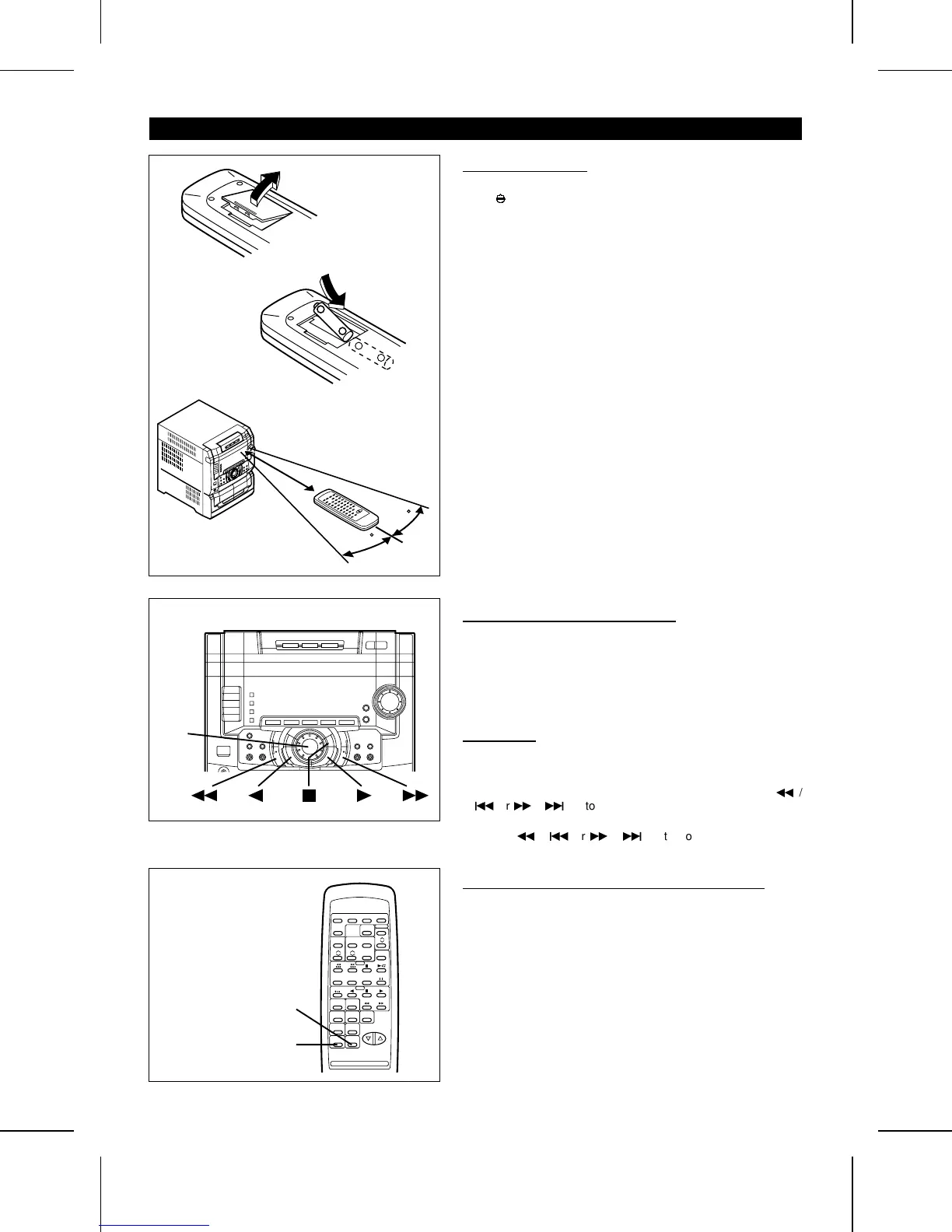
■ Remote control
● When inserting or removing the batteries, push them towards
the
ë
battery terminal.
● Installing the batteries incorrectly may cause the unit to mal-
function.
Precautions for battery use:
● Insert the batteries according to the direction indicated in the
battery compartment.
● Replace all old batteries with new ones at the same time.
● Do not mix old and new batteries.
● Remove the batteries if they are weak, or if the unit will not
be used for long periods of time. This will prevent potential
damage due to battery leakage.
Caution:
Do not use rechargeable batteries (nickel-cadmium battery, etc.).
Notes concerning use:
● Replace the batteries if control distance decreases or operation
becomes erratic.
● Periodically clean the transmitter LED on the remote control
and the sensor on the main unit with a soft cloth.
● Exposing the sensor on the main unit to strong light may in-
terfere with operation. Change the lighting or the direction of
the unit.
● Keep the remote control away from moisture, excessive heat,
shock, and vibrations.
<P=009>
■ Main unit operation buttons
The main unit operation buttons are common to all functions
(CD/Tuner/Tape).
Some buttons may have no function, depending on the mode
selected.
When a button indicator is lit, the corresponding button can be
used.
■ To change the brightness of the display
1 Press the ON/STAND-BY button to turn the power on.
2 Press the DIMMER button.
● The display will become dimmer.
To return to the original brightness:
Press the DIMMER button again.
+
-
-
+
● 2 "AA" size batteries
(UM/SUM-3, R6, HP-7
or similar)
15
15
0.2 m - 6 m
(8" - 20’)
Jog
dial
DIMMER
ON/STAND-BY
■ Jog dial
The jog dial is used to select CD track numbers, adjust the clock
and recall a memorised station, etc.
● When the jog dial is turned one step, it will stop at an angle
of about 15˚. This has the same effect as pressing the
3
/
5
or
2
/
4
button on the remote control once.
● If the jog dial is turned further, it has the same effect as press-
ing the
3
/
5
or
2
/
4
button on the remote control
repeatedly.
(Remote control operation)
CD-C491H(SUK) TINSE0229AWZZ
9



 To Next Page