PREPARATION
SETTING UP THE CURRENT TIME
E-12
1
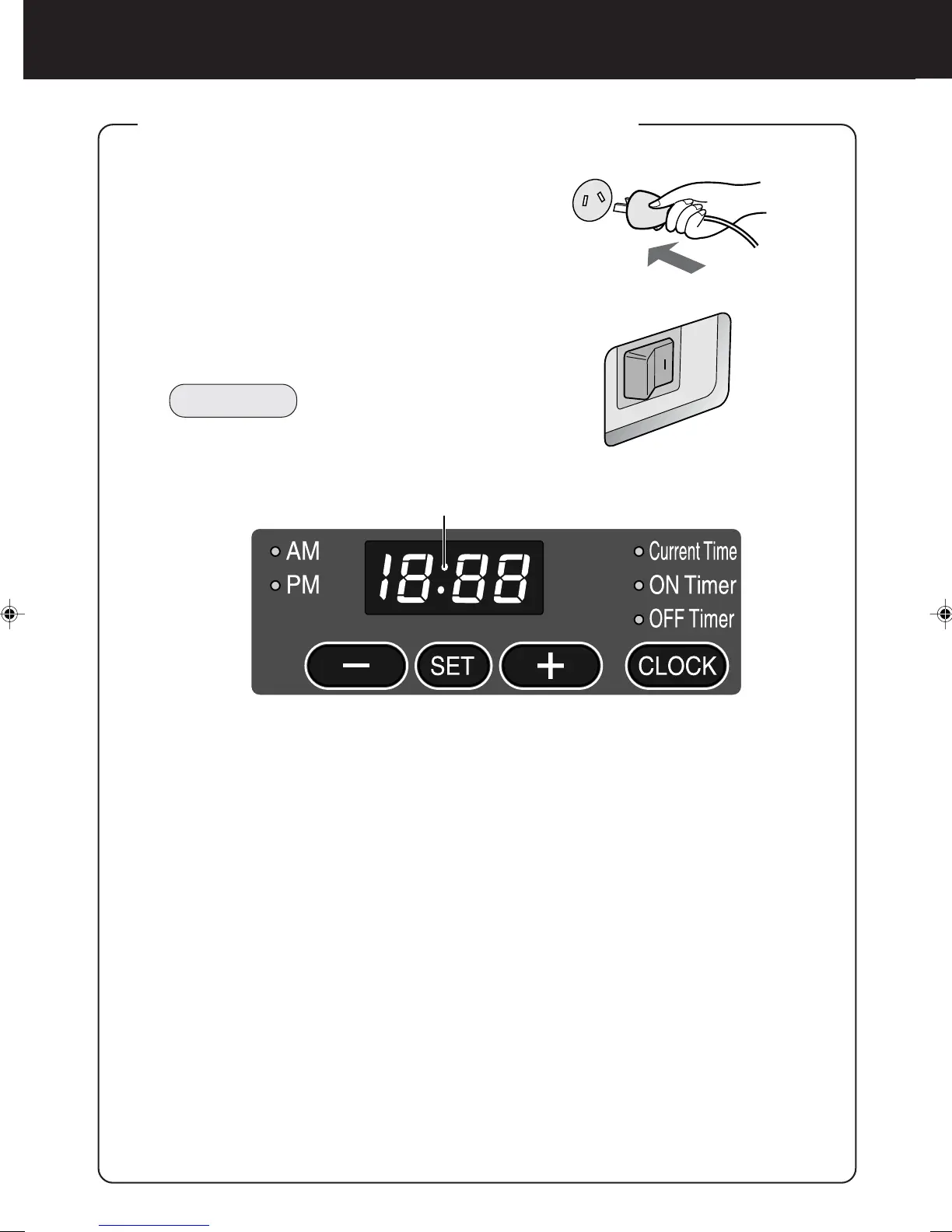
Insert the Power Plug into the outlet.
2
Turn on the Main Power Switch.
The Power Lamp is lit red and the digital dis-
play blinks.
NOTE
The current time must be set up while the unit
is non-operational. It cannot be set up during
operation.
3
Press the SET Button.
The Colon in the middle of the Digital Display stops blinking, and the indicated cur-
rent time blinks.
4
Press the
+
Button or
-
Button.
Set up the current time while observing the Digital Display.
• The time advances by one minute with each press of the + Button, and goes back
by one minute with each press of the
-
Button.
• This process will increase in speed if the relevant button is pressed continuously.
Press the + Button or
-
Button while the colon is not blinking (about 60 seconds).
If the colon starts blinking again, repeat this operation from Step 3.
• The a.m. and p.m. settings must also be set correctly.
5
Press the SET Button.
The colon in the middle of the Digital Display starts blinking, and the clock starts
running.
Colon



 To Next Page