E-6
PART NAMES
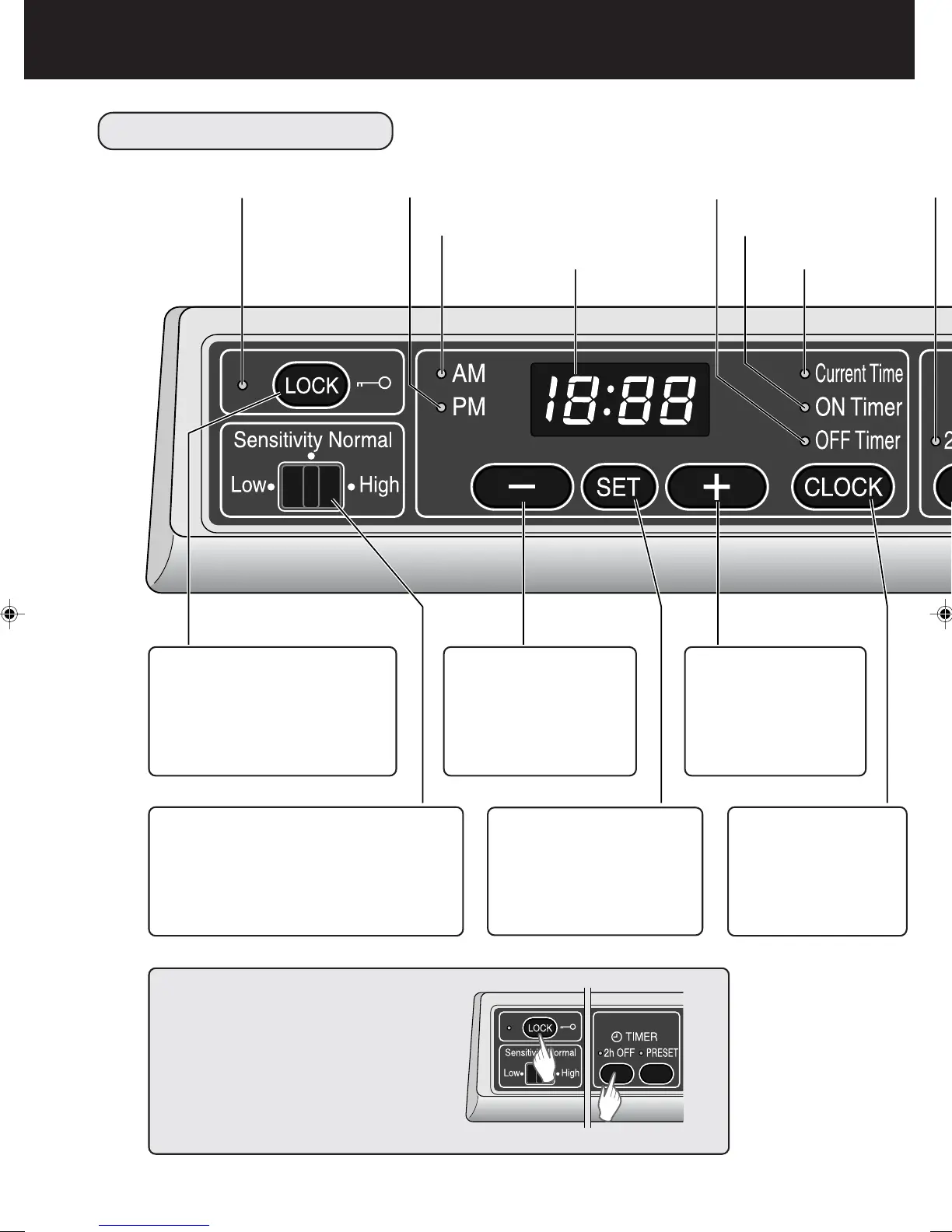
OPERATION PANEL
Lock Lamp
PM Lamp
AM Lamp
Digital Display
OFF Timer Lamp
ON Timer Lamp
Current Time Lamp
LOCK Button
All other buttons along this
operation panel are disabled
when this LOCK Button is
pressed. (Refer to E-17)
-
Button
Reverses the time
during setting.
(Refer to E-12,18)
Sensor Sensitivity Select Switch
Switches sensor response between
‘High’, ‘Sensitivity Normal’, and ‘Low’.
(Refer to E-17)
SET Button
Sets up the current time
and the on/off timers.
(Refer to E-12,18)
+
Button
Forwards the time
during setting.
(Refer to E-12,18)
CLOCK Button
Sets up the current
time and the on/off
timers.
(Refer to E-12,18)
Filter Reset
Press the LOCK Button and 2h OFF
Timer Button at the same time for
three seconds.
(Refer to E-23)



 To Next Page