11
CHVOL
MENU
TV/VIDEO MAIN POWER
A
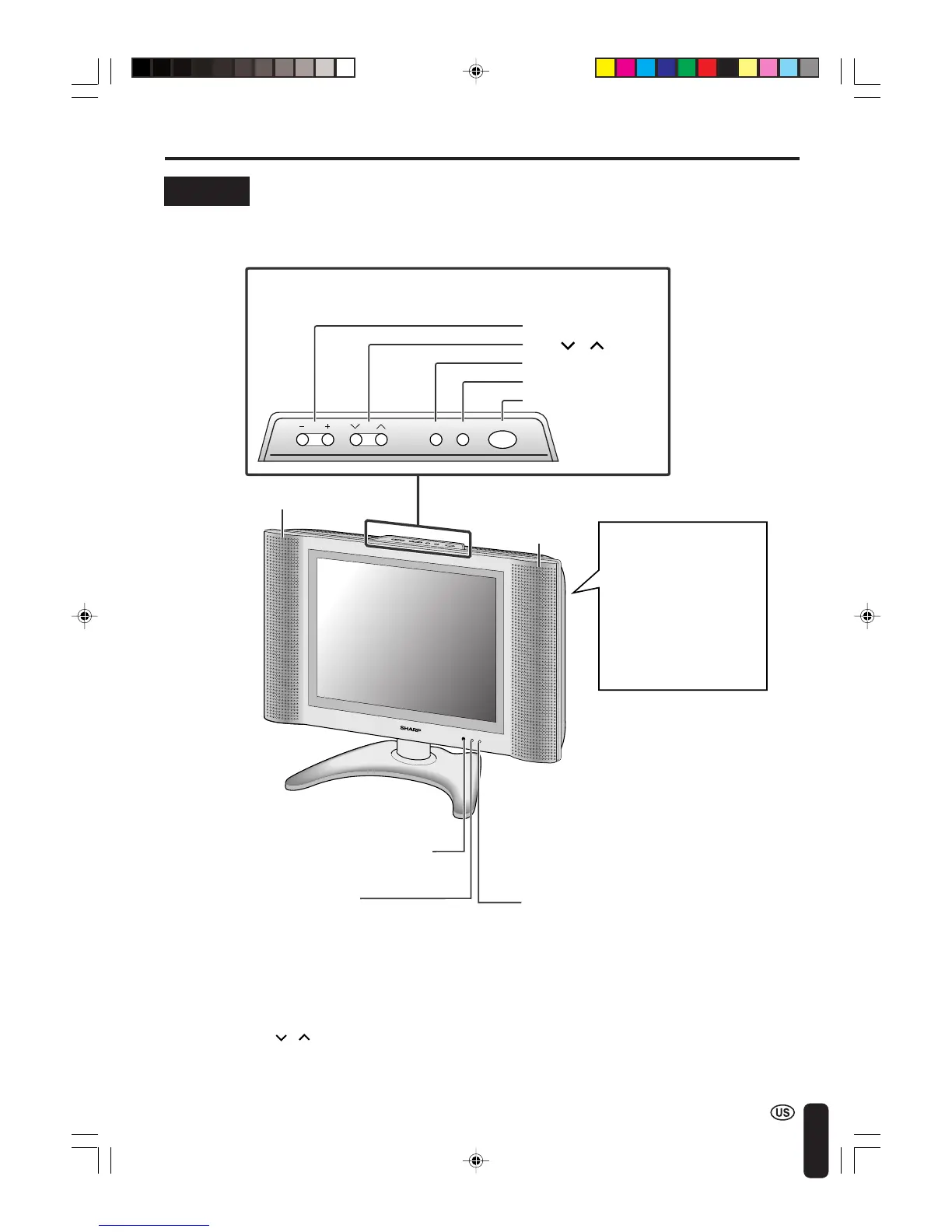
• TV/VIDEO, CH ( )/( ), VOL (–)/(+), and MENU on the main unit have the same functions as the same buttons
on the remote control. Basically, this operation manual provides a description based on operation with the remote
control.
DISPLAY AND CONTROL OVERVIEW
MAIN POWER
TV/VIDEO
MENU
CH ( )/( )
VOL (–)/(+)
Speaker (Right)
SLEEP indicator
The SLEEP indicator lights up red when the
SLEEP TIMER is set.
Upper control panel
To change the vertical
angle of the LCD TV set,
tilt the screen up to 5
degrees forward or 10
degrees backward. The
TV set can also be
rotated 50 degrees
horizontally. Adjust the
angle so that the TV set
can be watched most
comfortably.
Speaker (Left)
POWER indicator
A green indicator lights when the power is
on and a red indicator lights when in the
standby mode (the indicator will not light
when the main power is off).
Controls
Remote control sensor
LC-20B4U(E)-b 03.2.26, 3:25 PM11













 To Next Page