23
Sound Volume
CHVOL
POW
ER
ENTER
DISPLAY
MUTE
SLEEP PIC. FLIP
BRIGHT TV/VIDEO MENU
FLASH-
BACK
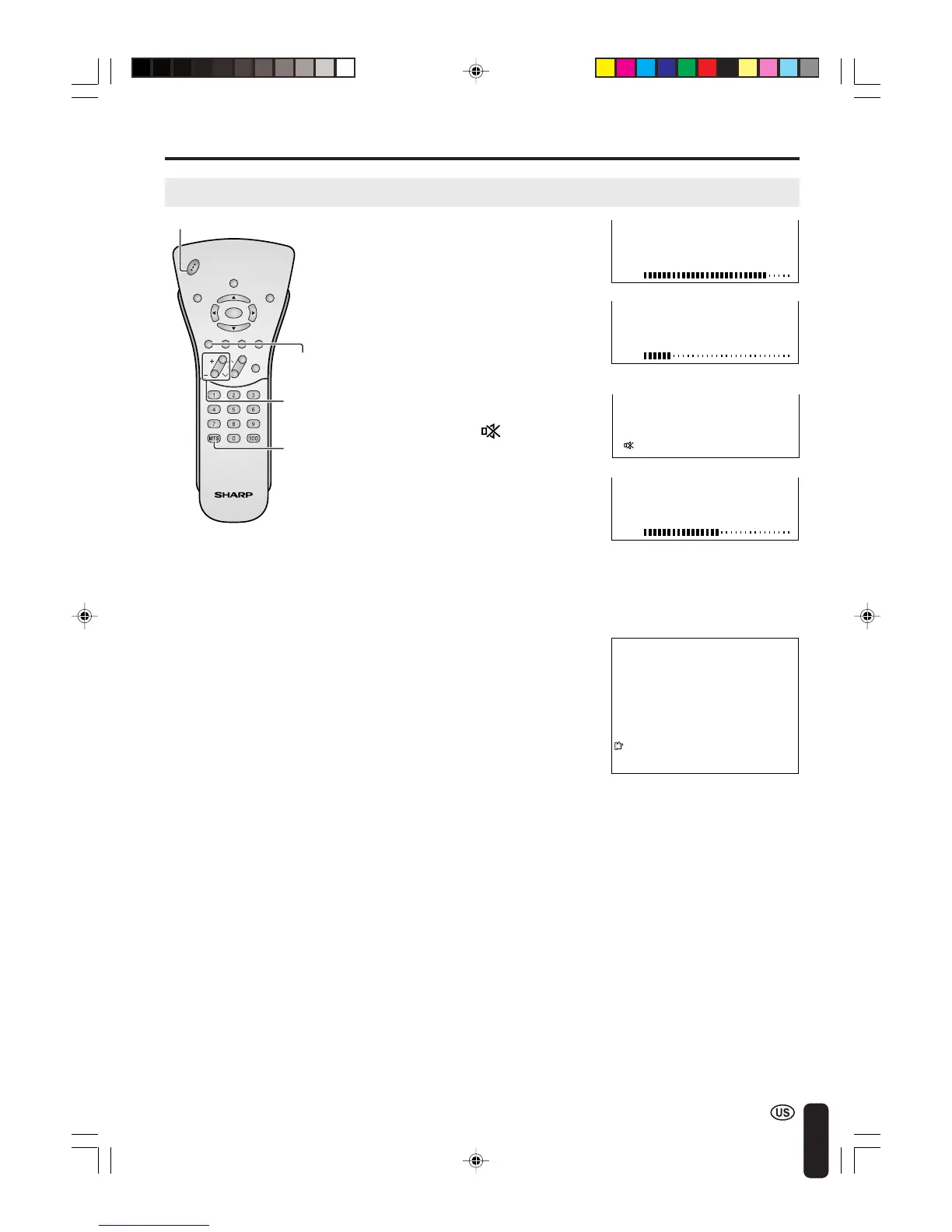
To mute the sound
BASIC OPERATION (Continued)
1 Press VOL (+) to increase the sound
volume. The bar indicator shifts right.
2 Press VOL (–) to decrease the sound
volume. The bar indicator shifts left.
1 Press MUTE to temporarily turn off
the sound.
The MUTE mark
is displayed for
4 seconds.
2 Press MUTE or VOL (+)/(–) to turn
the sound back to the previous level.
The mute function is automatically
turned off when any of the following
buttons are pressed: POWER,
VOL (+)/(–) or MTS.
MUTE
VOL
(+)/(–)
MTS
50
VOLUME
10
VOLUME
30
VOLUME
To select MTS (Multichannel TV Sound)
1 Press MTS to display the MTS
screen.
2 Press MTS to select the MTS
settings.
STEREO: stereo audio
SAP: secondary audio program
MONO: monophonic audio
2
STEREO
<
ON A I R
SAP
M
ONO
A
•
<
ON AIR appears when a STEREO or SAP
broadcast is being aired.
POWER
LC-20B4U(E)-b 03.2.26, 3:26 PM23














 To Next Page