19
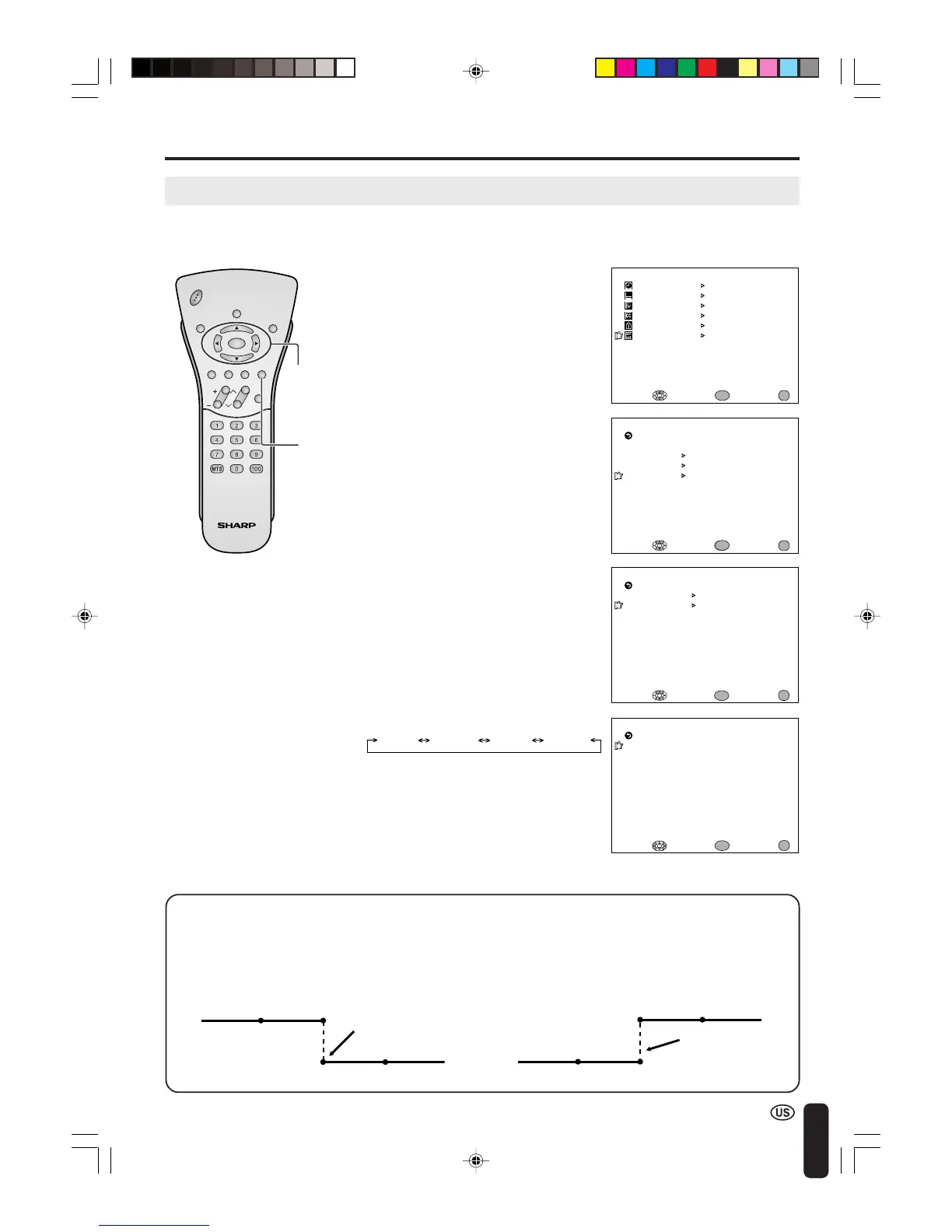
MANUAL CLOCK Setting
M
ENU
SLEEP T I
M
ER
PRESET
CLOSED CAPT ION
V–CHIP BLOCK
SET UP
SELECT : EXIT:
V I DEO AD JUST
ENTER:
ENTER
MENU
CLOCK
AUTO CLOCK
M
ANUAL CLOCK
OFF
SELECT : ENTER: EXIT:
RETURN
ENTER
MENU
M
ANUAL CLOCK
T IME [ 0 : 00AM]
EXIT:
RETURN
DST [OFF ]
ENTER:
ENTER
ADJUST :
MENU
CHVOL
PO
WER
ENTER
DISPLAY
MUTE
SLEEP PIC. FLIP
BRIGHT TV/VIDEO MENU
FLASH-
BACK
SETTING THE CLOCK (Continued)
If there are no channels with EDS signals, set the clock manually using MANUAL CLOCK.
BLUE SCREEN [OFF ]
LANGUAGE
SELECT : EXIT:
RETURN
SET UP
CH–SETT ING
ENTER
ENTER:
MENU
CLOCK
1 Press MENU to display the MENU
screen.
2 Press a/b to move the cursor to
SET UP, and press ENTER.
3 Press a/b to move the cursor to
CLOCK, and press ENTER.
6 Press c/d to set the time, and
press ENTER.
4 Press a/b to move the cursor to
MANUAL CLOCK, and press
ENTER.
7 Press MENU to return to the main
screen.
0:00AM 11:59AM 11:59PM0:00PM
5 Press a/b to move the cursor to
TIME, and press ENTER.
Daylight Saving-Time (DST) Adjustment
The Daylight Saving-Time changes as shown below, set the DST to ON to forward the clock by 1
hour. To rewind the clock by 1 hour, set the DST to OFF.
(Spring)
On the first Sunday in April D.S.T. starts.
(Autumn)
On the last Sunday in October D.S.T. finishes.
1:00AM 2:00AM
3:00AM 4:00AM
1:00AM 2:00AM
1:00AM 2:00AM
Advances 1 hour.
Rewinds 1 hour.
ENTER/
a/b/c/d
MENU
A
• Make sure to press ENTER after
adjusting the time. Otherwise, the time
will not be set.
LC-20B4U(E)-b 03.2.26, 3:26 PM19














 To Next Page