24
1 Press the button.
2 Press the
5
button.
BASIC OPERATION (Continued)
Changing Channels
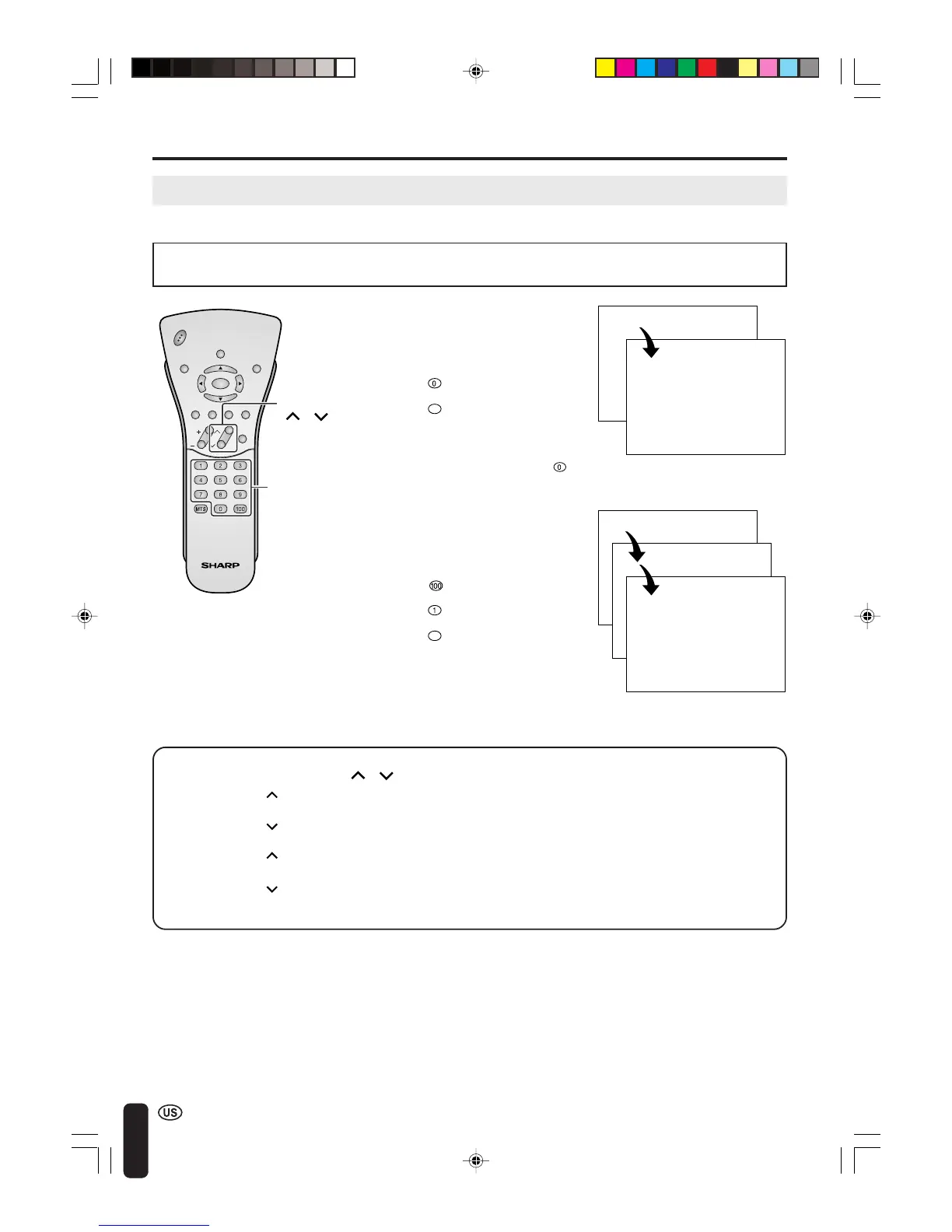
Changing channels by using Channel Select on the remote control
To select a 1- or 2-digit channel
number (e.g., Channel 5):
Complete the following procedure
within 4 seconds.
• This LCD TV set allows you to select up to 125 channels (1 to 125). To select a channel, enter a 2-
or 3-digit number.
1 Press the button.
2 Press the button.
3 Press the
5
button.
To select a 3-digit channel number
(e.g., Channel 115):
Complete the following procedure
within 4 seconds.
A
• When selecting a 1-digit channel
number, do not fail to press the
button first.
Changing channels with CH ( )/( ) on the remote control
Air Press CH ( ) and the channels change in the order shown below:
2 → 3 → . . . → 68 → 69 → 2 → 3 → . . .
Press CH (
) and the channels change in the order shown below:
3 → 2 → 69 → 68 → . . . → 3 → 2 → . . .
Cable Press CH (
) and the channels change in the order shown below:
1 → 2 → 3 → . . . → 125 →1 → 2 → 3 → . . .
Press CH (
) and the channels change in the order shown below:
3 → 2 → 1 → 125 → . . . → 3 → 2 → 1 → . . .
CHVOL
PO
W
ER
ENTER
DISPLAY
MUTE
SLEEP PIC. FLIP
BRIGHT TV/VIDEO MENU
FLASH-
BACK
Channel
Select
0 –
5
1 ––
11–
115
A
• The 3-digit channel number can be
selected only when the receiving mode is
set to CABLE in CH-SETTING. (For
details on setting the receiving mode,
see page 33.)
CH
(
)/( )
LC-20B4U(E)-b 03.2.26, 3:26 PM24













 To Next Page