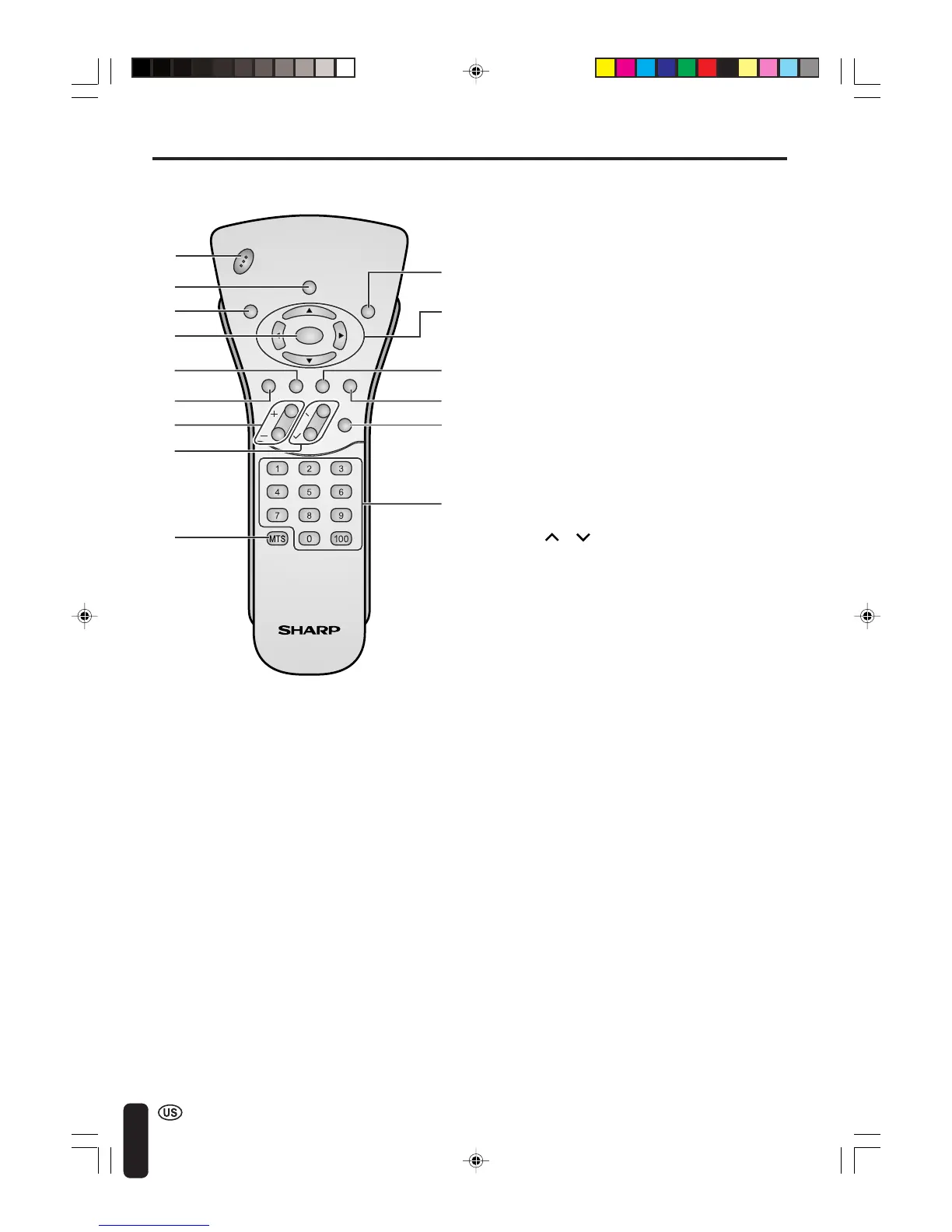
14
CHVOL
POWER
ENTER
DISPLAY
MUTE
SLEEP PIC. FLIP
BRIGHT TV/VIDEO MENU
FLASH-
BACK
REMOTE CONTROL
1 POWER (p. 21)
Switch the Liquid Crystal Television power
on or off.
2 DISPLAY
Display the channel and time information.
3 SLEEP (p. 26)
Set the sleep timer.
4 ENTER
Execute a command.
5 BRIGHT (p. 27)
Adjust the brightness of the screen.
6 MUTE (p. 23)
Mute the sound.
7 VOL (+)/(–) (p. 23)
Set the volume.
8 CH ( )/( ) (p. 24)
Select channel.
9 MTS (p. 23)
Select audio settings.
10 PIC. FLIP (p. 28)
Set the orientation of the picture.
11 a/b/c/d (Cursor control) (p. 25)
Select a desired item on the screen.
12 TV/VIDEO (p. 22)
Select a Liquid Crystal Television input
source.
13 MENU (p. 25)
Display the menu screen.
14 FLASHBACK
Return to the previous channel.
15 Channel Select (p. 24)
Set the channel.
1
2
3
4
5
6
7
8
9
10
11
12
13
14
15
LC-20B4U(E)-b 03.2.26, 3:25 PM14














 To Next Page