39
[1] MPAA RATING
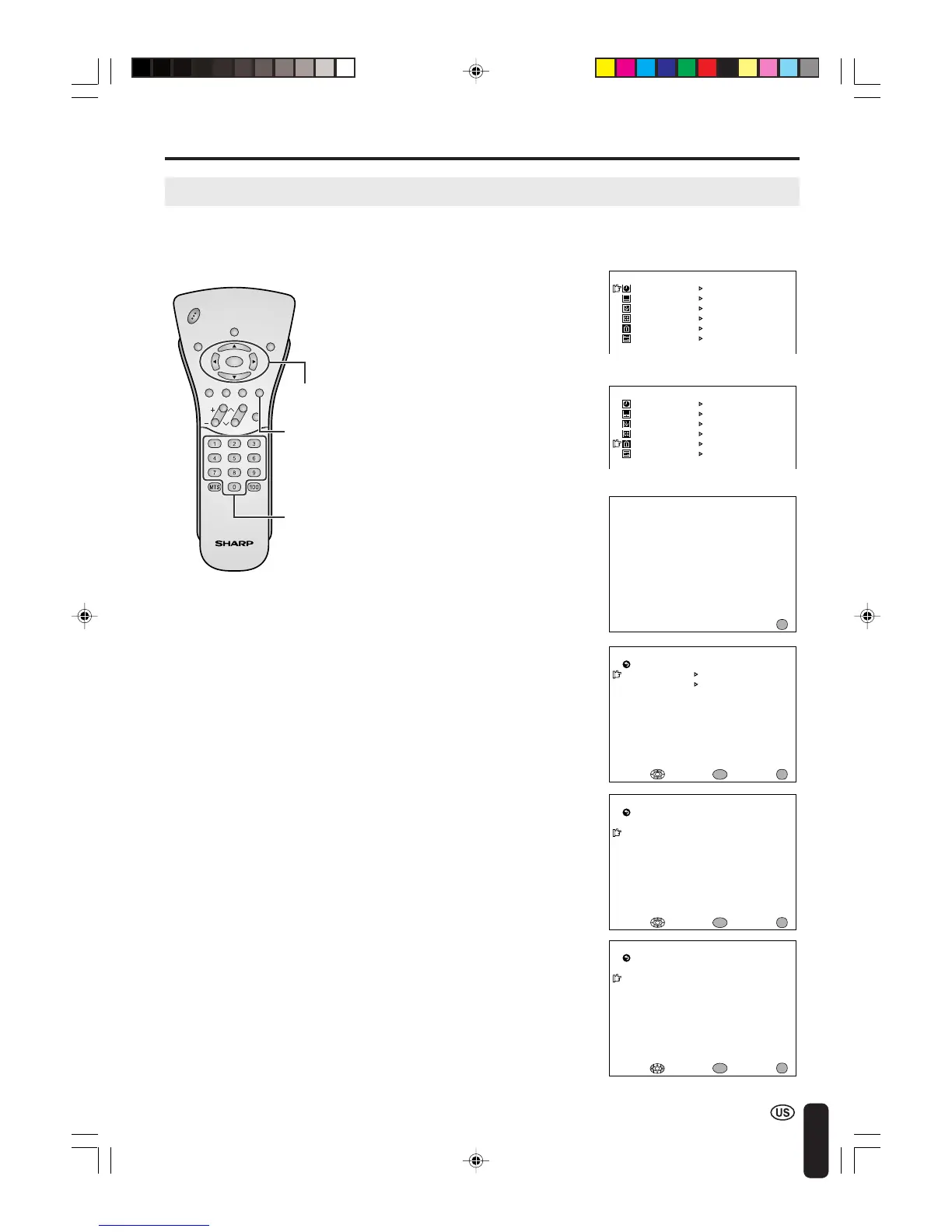
■ SETTING V-CHIP
Adjusting V-CHIP Settings (Continued)
2 Press a/b to move the cursor
to V-CHIP BLOCK, and press
ENTER.
4 Press a/b to move the cursor to
MPAA, and press ENTER.
5 Press a/b to move the cursor
to PG, and press ENTER.
1 Press MENU to display the MENU
screen.
ADJUSTMENTS (Continued)
ENTER/
a/b/c/d
Channel
Select
M
ENU
SLEEP T I
M
ER
V I DEO AD JUST
PRESET
CLOSED CAPT ION
V–CH IP BLOCK
SET UP
M
ENU
SLEEP T I
M
ER
V I DEO AD JUST
PRESET
CLOSED CAPT ION
V–CH IP BLOCK
SET UP
INPUT SECRET NO .
– – – –
EXIT:
MENU
M
PAA
TV GUIDEL INES
STATUS
SELECT : EXIT:
RETURN
V–CHI P BLOCK
[OFF]
ENTER :
ENTER
MENU
M
PAA
G [ –––––]
EXIT:
RETURN
PG [ BLOC K]
PG– 13 [BLOCK]
R [BLOCK]
NC– 17 [BLOCK]
X [BLOCK]
ENTER :
ENTER
ADJUST :
MENU
CHVOL
P
OW
ER
ENTER
DISPLAY
MUTE
SLEEP PIC. FLIP
BRIGHT TV/VIDEO MENU
FLASH-
BACK
M
PAA
G [ –––––]
EXIT:
RETURN
PG [ –––––]
PG– 13 [ –––––]
R [ –––––]
NC– 17 [ –––––]
X [ ––––– ]
ENTER :
ENTER
SELECT :
MENU
6 Press c/d to select BLOCK,
and press ENTER. If you set PG
to BLOCK, PG-13, R, NC-17 and
X are automatically blocked.
7 Press MENU to return to the
main screen.
A
• If you set G to BLOCK, all ratings are automatically blocked.
• If you set X to BLOCK, G, PG, PG-13, R and NC-17 are not blocked.
3 INPUT SECRET NO. will be
displayed. Input the 4-digit
secret number by using
Channel Select, and press
ENTER.
MENU
A
• When you input the secret number for
the first time, press ENTER to register.
Otherwise, continue to step 4.
LC-20B4U(E)-d 03.2.26, 3:31 PM39














 To Next Page