32
A
• In BLUE SCREEN, VIDEO ADJUST settings displayed in magenta cannot be selected.
• Selecting RESET will return all settings to the factory settings. (See page 31.)
• TV mode
This product is factory set to comply with the color system in the United States (NTSC-N358). For Brazil (PAL-M),
Argentina (PAL-N) or Uruguay (PAL-N), adjust the color system before using this product.
ADJUSTMENTS (Continued)
TV mode
AV mode
Adjusting VIDEO ADJUST Settings (Continued)
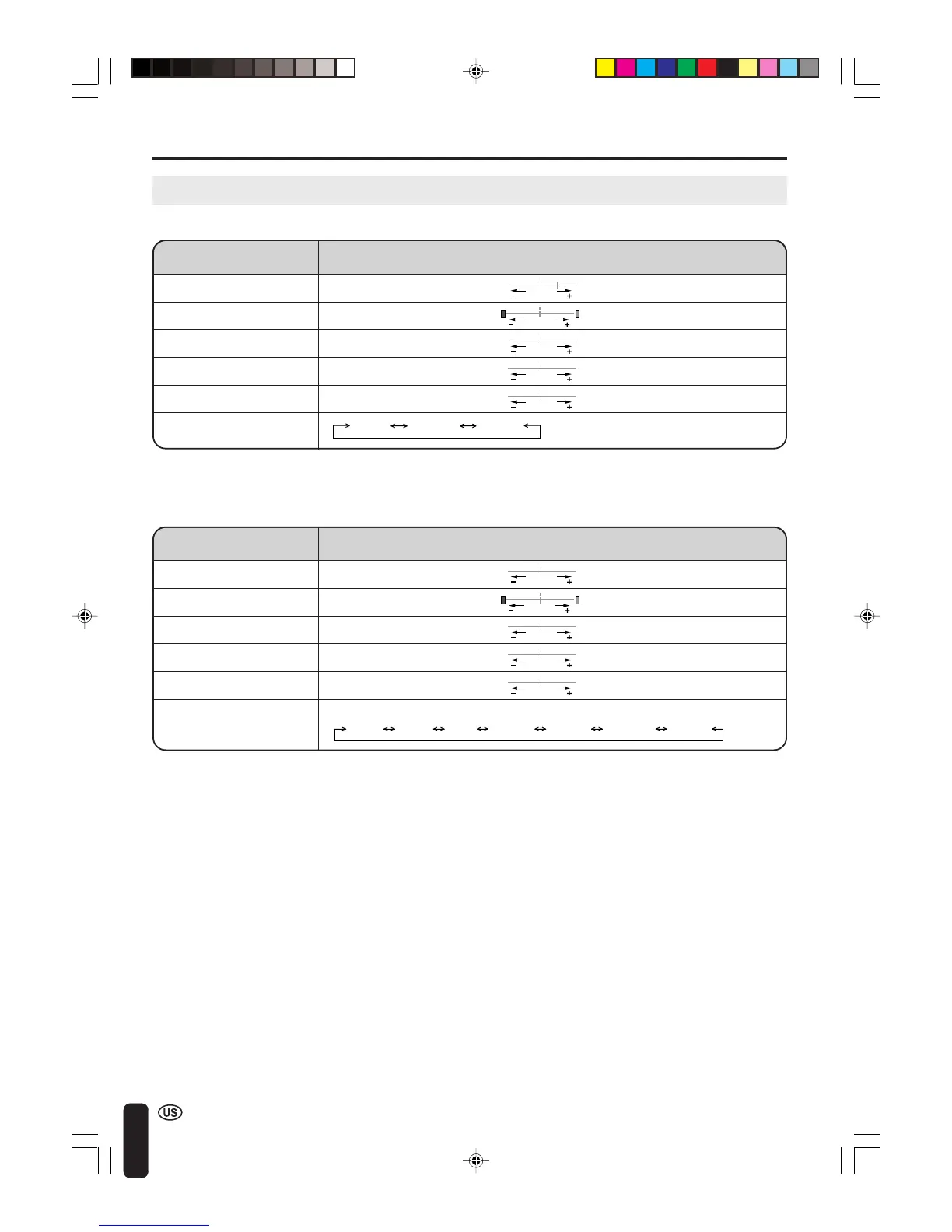
N358 PAL-M PAL-N
Selected item Press c Press d
PICTURE Decrease contrast Increase contrast
TINT Toward purple Toward green
COLOR Lower color intensity Higher color intensity
BLACK LEVEL Less brightness More brightness
SHARPNESS Soft picture Sharp picture
COLOR SYSTEM
Selected item Press c Press d
PICTURE Decrease contrast Increase contrast
TINT Toward purple Toward green
COLOR Lower color intensity Higher color intensity
BLACK LEVEL Less brightness More brightness
SHARPNESS Soft picture Sharp picture
COLOR SYSTEM • Press c/d to select the COLOR SYSTEM.
(AV1/AV2)
N358 N443 PAL-MPAL PAL-N SECAM PAL60
LC-20B4U(E)-c 03.2.26, 3:29 PM32













 To Next Page