45
CONNECTING EXTERNAL DEVICES (Continued)
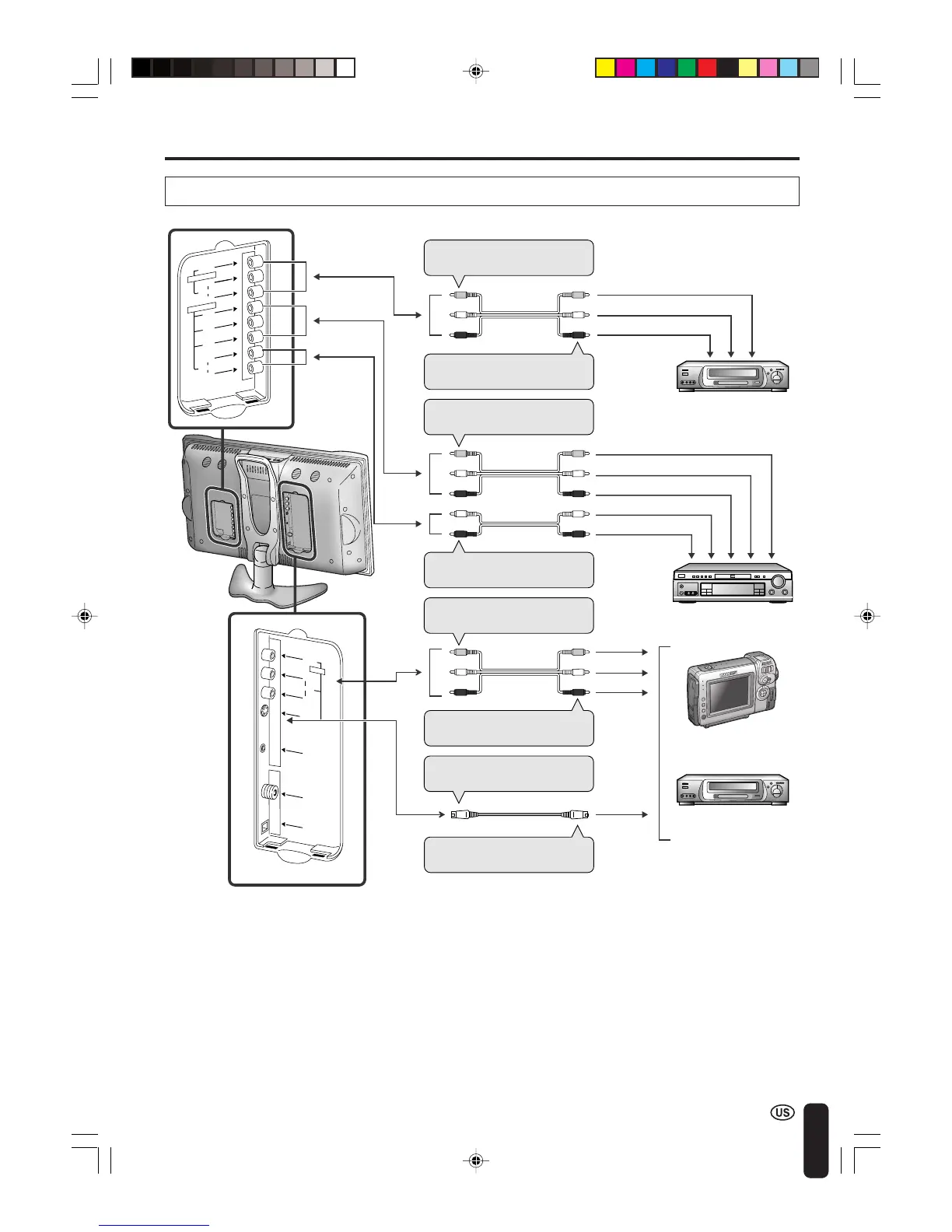
Connecting a VCR, DVD player or a video camera (AV-IN1/2/COMPONENT)
A
• If your VCR (or other external devices) has an S-video terminal, S-VIDEO connection is recommended. (Use an
S-video cable.)
• When you connect external devices to both S-VIDEO and VIDEO terminals (and if you select AV-IN1), you can
only view pictures from the S-VIDEO terminal.
• You cannot view multiple or synthesized pictures by connecting two or more external devices. When connecting
an external device, use care to connect the video and audio cables to the corresponding terminals.
V
O
L
C
H
M
E
N
U
T
V
/
V
I
D
E
O
M
A
I
N
P
O
W
E
R
VIDEO
AUDIO
L
Y
P
B
P
R
R
AUDIO
L
R
COMPONENT
AV-IN2/OUT
ANT.
VIDEO
S-VIDEO
AUDIO
L
R
HEAD
PHONE
POWER
INPUT
DC13V
AV-IN1
To AV-IN2 terminal
To audio/video output
terminal
To S-VIDEO input termi-
nal
To S-video output
terminal
To AV-IN1 terminal
To audio/video output
terminal
Video
Audio (L)
Audio (R)
Audio (L)
Audio (R)
Y
P
B
PR
VCR
VCR
Video
Audio (L)
Audio (R)
To COMPONENT input
(Video) terminal
To COMPONENT input
(Audio) terminal
S-video
DVD Player
Camcorder
LC-20B4U(E)-d 03.2.26, 3:32 PM45













 To Next Page