LC-37D44E/S/RU-BK/GY
2 – 4
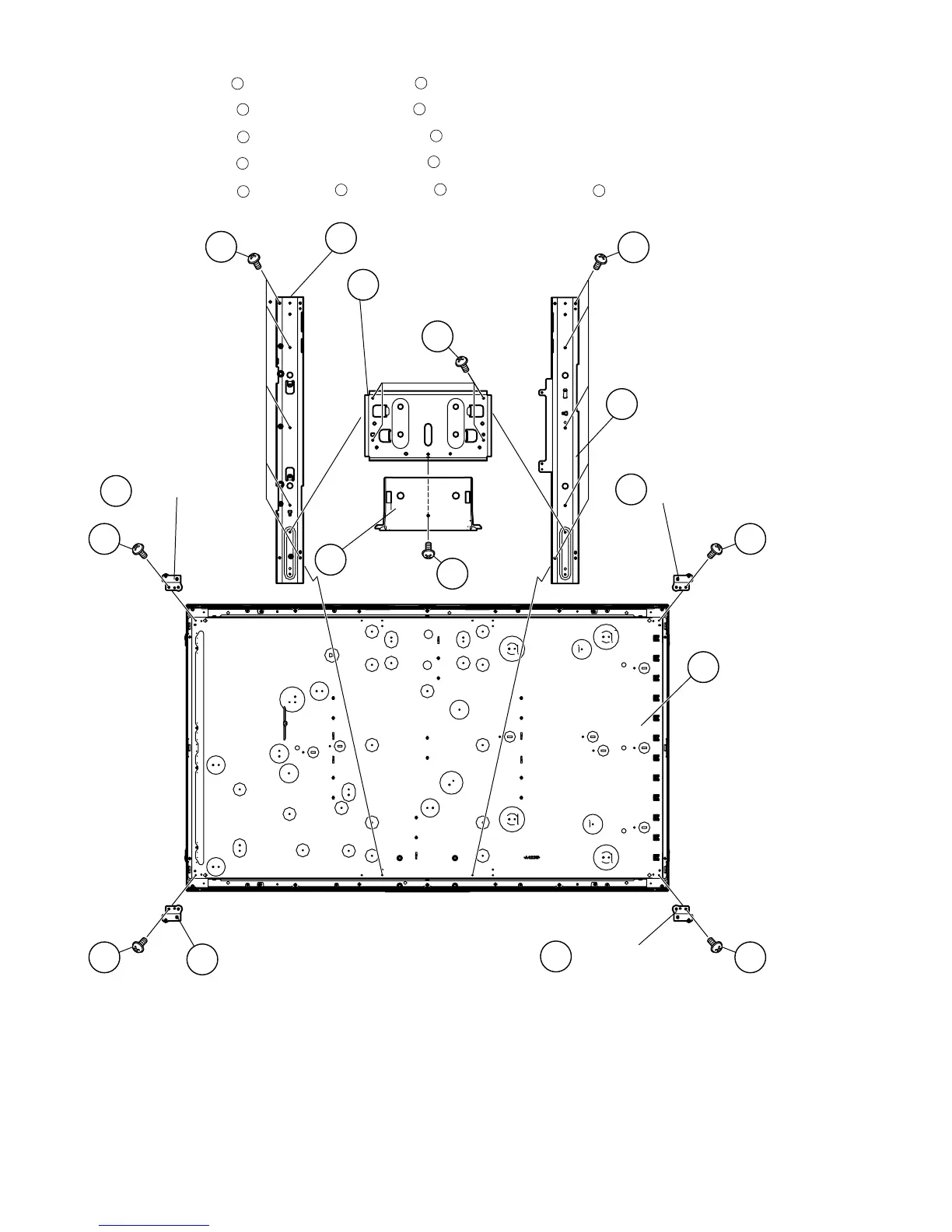
14.Remove the 1 lock screw and detach the Bottom Cover .
15.Remove the 4 lock screws and detach the Stand Angle .
16.Remove the 5 lock screws and detach the Center Angle R .
17.Remove the 5 lock screws and detach the Center Angle L .
18.Remove the 4 lock screws , LCD Angle A , LCD Angle B from the LCD Panel Unit .
33
34
35
36
37
38
39
40
41
42
43
44
42
44
42
43
43
37
38
35
39
Center Angle R
36
Stand Angle
Bottom
Cover
40
33
34
4141
41
41
Center Angle L
LCD Angle A
LCD Panel Unit
LCD Angle A
LCD Angle B
LCD Angle B




 To Next Page