MX-C250 SIMULATION 6 – 61
64-2
Purpose
Operation test/check
Function (Purpose)
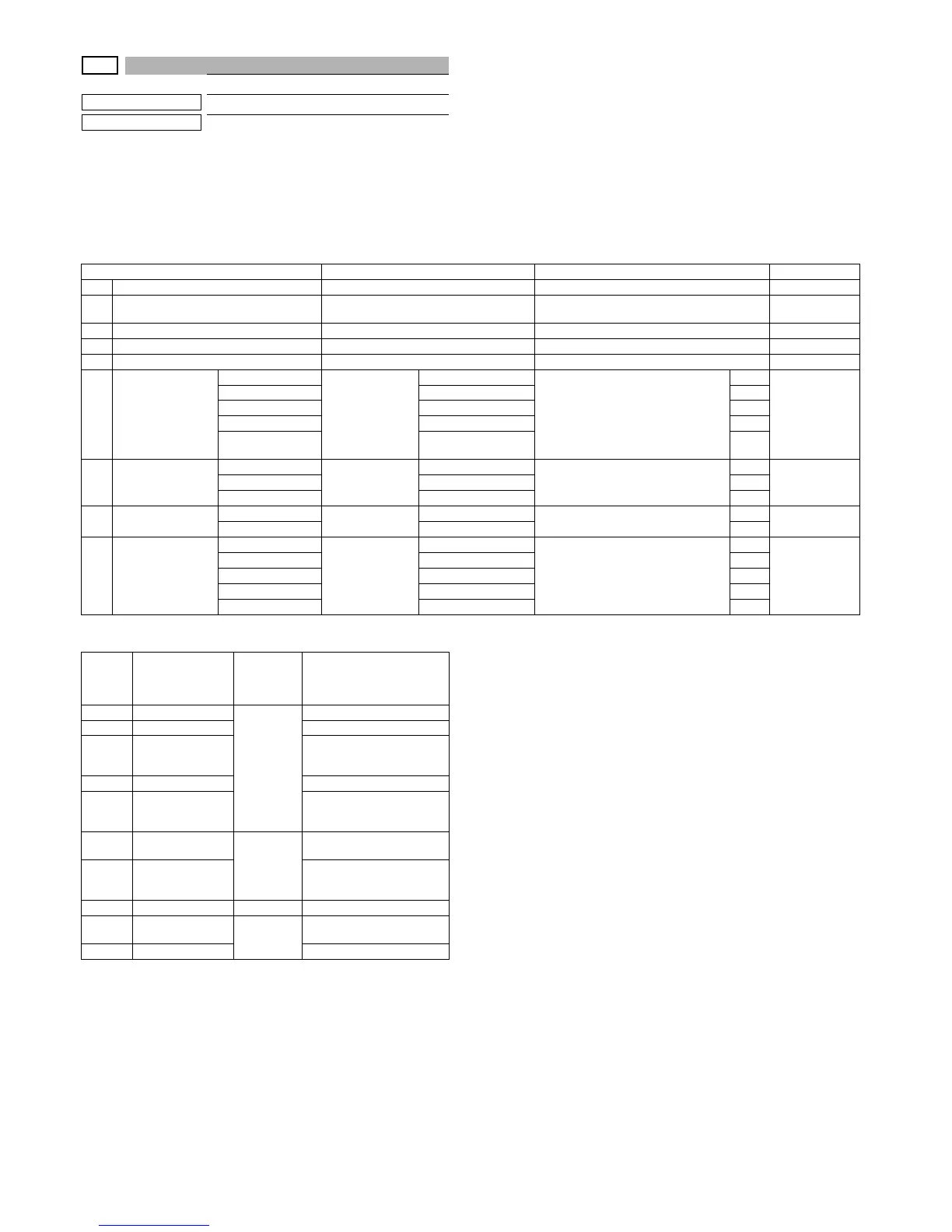
Test print. (Self print) (Monochrome mode)
Section
Operation/Procedure
1) Select an item to be set with Arrow keys.
2) Enter the set value with 10 keys.
3) Press [OK]/[START] key.
The set value in step 2) is saved.
<Print pattern of Item A>
Item/Display Content Setting range Default value
1 PRINT PATTERN Print pattern specification 1 - 22 1
2DOT1
Setting of print dot number (M parameter)
(Self print pattern: m by n)
0-255 1
3 DOT2 Setting of blank dot number 0-255 254
4 DENSITY Used to specify the print gradation. 1-255 255
5 MULTI COUNT Number of print 1 - 999 1
6 EXPOSURE
THROUGH
Exposure mode
specification
No process (through)
1-8
1
8
(STANDARD
DITHER)
CHAR/PRPIC Text/ Photograph 3
CHAR Text 4
PRINT PIC Printed Photo 5
STANDARD
DITHER
Dither without correc-
tion
8
7 PAPER
MFT
Tray selection
Manual paper feed
1 - 3
1
2 (CS1)CS1 Tray 1 2
CS2 Tray 2 3
8 DUPLEX
YES
Duplex print
selection
Yes
0 - 1
0
1 (NO)
NO No 1
9 PAPER TYPE
PLAIN
Paper type
Standard paper
1 - 5
1
1 (PLAIN)
HEAVY Heavy paper 2
OHP OHP 3
ENVELOPE Envelope 4
GLOSSY Glossy paper 5
Pat-
tern
No.
Content
Pattern
generat-
ing sec-
tion
NOTE
1 Grid pattern
LSU-ASIC
2 Dot print -
9
Each color 10%
area (A4/A4R)
density print
10 8-color belt print
11
4-color dot print
(sub scan)
Print of each color is made
for every 1/4 of the sub
scanning paper size.
17
All background
(half tone)
Half tone
(MFP ASIC
after pro-
cess)
-
18
256 gradations
pattern
(Other dither)
-
20 - - -
21
4-point dot print
(main scan)
LSU-ASIC
22 Slant line


 To Next Page