MX-M260/M310/M260N/M310N FIRMWARE UPDATE 9 - 3
C. Others (Troubleshooting)
Followings are the error possibly occur during the download process and troubleshooting method.
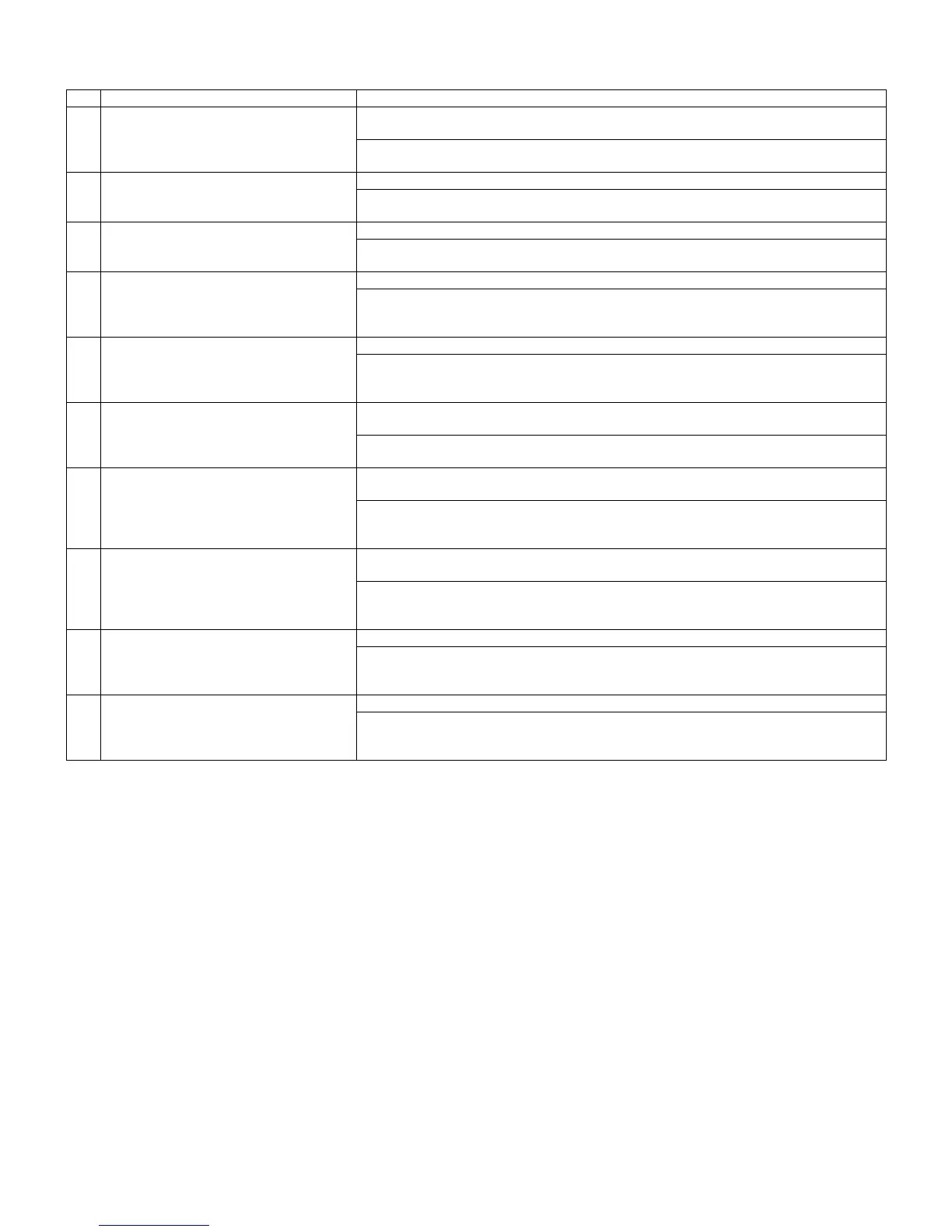
No Warning/error message Detail
1 Incorrect destination. Continue with the
download process?
Destination of download file and copier doesn't match.
Possible to select either continue or cancel the job.
[TROUBLESHOOTING]
To change destination, select "Yes". If not, select "No" and cancel download process.
2 Incorrect download file. Invalid download file for the machine is selected, or the file format is not correct.
[TROUBLESHOOTING]
Confirm the download file. Possibly the improper download file is selected.
3 No downloadable data included. Unable to find appropriate data in selected download file.
[TROUBLESHOOTING]
Confirm the download file. Possibly the improper download file is selected.
4 This option not available. Download procedure is executed on uninstalled optional kit.
[TROUBLESHOOTING]
Confirm installed optional kit.
Confirm the download file. Possibly the improper download file is selected.
5 The data size exceeds the Flash ROM size.
Try again with the appropriate size of data.
Panel flash ROM size is not enough to execute download procedure.
[TROUBLESHOOTING]
Confirm the download file. Possibly the improper download file is selected.
Exchange the flash ROM to the one which has more capacity.
6 Time out error. Transmission error
Unable to receive data from the machine among the certain period of time.
[TROUBLESHOOTING]
Restart maintenance program after confirming communication port or communication cable.
7 Communication (incoming) error. Incorrect download procedure.
The machine did not proceed download procedure correctly.
[TROUBLESHOOTING]
Restart maintenance program after confirming communication port or communication cable.
Make sure the communication device of PC(either COM or parallel) is under right condition.
8 Checksum error. Transmission error
The check sum value of the transmission data is mismatch.
[TROUBLESHOOTING]
Restart maintenance program after confirming communication device of PC (either COM or
parallel) is under right condition.
9 Error during the download process. Error
code: 0xXXXXXXXX
Download data file operation error.
[TROUBLESHOOTING]
Restart maintenance program after confirming the selected download file is not abnormal and
not using other application.
10 An error. [0xXXXXXXXX] The error occurred except the above errors.
[TROUBLESHOOTING]
Restart maintenance program after confirming communication device of PC(either COM or
parallel) is under right condition.



 To Next Page