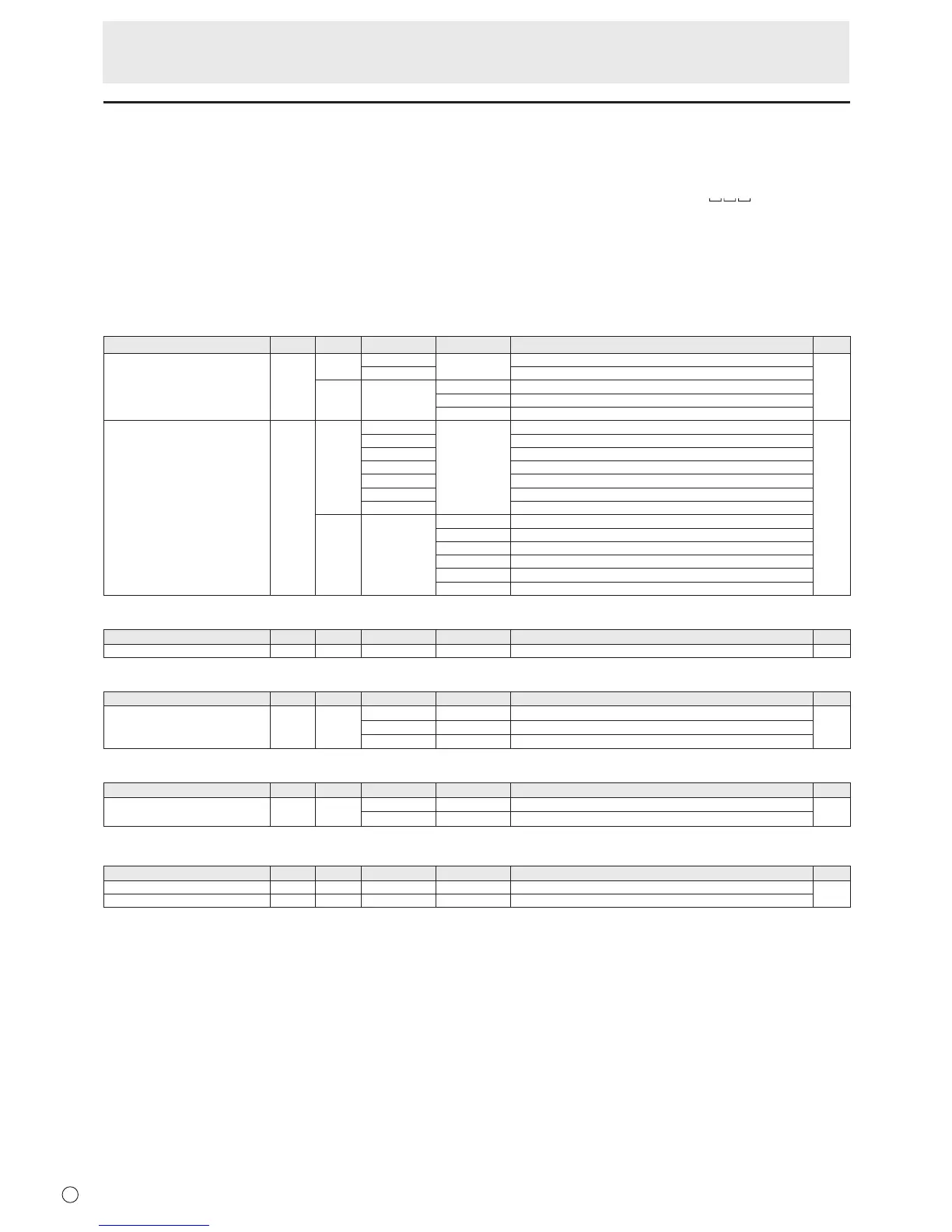
RS-232C command table
How to read the command table
Command: Command eld (See page 22.)
Direction: W When the “Parameter” is set in the parameter eld (see page 22), the command functions as described
under “Control/Response Contents”.
R The returned value indicated under “Reply” can be obtained by setting “????” or “
?” in the
parameter eld (see page 22).
Parameter: Parameter eld (See page 22.)
Reply: Response (Returned value)
*: “Yes” indicates a command which can be used in power standby mode.
“No” indicates a command which cannot be used in power standby mode.
Power control/Input mode selection
Function
Command Direction
Parameter Reply Control/Response contents *
POWER CONTROL POWR W 0
Switches to standby mode.
Yes
1 Returns from standby mode.
R 0 Standby mode
1 Normal mode
2 Input signal waiting mode
INPUT MODE SELECTION INPS W 0 Toggle change for input mode.
Yes
1 DVI-D
2 D-SUB
3 COMPONENT
4 VIDEO
9 HDMI
11 USB
R 1 DVI-D
2 D-SUB
3 COMPONENT
4 VIDEO
9 HDMI
11 USB
SCREEN menu
Function
Command Direction
Parameter Reply Control/Response contents *
AUTO ASNC W 1 Only when the input mode is D-SUB. No
PICTURE menu
Function
Command Direction
Parameter Reply Control/Response contents *
COLOR MODE BMOD WR 0 0 STD
No2 2 VIVID
3 3 sRGB (DVI-D, D-SUB input only)
SETUP menu
Function
Command Direction
Parameter Reply Control/Response contents *
THERMAL SENSOR SETTING STDR WR 0 1 LANDSCAPE (Horizontal orientation)
No
1 1 PORTRAIT (Vertical orientation)
FUNCTION (Initialization/Functional Restriction Setting) menu
Function
Command Direction
Parameter Reply Control/Response contents *
ALL RESET RSET W 0 All reset
No
ADJUSTMENT LOCK ALCK WR 0-2 0-2 0: OFF
Controlling the Monitor with a PC (RS-232C)


 To Next Page