VC-V50S
VC-V80T
VC-V91T
25
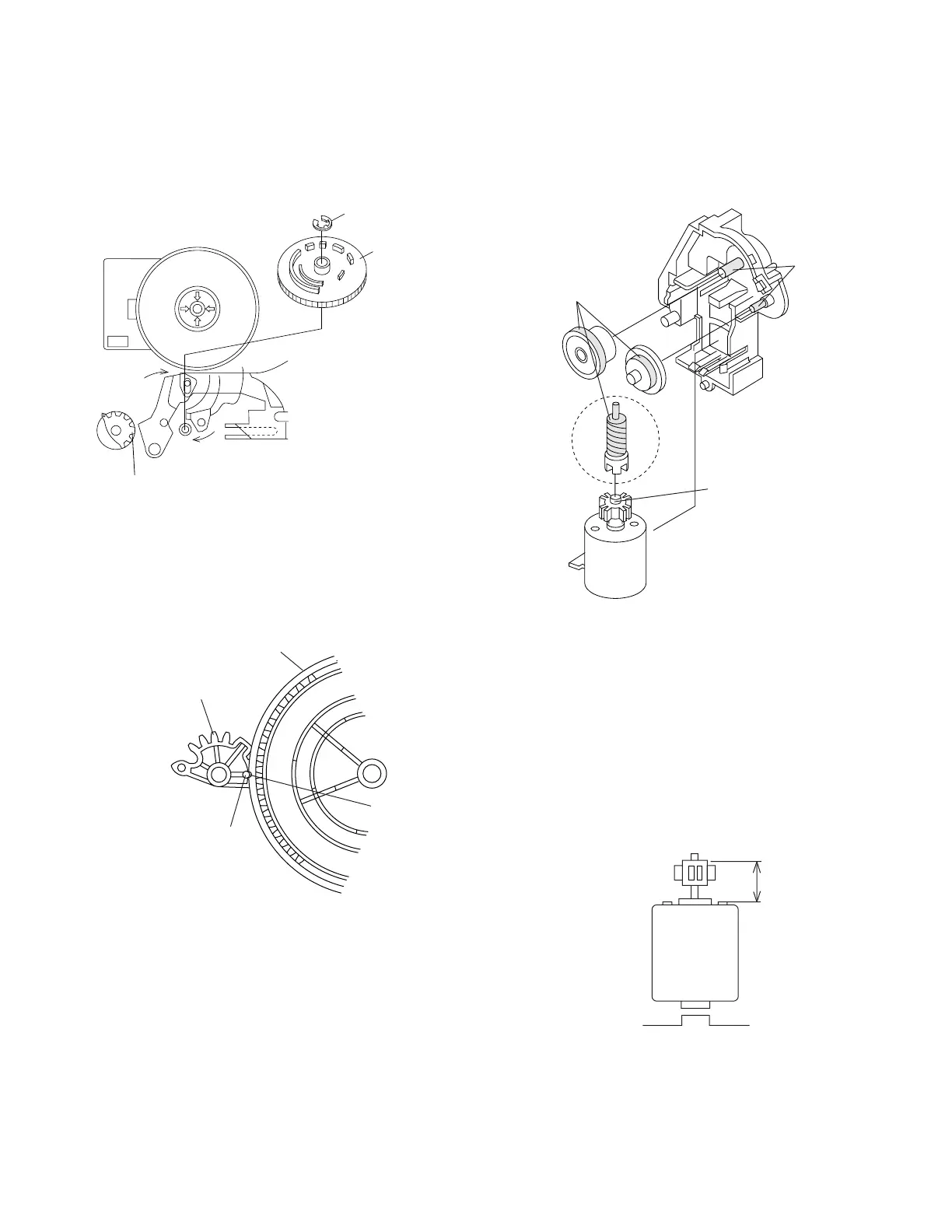
4-24 INSTALLING THE MASTER CAM (AT
REAR SIDE OF MECHANISM CHASSIS)
1. Make sure beforehand that the shifter is at the point as
shown below.
2. Place the master cam in the position as shown below.
Note:
See the figure below for the phase matching between the
master cam and the casecon drive gear.
3. Finally fix with the E ring.
4-25 REPLACEMENT OF LOADING MOTOR
• Removal
• Replacement
Remove the loading motor, and install the replacement
loading motor as shown below.
Figure 4-46.
Figure 4-44-2.
When installing the master cam,
align the casecon drive gear
round mark with the half-round
notch of master cam.
The loading motor pressing-in must be less than 14.7 N
(1500 gf).
Adjust the distance between motor and pulley to 10.2
mm).
E ring
(XRESJ30-06000)
Master cam
Fully turn
clockwise
Fully turn counterclockwise
Figure 4-44-1.
Face the wide tooth side ward
Master cam
Casecon drive gear
10.2 mm
Round mark
Half-round notch
+0.2
–0.2
Apply grease
Apply grease
No grease
Figure 4-45.
+0.2
–0.2


 To Next Page