XG-PH70X/XG-PH70X-N (1st. Edition)
1 – 7
RS-232C Terminal: 9-pin D-sub male connector
Pin No. Signal Name I/O Reference
1 Not connected
2 RD Receive Data Input Connected to internal circuit
3 SD Send Data Output Connected to internal circuit
4 Not connected
5 SG Signal Ground Connected to internal circuit
6 Not connected
7 RS Request to Send Connected to CS in internal circuit
8 CS Clear to Send Connected to RS in internal circuit
9 Not connected
RS-232C Cable Recommended Connection: 9-pin D-sub female connector
Pin No. Signal Pin No. Signal
1CD 1 CD
2RD 2 RD
3SD 3 SD
4ER 4 ER
5SG 5 SG
6DR 6 DR
7RS 7 RS
8CS 8 CS
9CI 9 CI
Note
Depending on the controlling device used, it may be necessary to connect Pin 4 and Pin 6 on the controlling
device (e.g. computer).
LAN Terminal : 8-pin RJ-45 modular connector
Pin No. Signal Pin No. Signal
1TX+ 5
2TX− 6RX−
3RX+ 7
48
5
10
15
1
11
6
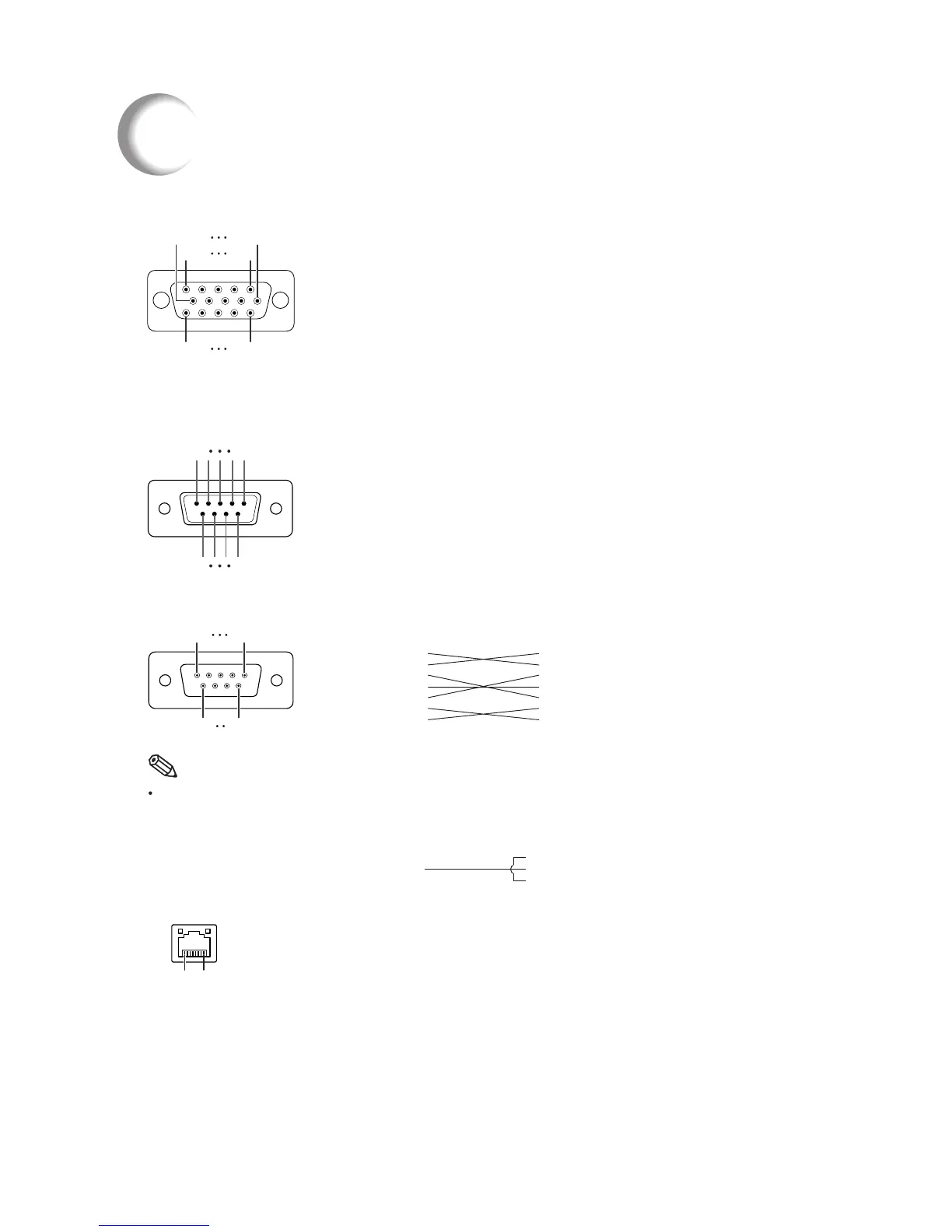
RGB Signal Terminal (INPUT 1 and OUTPUT (FOR INPUT 1, 2)): 15-pin mini D-sub female connector
Connecting Pin Assignments
RGB Input
1. Video input (red)
2. Video input (green/sync on green)
3. Video input (blue)
4. Not connected
5. Not connected
6. Earth (red)
7. Earth (green/sync on green)
8. Earth (blue)
9. Not connected
10. GND
11. Not connected
12. Bi-directional data
13. Horizontal sync signal: TTL level
14. Vertical sync signal: TTL level
15. Data clock
Component Input
1. P
R
(C
R
)
2. Y
3. P
B
(C
B
)
4. Not connected
5. Not connected
6. Earth (P
R
)
7. Earth (Y)
8. Earth (P
B
)
9. Not connected
10. Not connected
11. Not connected
12. Not connected
13. Not connected
14. Not connected
15. Not connected
51
96
8...1
Projector
Pin No.
4
5
6
Computer
Pin No.
4
5
6
51
96



 To Next Page