04/5/17 XL-HP888V(Z)E3.fm
E-21
ENGLISH
TINSZA075AWZZ
XL-HP888V
Disc Playback
Video CD playback (continued)
Notes:
!
Whilst the disc is being read ("TOC READ" is displayed), you
cannot play another disc. The 1 - 5 buttons work, but the /
(SELECT/RESUME ) button does not.
!
Playback control allows a video CD to be played back according
to instructions recorded on the disc. The "previous", "next",
"return" and "select" operations may function differently, depend-
ing on the PBC CDs.
!
Some video CDs with playback control may have an "auto
pause" recorded on them. When such a disc is played, the
screen will stop automatically at the point where an "auto pause
signal" has been inserted.
!
If the picture looks dirty when a video CD is played back, there
may be a scratch on the video CD. Replace it with another video
CD in good condition.
Caution:
!
Do not place two discs in one disc tray.
!
Do not play discs with special shapes (heart or octagon shaped)
as it may cause malfunctions.
!
Do not push the disc tray whilst it is moving.
!
If the power fails whilst the tray is open, wait until the power is
restored.
!
If the disc tray is stopped with force, "ER-CD20" will appear on
the display for 3 seconds and the unit will not function. If this
occurs, press the ON/STAND-BY button to enter the power
stand-by mode and then turn the power on again.
!
If TV or radio interference occurs during CD operation, move the
unit away from the TV or radio.
!
If a disc is damaged, dirty, or loaded upside down, the disc will
skip.
Auto power on function:
When you press any of the following buttons, the unit turns on.
!
CD/VIDEO CD (CD) button (main unit and remote control): The
unit turns on and the "CD" function is activated.
! SELECT/RESUME button on the remote control: The unit
turns on and disc playback starts (regardless of the last function).
!
/ button on the main unit: The unit turns on and playback of
the last function starts (CD/VIDEO CD, TAPE, TUNER, VIDEO).
" Various disc functions
Notes:
!
Operations may be different from the above in the P.B.C. mode.
!
Pictures are shown intermittently and no sound is heard during
fast forward or fast reverse on video CDs.
!
During fast forward/fast reverse, no sound is produced. Images
may be distorted or become noisy, or discolouration may occur.
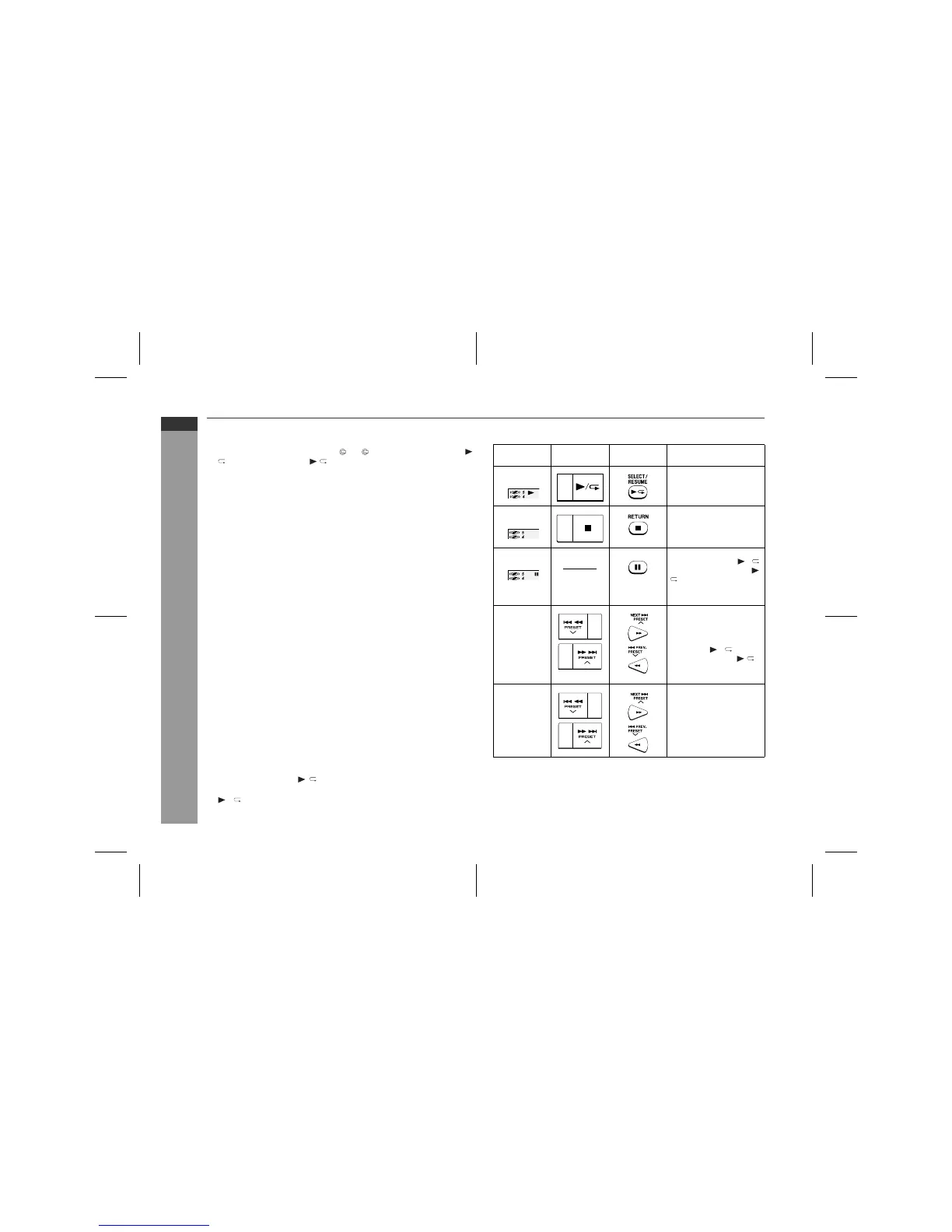
Function Main unit Remote
control
Operation
Play Press in the stop
mode.
Stop Press in the playback
mode.
Pause Press in the playback
mode. Press the /
(SELECT/RESUME
) button to resume
playback from the
paused point.
Track up/
Track down
Press in the playback
or stop mode.
(One disc
only)
If you press the button
in the stop mode,
press the / (SE-
LECT/RESUME )
button to start the de-
sired track.
Fast for-
ward/Fast
reverse
Press and hold down
in the playback mode.
(One track
only)
Release the button to
resume playback.



 To Next Page