04/5/17 XL-HP888V(Z)E4.fm
E-39
ENGLISH
TINSZA075AWZZ
XL-HP888V
Tape Recording
Recording on a cassette tape (continued)
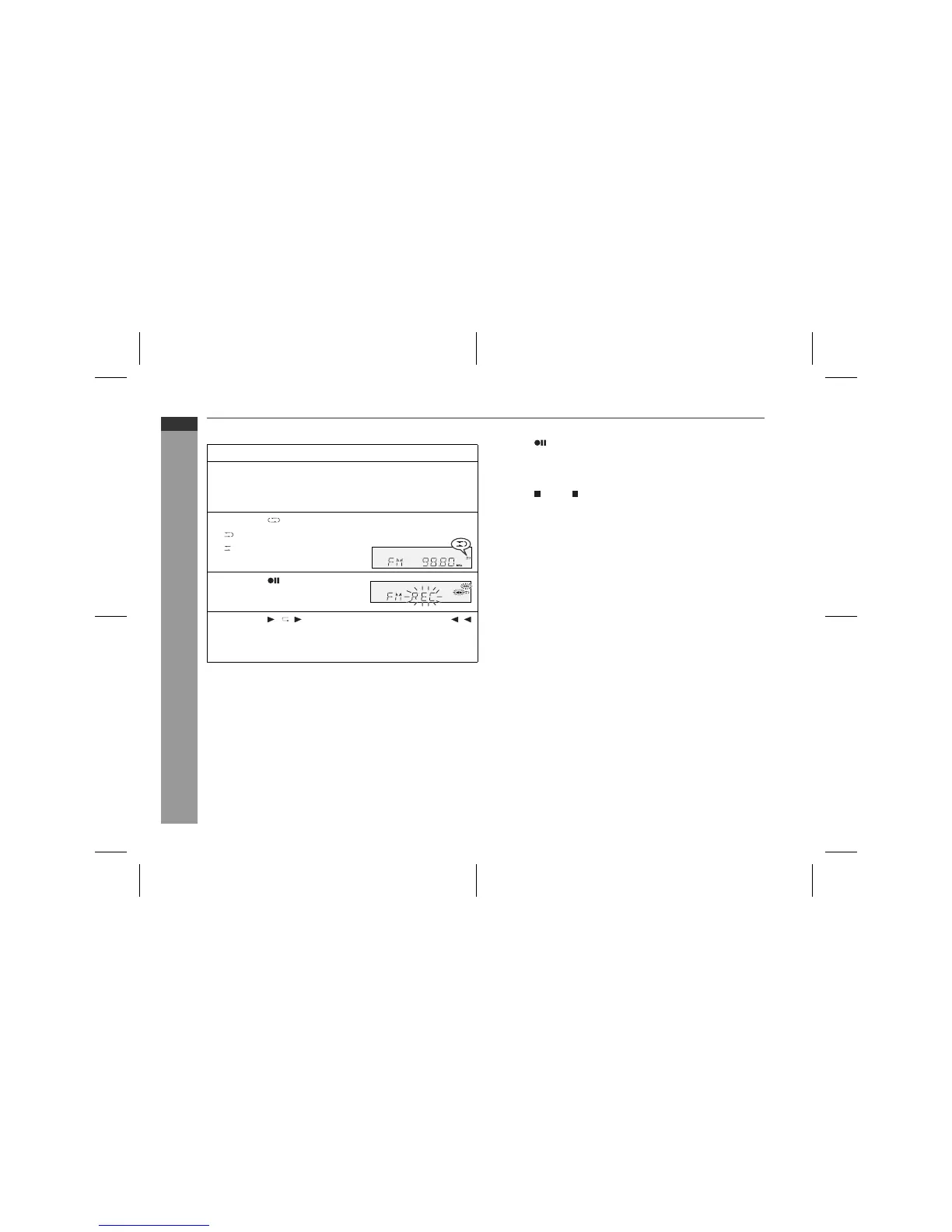
" Recording from the radio
To interrupt recording:
Press the button.
To resume recording, press the same recording button you pressed
in step 5. Other buttons do not allow resuming.
To stop recording:
Press the (TAPE ) button.
Note:
If you hear a whistling noise whilst recording an AM station, move
the AM loop aerial.
" Erasing recorded tapes
1 Press the TAPE button.
2 Follow steps 2 - 5 in "Recording from the radio".
1
Tune in to the desired station (see page 31).
2
Load a cassette into the cassette compartment with side A
facing you.
Wind past the leader of the tape, on which recording cannot be
performed.
3
Press the button to choose one side or both sides.
... To record on both sides.
... To record on only one
side.
4
Press the button.
Recording will be paused.
5
Press the / ( ) button to record on side A, or the ( )
button for side B.
To record on both sides, begin with side A. (If recording is start-
ed from side B, the tape will not switch over to side A.)



 To Next Page