04/5/17 XL-HP888V(Z)E3.fm
E-24
ENGLISH
TINSZA075AWZZ
4
XL-HP888V
Disc Playback
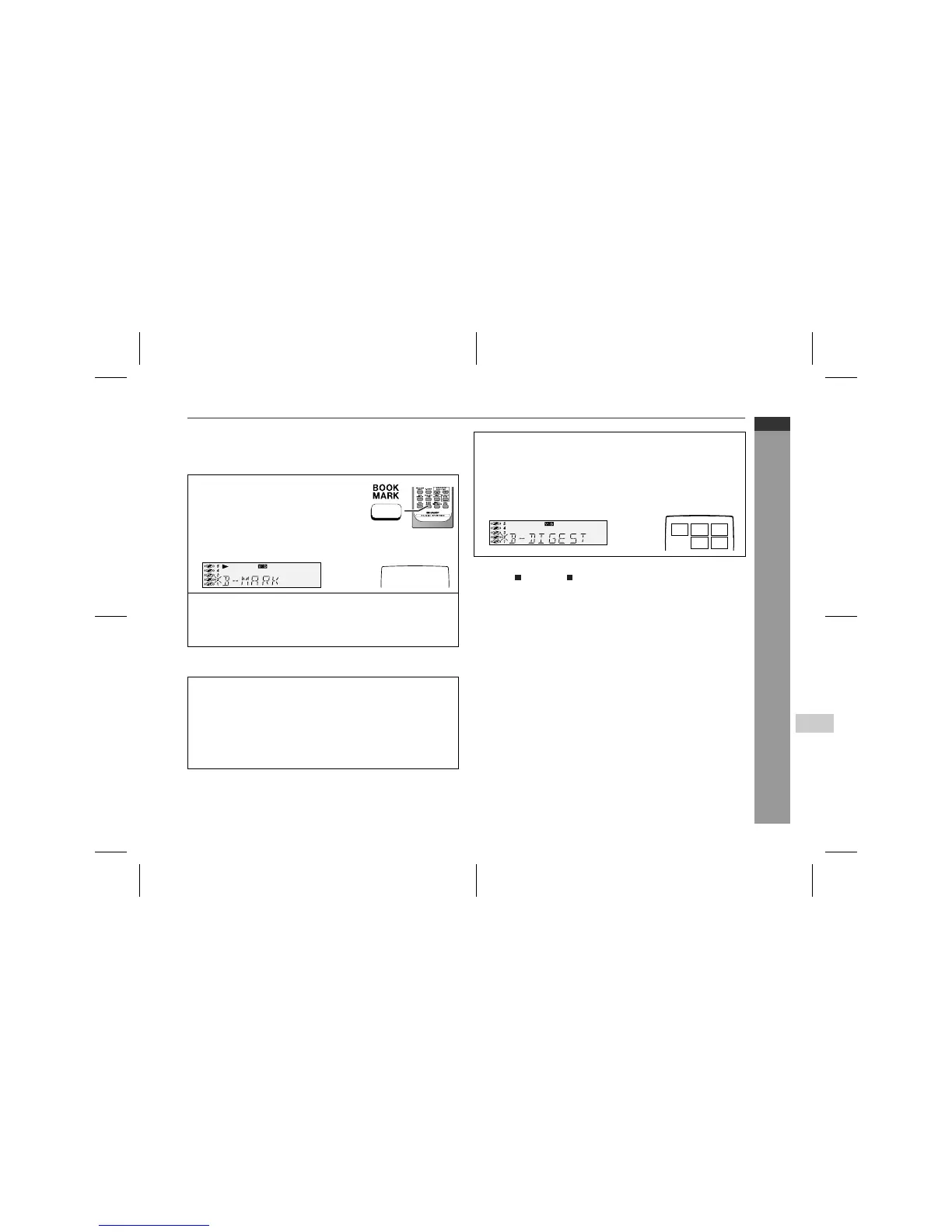
" To create a bookmark
This function marks the desired scene on the video CD to play it
back easily. (Up to 9 scenes per disc can be marked.)
To recall a bookmarked scene:
To cancel the bookmark function:
Press the (RETURN ) button.
Notes:
!
Even if the unit is set to the stand-by mode or the function is
changed from CD/VIDEO CD (CD) to some other function, the
marks will not be erased.
!
Opening the disc tray automatically erases the marks.
!
This function is invalid with still pictures (menu display, photo,
etc.).
!
This function is not available with an audio CD or MP3 disc.
Caution:
!
This function does not work during P.B.C. play. Cancel the
P.B.C. mode when playing video CDs with P.B.C.
!
This function does not work during programmed play.
1
Whilst in the playback mode, press
the BOOKMARK button on the re-
mote control when the desired scene
is displayed.
"B-M" will appear on the TV screen for a
few seconds.
2
Repeat step 1.
!
Up to 9 scenes can be marked.
!
If more than 9 bookmarks are created, bookmarks will be
erased in the order they were created.
1
Whilst in the stop or playback mode, hold down the BOOK-
MARK button on the remote control for more than 1 sec-
ond.
"BOOKMARK DIGEST" will appear before the marked scenes
and numbers are displayed on the TV screen. Each time a
bookmarked scene is displayed, you can hear the first several
seconds of the scene. After displaying every scene, this unit will
enter the pause mode automatically.
B-M
<TV screen>
2
Press the direct search buttons on the remote control to
select the scene you want to play back.
!
Playback will begin from the selected scene.
!
After the last track on the fifth disc is played, the unit will stop
automatically.
<TV screen>
1 2
5
3
4



 To Next Page