EN
EN – 23EN – 23
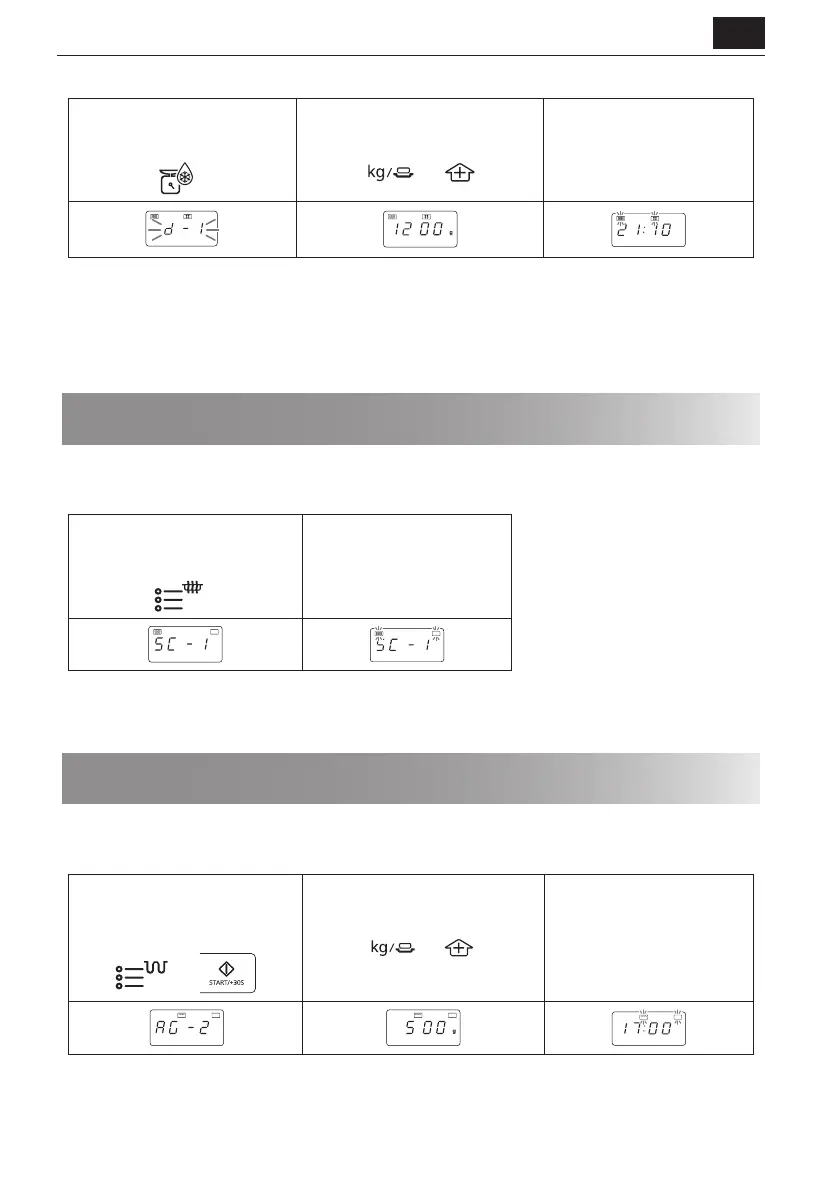
Place the food in a at dish or alternatively on a microwave oven defrost rack on the turntable.
1. Select the menu required by
pressing the [WEIGHT DEFROST]
button once.
x1
2. Enter the weight by pressing the
[WEIGHT/PORTION] buttons until
the desired weight is displayed
3. Press the [START/+30s]
button to start the
defrosting.
(The display will count down
through defrosting time)
Frozen foods are defrosted from -18°C.
Notes for weight defrost:
• Before freezing foods, ensure food is fresh and of good quality.
• Food weight should be rounded up to the nearest 0.1kg, for example, 0.65kg to 0.7kg.
• If necessary, shield small areas of meat or poultry with at pieces of aluminium foil. This will prevent the areas from
becoming warm during defrosting. Ensure the foil does not touch the oven walls.
Cooking using the microwave sensor
The [MICROWAVE SENSOR MENU] button automatically work out the correct cooking mode and cooking time of the
foods. Follow the example below for details on how to operate this function.
Example: To cook two baked potatoes (0.46kg) by using the microwave sensor menu function.
1. Select the menu required by
pressing the [MICROWAVE
SENSOR MENU] button once.
x1
2. Press the [START/+30s]
button to start the cooking.
Auto
Auto
NOTES:
• For food weighing more or less than the weights/quantities given in the microwave sensor cooking chart, cook
manually.
Cooking using the auto grill menu
The [GRILL AUTO MENU] button automatically calculates the correct cooking mode and cooking time of the foods.
Follow the example below for details on how to operate this function.
Example: To cook 500g of grilled chicken pieces by using the grill auto menu function.
1. Select the menu required by
pressing the [GRILL AUTO MENU]
button twice and press the
[START/+30s] button.
x2
2. Press [WEIGHT/PORTION UP/
DOWN] buttons to choose the
required quantity.
3. Press the [START/+30s]
button to start the cooking.
(The display will count down
through cooking time)
Auto Auto
Auto
NOTES:
• The weight or quantity of the food can be input by pressing the WEIGHT/PORTION buttons until the desired weight/
quantity is displayed. Enter the weight of the food only. Do not include the weight of the container.
• For food weighing more or less than the weights/quantities given in the auto grill menu cooking chart, cook
manually.


 To Next Page