EN – 24EN – 24
Cooking using the auto convection menu
The [CONVECTION AUTO MENU] button automatically work out the correct cooking mode and cooking time of the
foods. Follow the example below for details on how to operate this function.
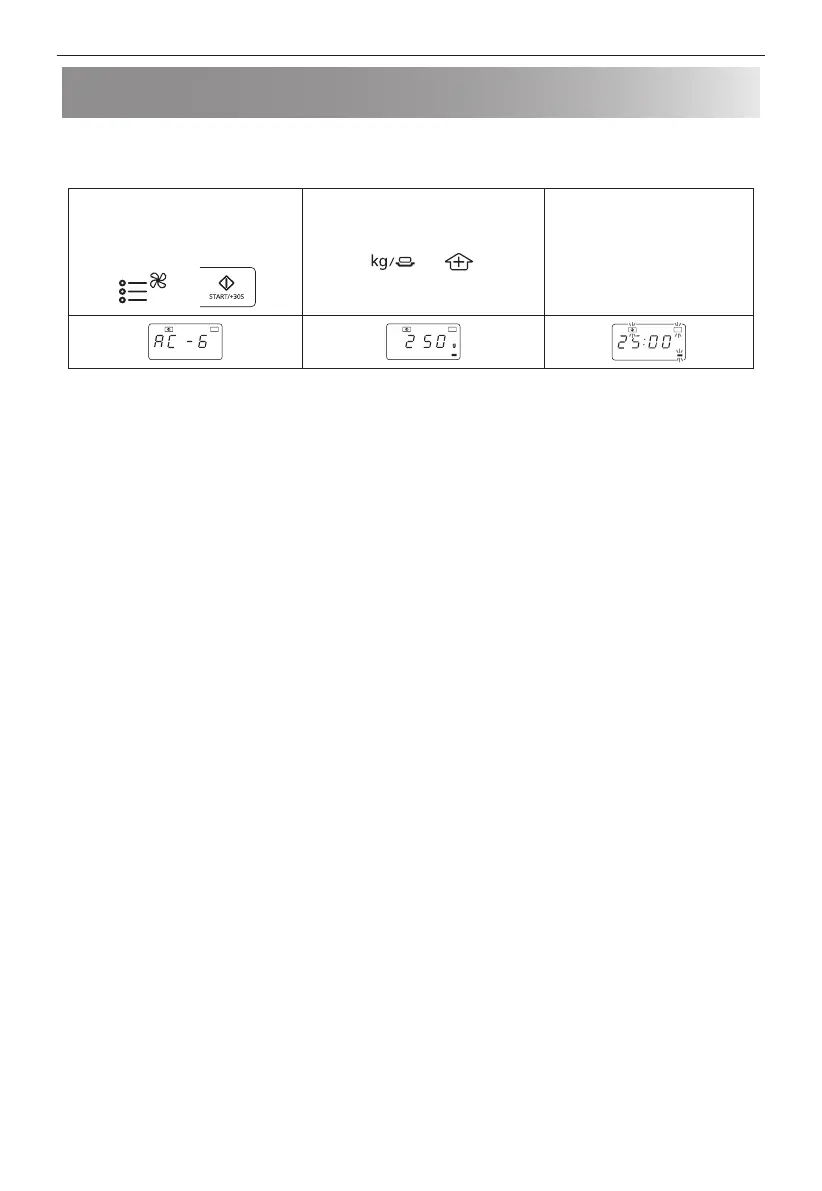
Example: To cook 250g of frozen onion rings by using the convection auto menu function.
1. Select the menu required by
pressing the [CONVECTION AUTO
MENU] button 6 times nd press
the [START/+30s] button.
x6
2. Press [WEIGHT/PORTION UP/
DOWN] buttons to choose the
required quantity.
3. Press the [START/+30s]
button to start the cooking.
(The display will count down
through cooking time)
Auto Auto
Auto
NOTES:
• The weight or quantity of the food can be input by pressing the WEIGHT/PORTION buttons until the desired weight/
quantity is displayed. Enter the weight of the food only. Do not include the weight of the container.
• For food weighing more or less than the weights/quantities given in the auto convection menu cooking chart, cook
manually.


 To Next Page