19
Search By Title
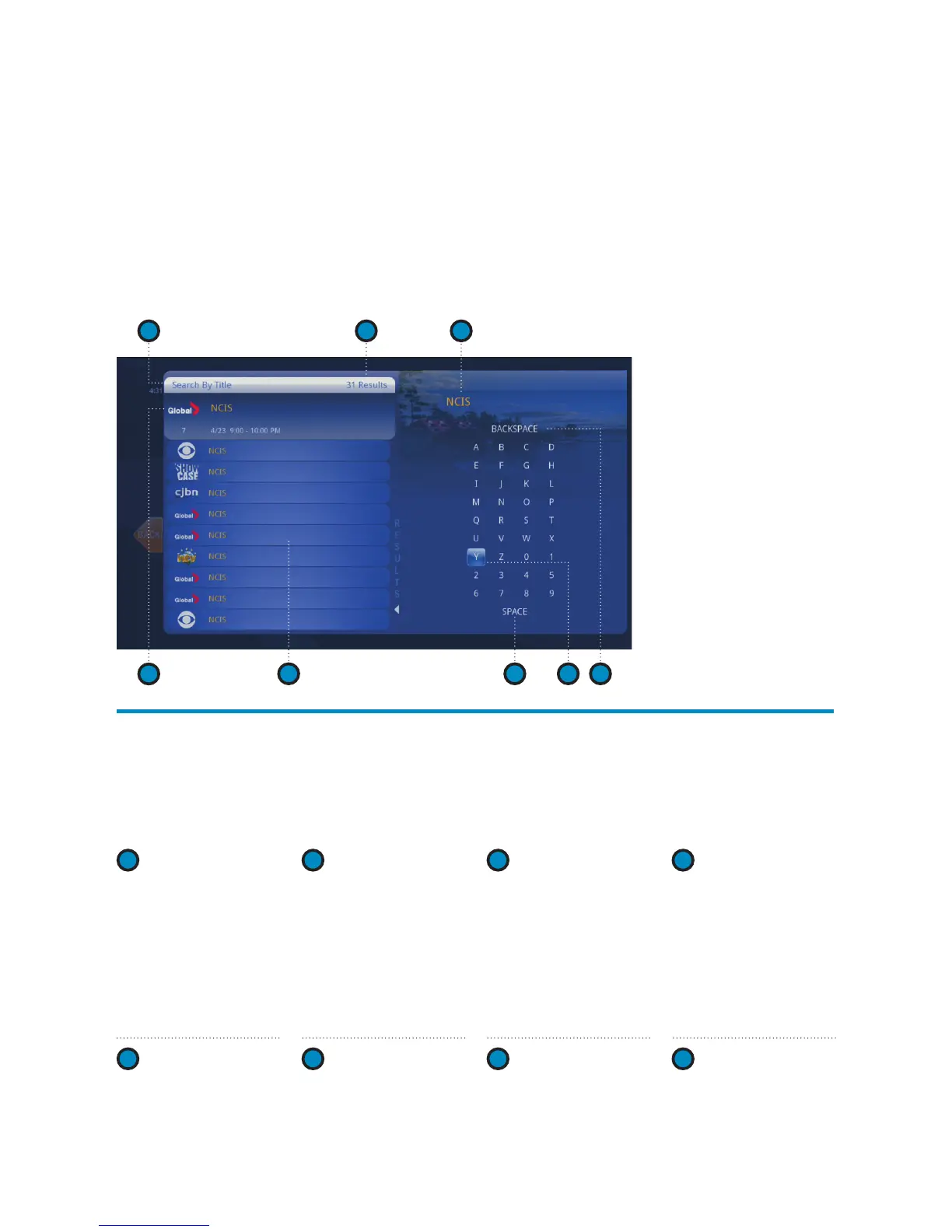
When you select Search By Title, a screen appears for you to enter a TV program’s name
and browse through results. Use the ARROW buttons to navigate the on screen keyboard.
To enter a letter, press OK with that letter highlighted. To browse the list, press the LEFT
ARROW until that panel is highlighted.
1 2 3
4
7 85 6
1
SEARCH TYPE
Describes the type of
search you’re doing.
2
SEARCH
RESULTS
As you enter characters
on the right, the list on
the left will filter down
to display shows that
match your entry.
3
SEARCH BOX
As you select characters,
the characters are
entered in the search
box. Tip: The number
keys on your remote
can be used to enter
letters. 0 is used for
spaces.
4
HIGHLIGHTED
PROGRAM
The details for the
channel and show are
highlighted.
5
LIST
The vertical list fills
with shows that
match your criteria.
Press the UP and
DOWN ARROWS to
navigate the list.
6
SPACE
Use a space to
separate words in
your search entry.
7
SELECTOR
To enter a letter, move
the selector to it, and
press OK. The letter
will be entered into
the search box.
8
BACKSPACE
Removes a character
from the search box.



 To Next Page