6
Using your remote
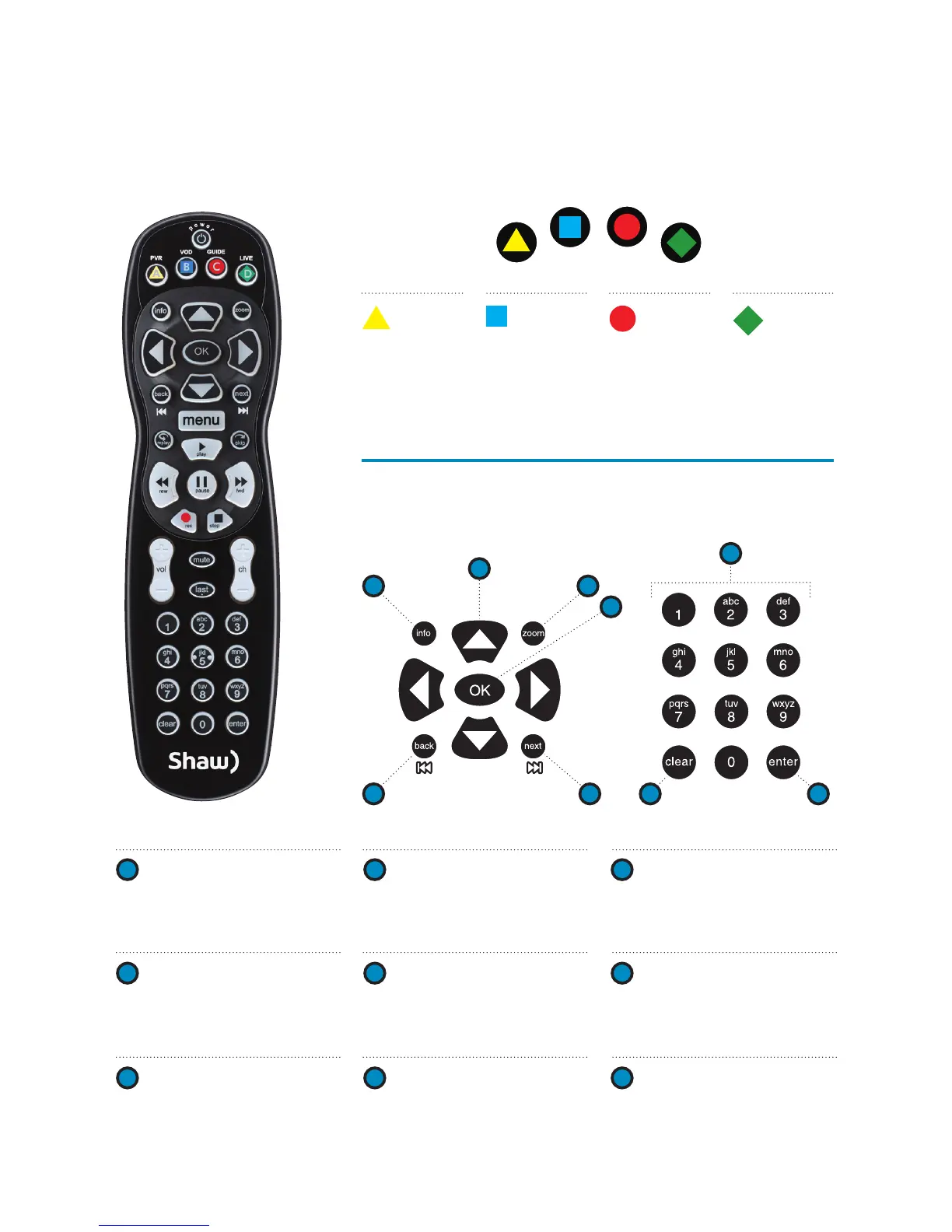
Shortcut buttons
Menu navigation
A
B
C
C
D
D
5
3 8
6
4 9
7
1
2
1
ARROWS
Moves backward or forward
one item. Hold down to speed
up your browsing speed.
2
OK
Begin playing a program or
select an option in a menu.
3
BACK
View TV programming from the
previous half hour. Also pages
back in menus.
4
NEXT
View TV programming for the
next half hour. Also pages
forward in menus.
5
INFO
Bring up a menu of options or
information. Also view your
individual recording settings.
6
ZOOM
Alternate between full screen
viewing and the last menu
screen you were in.
7
NUMBER KEYS
Enter a channel number to go
directly to the channel.
8
CLEAR
Deletes highlighted content
within My PVR Recordings.
Also clears search box.
9
ENTER
Selects an option in a menu.
A
PVR
View
My PVR
Recordings.
B
VOD
Access the
Shaw On
Demand
menu.
C
GUIDE
Activate the
Channel Grid
Guide view
of TV
programming.
D
LIVE
Jumps to
full‑screen,
live TV.
PVR
VOD
LIVE
GUIDE



 To Next Page