12
*3 Only displayed for manual gear shifting. (Refer to "Indicating the optimal gear shifting timing via an icon [Shifting
advice]".)
*4 For bicycles that cannot switch between auto and manual gear shifting, the display is fixed to [Auto] or [Manual].
*5 Refer to the SHIMANO STEPS user's manual.
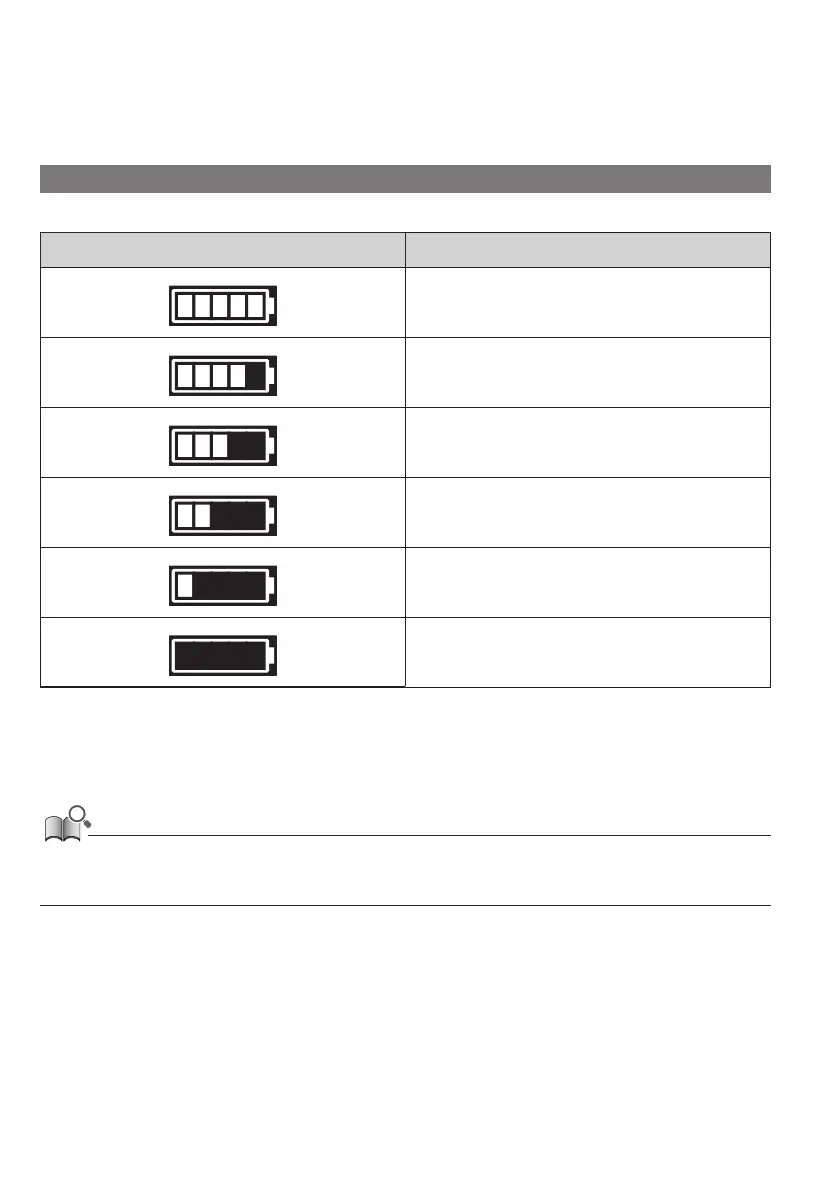
Battery level indicator
The battery level is shown as an icon.
Display Battery level
100 - 81%
80 - 61%
60 - 41%
40 - 21%
20 - 1% *
0%
*
The battery level indicator will flash when the battery level is low.
• The cycle computer uses zero to indicate a battery level where assistance cannot be performed. With the SHIMANO STEPS system, the light
can still be lit up for a while when assist stops due to a low battery. Therefore, the above-mentioned battery level may differ from that
which can be checked on the battery.






 To Next Page