19
Changing the unit of the speed and distance [Unit]
Select the unit for displaying the speed and distance.
1.
Setting menu screen ⇒ [Unit] ⇒ [km] / [mile]
The display will automatically return to the setting menu screen.
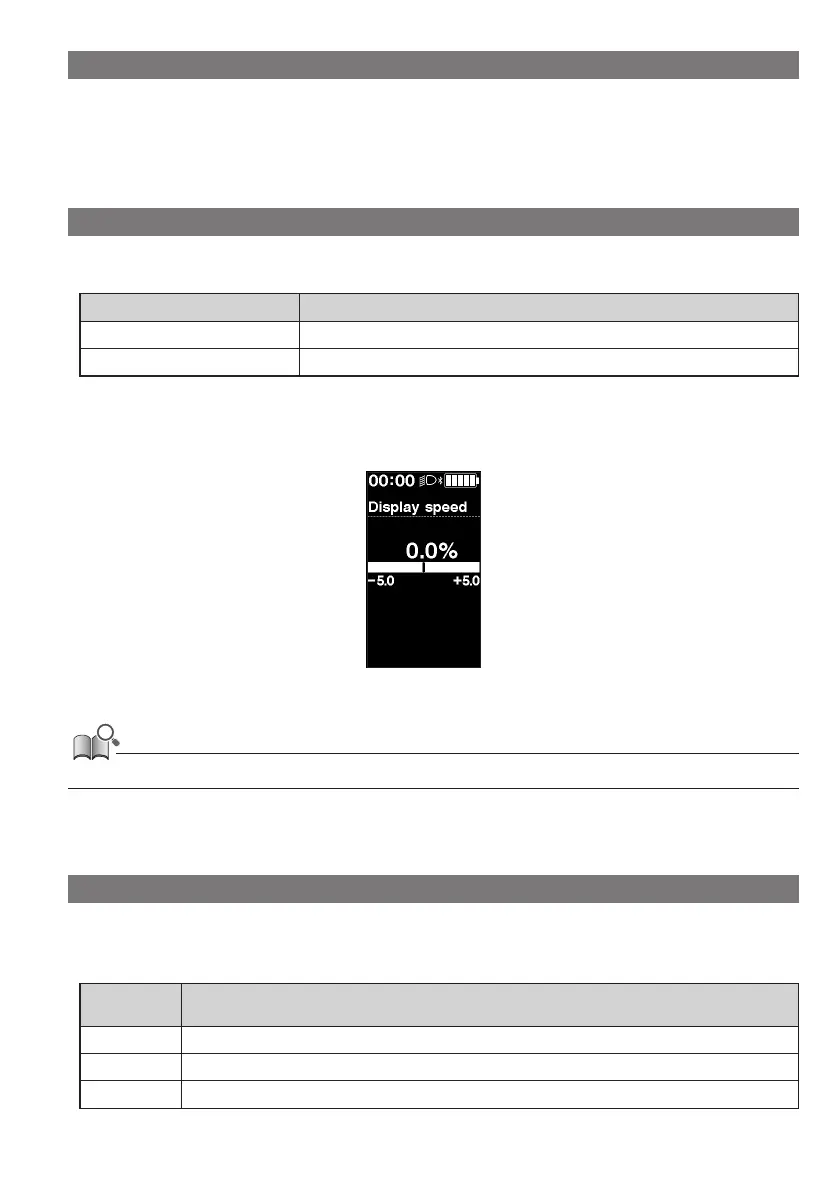
Matching the displayed speed with another device [Display speed]
You can adjust the displayed value when there is a difference between the speed displayed on this product and the
speed indicator of another device.
Setting items Explanation
Increase value Increases the displayed speed value.
Decrease value Decreases the displayed speed value.
1.
Setting menu screen ⇒ [Display speed] ⇒ <↑> or <↓> to adjust the value ⇒ <F>
The display will automatically return to the setting menu screen.
• This setting only changes the displayed value. It does not change the power assist function.
Resetting the settings [Clear]
Resets the traveling distance and settings. When the traveling distance is reset, [TIME] (traveling time), [AVG] (average
speed), and [MAX] (maximum speed) will also be reset.
Configurable
items
Details
[Exit] Return to setting menu.
[DST] Reset the traveling distance.
[Default]
*
Resets the settings.



 To Next Page