22(29)
4. Operation Guide
4.1 Control Panel
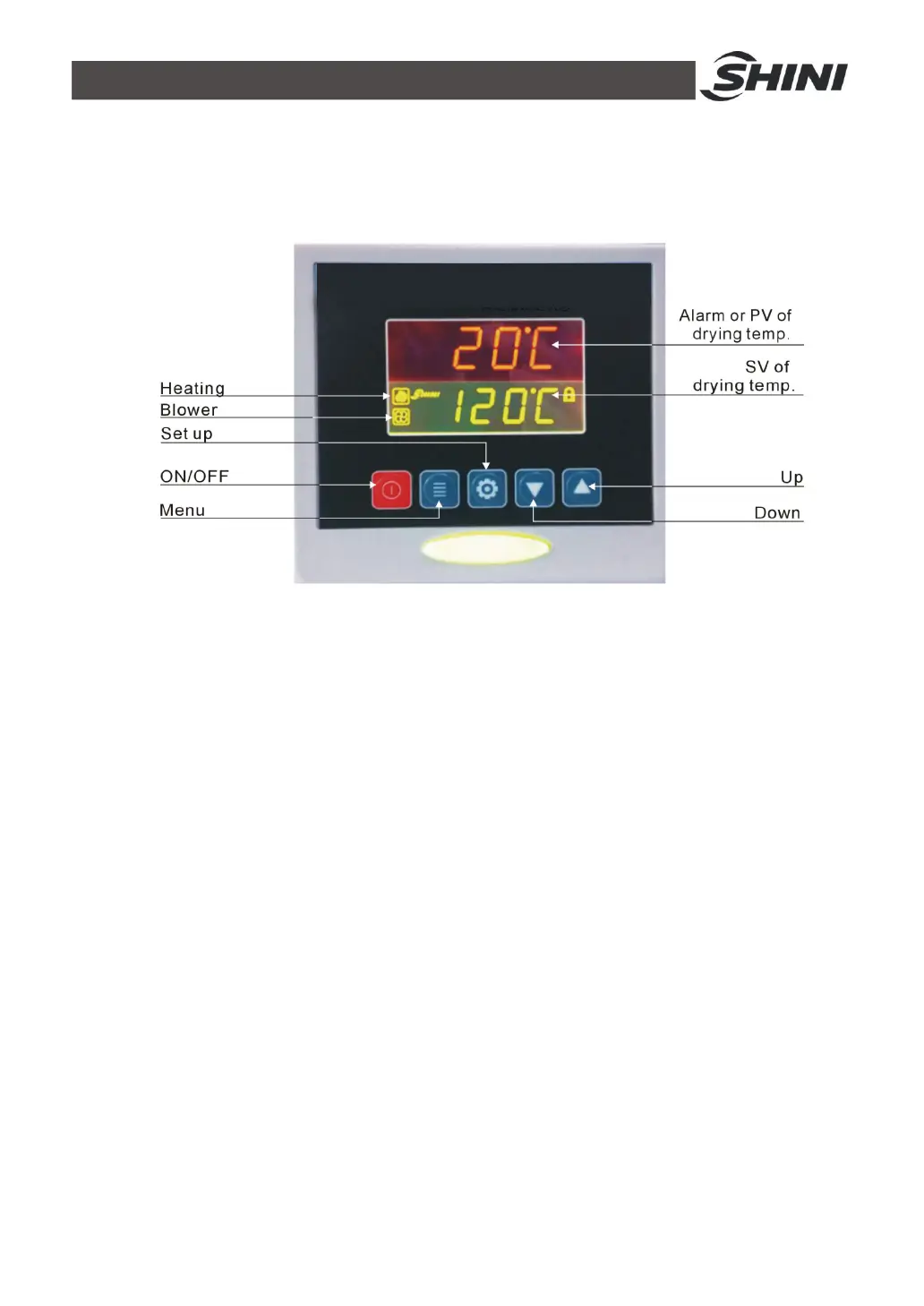
Picture 4‑1:Control Panel
4.1.1 Panel Operation
1) Turn on main switch of control box.
2) Press “ON/OFF”key, it starts drying process, indicator turns green.
3) Press “ON/OFF” key again, it stops drying process, indicator turns yellow.
4.1.2 Temperature Setting
1) The setup number will flicker after pressing "Setting" key, add or decrease
temperature by pressing“Up”or “Down”key.
2) Press " Setting " key again to confirm the input value.
4.1.3 Temperature Lock
1) Press “menu” key for 2 seconds, it displays “TIME”.
2) Press “Up” key repeatly, till it display “LOCK”;
3) Press “Setting” key, the set value flickers, press “Up”or “Down” key to
select “YES”(lock temperature setting) and “NO” (don’t lock).
4) Press “Setup” key to confirm the input value.


 To Next Page