To operate the device with a DMX controller:
01) Set the DMX starting address of the device in the DMX Configuration menu. See 6.6.3. DMX
Configuration on page 24 for more information.
02) Select the DMX channel mode in the DMX Configuration menu. See 6.6.3. DMX Configuration on
page 24 for more information. See 6.7. DMX Channels on pages 25–26 for complete overview of all
DMX channels.
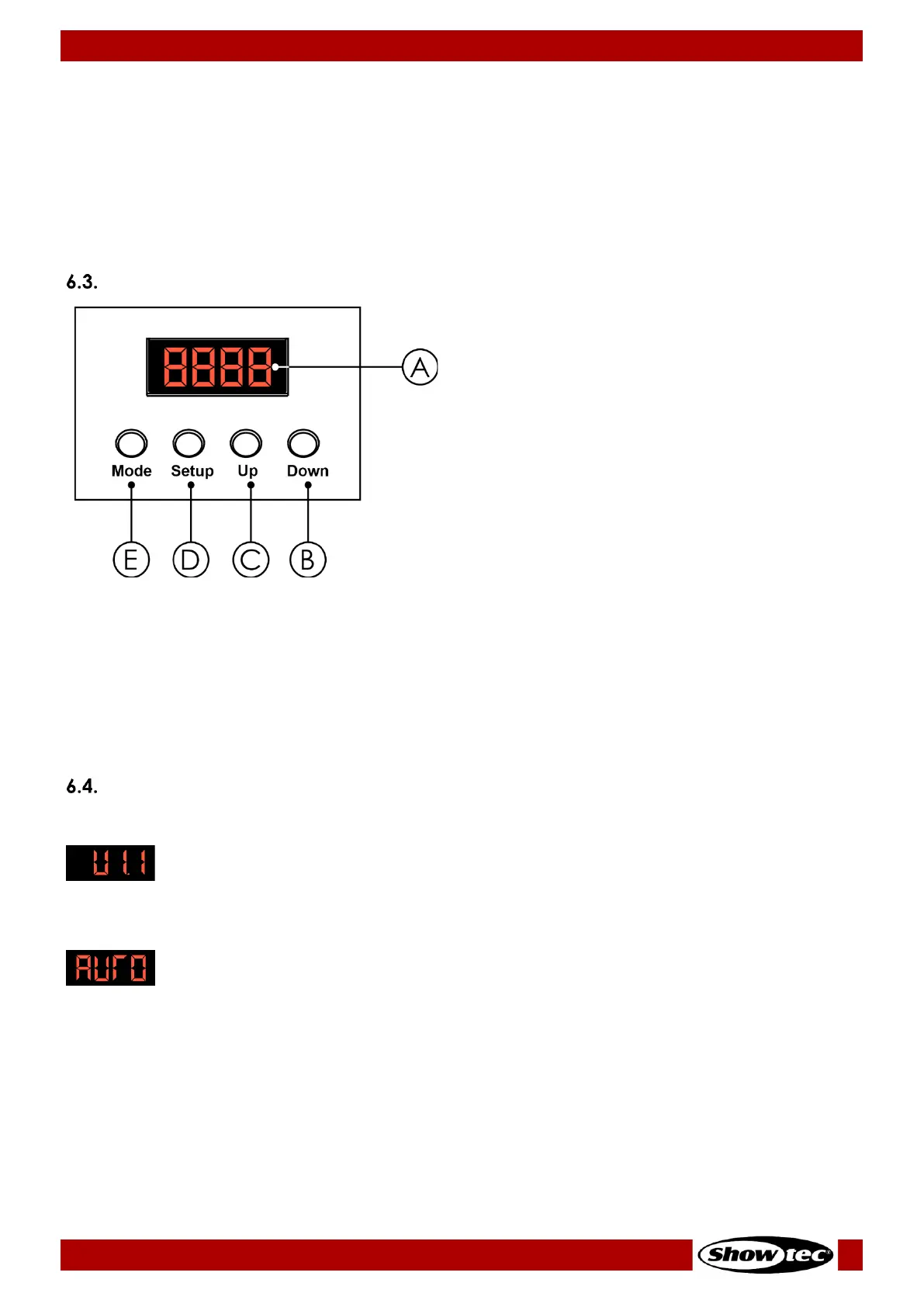
Control Panel
A) LED display
B) DOWN button
C) UP button
D) SETUP button
E) MODE button
● Use the MODE button to navigate through the main menu and to return to the main menu.
● Use the SETUP button to navigate through the submenus and open the submenus.
● Use the UP/DOWN buttons to scroll through the available options/values.
Note:
You do not need to confirm the selected options or values. Selecting an option or a value activates it
immediately.
Start-up
Upon start-up the display will show the firmware version:
If you start up the device for the first time or after a reset, it will enter by default into auto operation mode
and the display will show the following:
The next time you start up the device, it will enter into the last selected operation mode.
Note:
If no button is pressed, after 20 seconds of inactivity the display will turn off. Press any button to turn the
display on.












 To Next Page