DMX Configuration
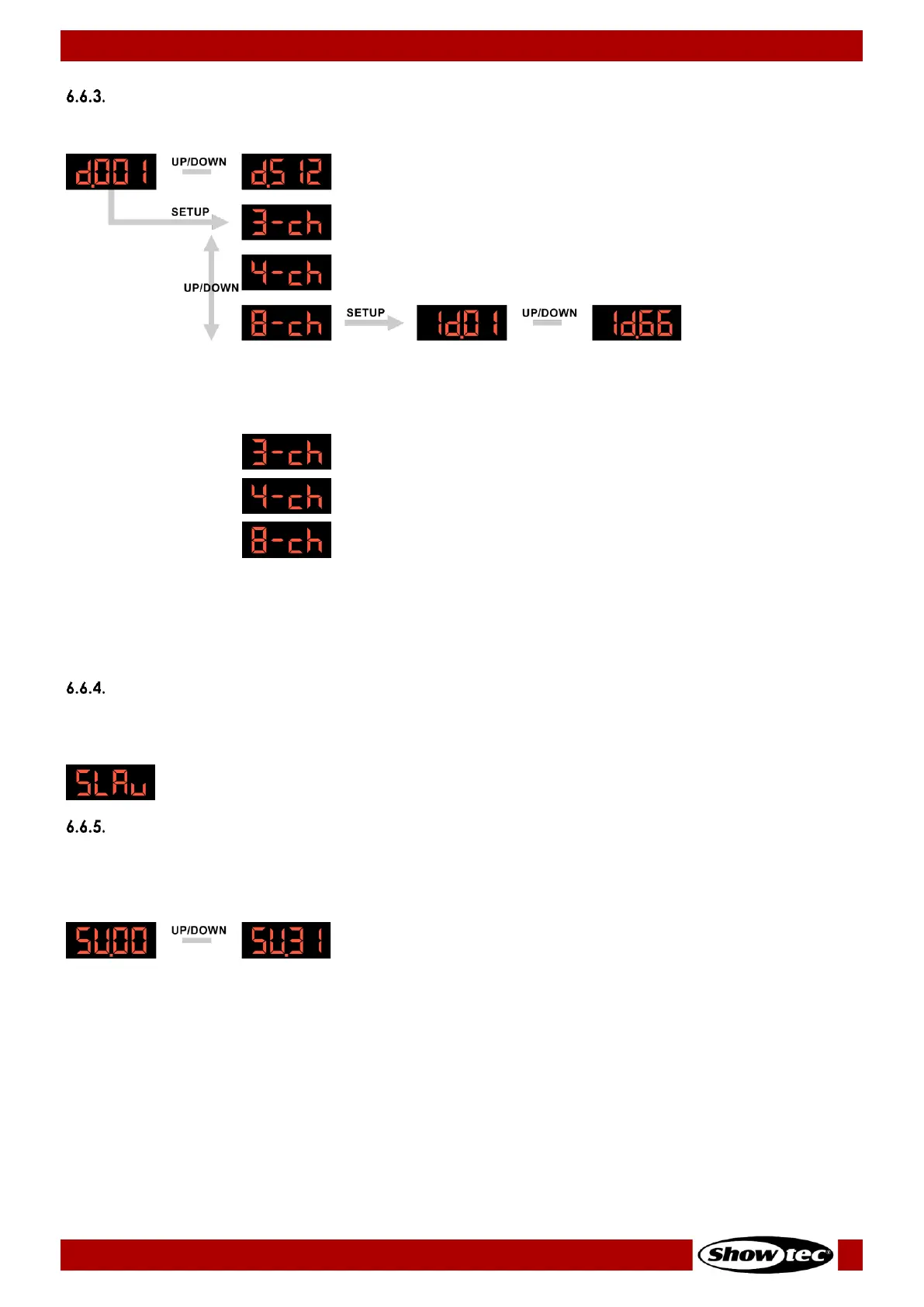
In this menu you can configure the DMX settings of the device or set an ID for your device.
01) Press the UP/DOWN buttons to select the DMX starting address of the device. The selection range is
001–512.
02) Press the SETUP button to enable the DMX channel mode selection.
03) Press the UP/DOWN buttons to select the DMX channel mode. There are 3 options available:
04) You are only able to set the device’s ID in the 8-channel mode.
05) Press the SETUP button to enable the ID setting.
06) Press the UP/DOWN buttons to select the ID of the device. The selection range is 01–66.
See 6.7. DMX Channels on pages 25–26 for complete description of the DMX channels and values.
Master/Slave Mode
In this menu you can set the device as a slave device in master/slave mode. When you select this menu
option, the device will operate as a slave device in a master/slave setup.
Sound Mode
In this menu you can activate the sound-controlled operation mode and adjust the sound sensitivity of
the device. When you select this option, the device runs the auto program reacting to the beat of the
music.
Press the UP/DOWN buttons to adjust the sensitivity of the built-in microphone. The adjustment range is 00–
31, from low to high sensitivity.












 To Next Page