
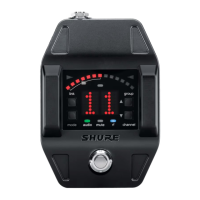
Why does my Shure Microphone system have sound level variations?
- MmrushSep 10, 2025
If you experience sound level variations when switching to different sources with your Shure Microphone system, adjust the transmitter gain as necessary.

Why does my Shure Microphone system have sound level variations?
If you experience sound level variations when switching to different sources with your Shure Microphone system, adjust the transmitter gain as necessary.
How to fix distortion on my Shure Microphone system?
If you notice distortion and the OL indicator appears on the receiver LCD of your Shure Microphone system, reduce the transmitter gain.
What to do if my Shure Microphone system has audio artifacts or dropouts?
If you're experiencing audio artifacts or dropouts with your Shure Microphone system, and the RF LED is flickering or off, consider the following: 1. Change the receiver and transmitter to a different group or channel. 2. Identify and remove any nearby sources of interference such as cell phones, Wi-Fi access points, or signal processors. 3. Charge or change the transmitter battery. 4. Make sure that the receiver and transmitter are positioned within the recommended system parameters, keeping the receiver away from metallic surfaces. 5. Ensure the transmitter is used within line of sight of the receiver for optimal sound.
How to fix a Shure GLXD6 Music Pedal receiver with a LCD screen off?
If the LCD screen on your Shure Music Pedal receiver is off, ensure the AC adapter is securely plugged into the electrical outlet and that the receiver is powered on.
Why does my Shure GLXD6 Music Pedal transmitter power off after 1 hour?
The transmitter powers off after 1 hour if the transmitter status LED is off. Make sure that the linked receiver is turned on.
What to do if the transmitter is plugged into the charger on my Shure GLXD6?
Disconnect the transmitter from the charger.
What to do if the receiver LCD screen is off on my Shure Music Pedal?
If the receiver LCD screen is off, ensure that the AC adapter is securely plugged into the electrical outlet and that the receiver is powered on.
Why isn't the transmitter information appearing on the receiver LCD of my Shure Music Pedal?
Transmitter information will not appear on the Receiver LCD if the linked transmitter is off, or the receiver is not linked to a transmitter.
Why is the receiver gain control on my Shure GLXD6 Music Pedal not adjustable?
The receiver gain control cannot be adjusted if the transmitter is off. Ensure the transmitter is on to enable gain changes.
What to do if I have sound level variations when switching to different sources on my Shure GLXD6 Music Pedal?
If you experience sound level variations when switching to different sources, adjust the transmitter gain as necessary.
| Type | Digital |
|---|---|
| Product type | Guitar wireless receiver |
| Product color | Black |
| Frequency range | 2400 - 2483.5 MHz |
| Compatible products | GLXD1 |
| Transmission distance | 60 m |
| 6.35 mm (1⁄4-inch) output | 1 |
| Battery life (max) | 16 h |
| Cables included | USB |
| Receiver dimensions (WxDxH) | 65 x 23 x 90 mm |
|---|
Describes the controls and indicators when the receiver is in audio mode.
Explains LED colors and flashing states for transmitter status.
Steps for charging the battery using an AC adapter.
Steps for charging the battery via a USB port.
Details battery charging durations and operational runtimes.
Instructions for inserting the rechargeable battery into the transmitter.
Step-by-step process for linking receivers and transmitters.
Steps to choose a specific group for frequency allocation.
How to link additional transmitters to the same receiver.
Strategies to manage interference in the 2.4GHz spectrum.
How to set the transmitter gain for optimal audio levels.
How to prevent accidental changes to receiver settings.
Feature to identify linked transmitter and receiver pairs.
Available settings for the tuner, such as indicator and output modes.
Setting the visual display style for tuning indicators.
Configuring audio output behavior when the tuner is active.
Procedure to reset the receiver to its factory defaults.
Procedure to reset the transmitter to its factory defaults.





