ENGLISH
5
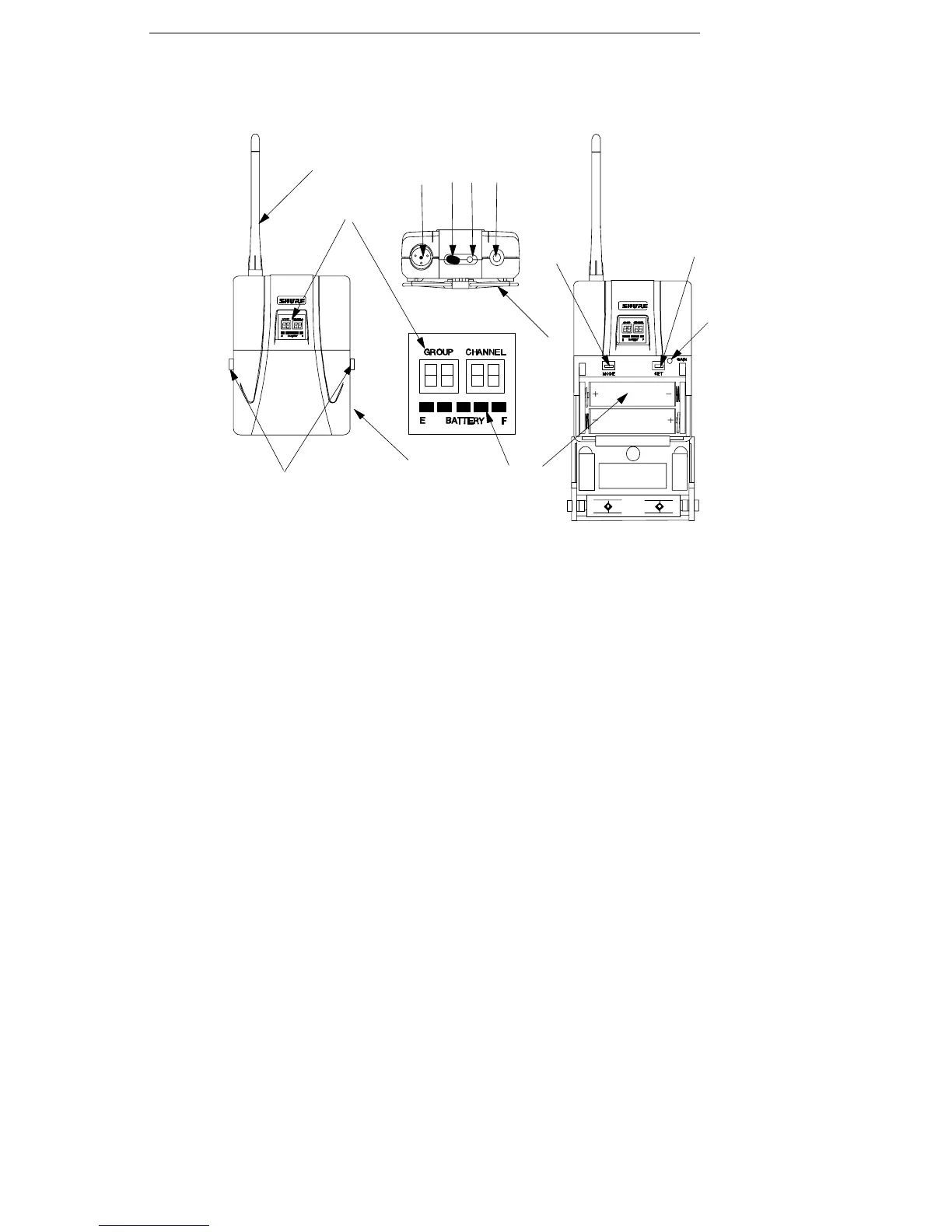
U1 TRANSMITTER CONTROLS & INDICATORS (FIGURE 2)
ON
FIGURE 2
OFF
a
b
cde
f
g
h
i
j
k
l
m
a
1. Antenna: A flexible 1/4 wave whip antenna is permanently attached to the top of
the U1 body-pack transmitter. A qualified technician can replace the antenna in
the field.
2. Programmable Display: Displays group and channel, battery power level, and
frequency lock/power lock on/off status.
3. Input Connector: Provides connection with a variety of lavalier and headset mi-
crophone cables, and the Shure WA302 instrument adapter cable. LEMO–type
connectors are available as an option.
4. ON/OFF Switch: Turns transmitter power on and off.
5. On/Off LED: Glows green when the U1 is turned on.
6. Belt Clip: Allows the transmitter to be easily worn on a belt, waistband, or guitar
strap.
7. MODE Button: Selects the parameter (Group or Channel) you wish to change.
8. SET Button: Changes transmitter Group and Channel settings. Also used with
the MODE button to lock power on and to lock the frequency and channel setting.
9. Audio Gain Control: Allows audio level adjustment to accommodate a variety of
sound sources (speaking, singing, or playing an instrument). A small screwdriver
is supplied for making adjustments.
10. Battery Cover Release Tabs: Squeeze these two tabs together to release the
battery cover.
11. Battery Compartment Cover: Hinged cover on front surface opens to expose
the battery and display control keys.
12. Battery Fuel Gauge: Visually indicates battery power level.
13. Battery Compartment: Holds two 1.5V AA batteries.













 To Next Page