5 COMMISSIONING AND OPERATION
22 Operating Instructions | InspectorP Rack Fine Positioning 8024534 / 16UW / 2020-02-26
Subject to change without notice
5.3 Parameterizing device with SOPASair
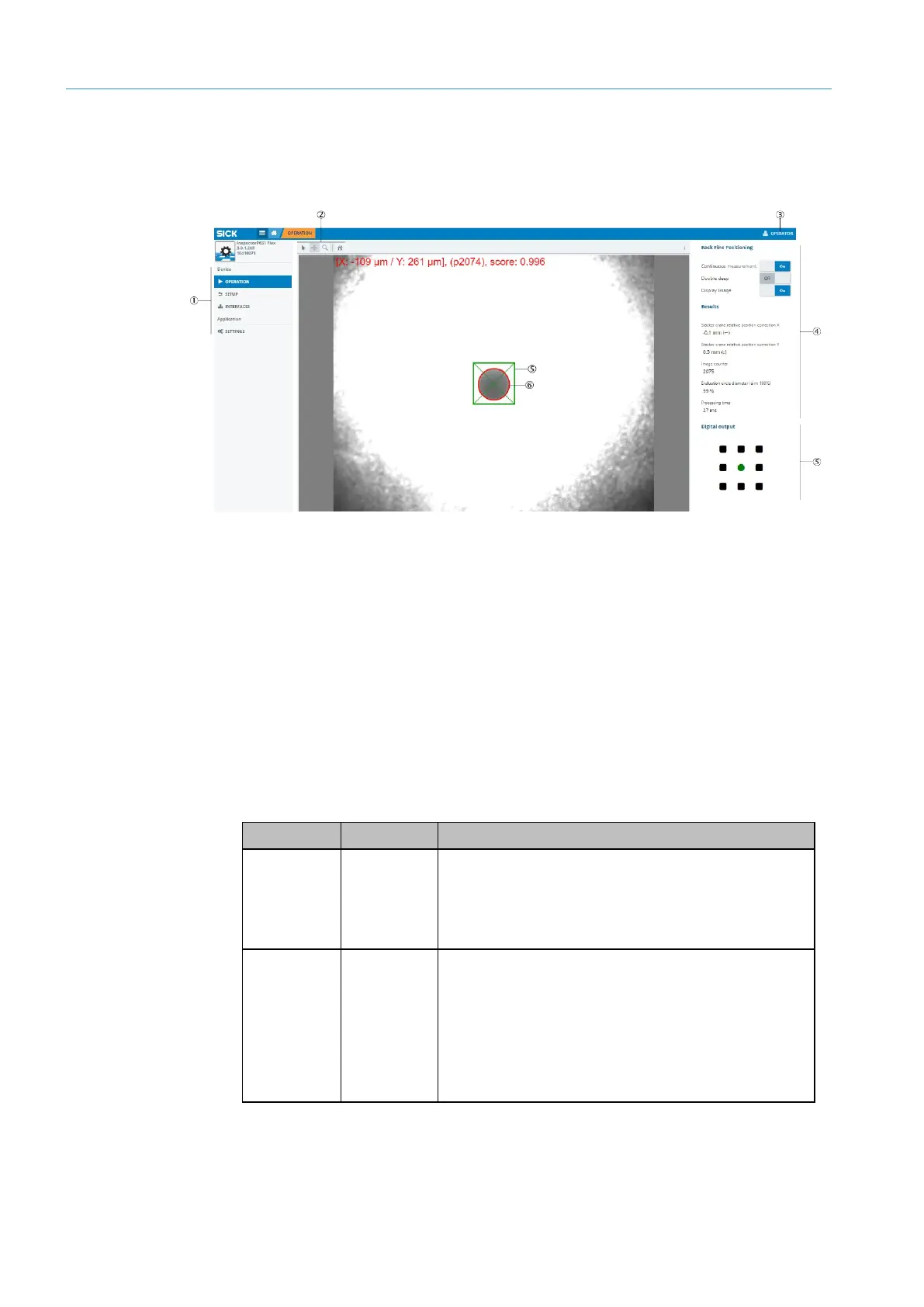
5.3.1 SOPASair user interface
(1) Menu bar with available windows
(2) Settings for image output
(3) User level currently set
(4) Parameter bar, areas with available parameters
(5) Digital output area, shows the current location of the positioning mark
(6) Target region (green)
(7) Positioning mark (red)
5.3.2 Setting up user interface
Setting user level
Several user levels are available in SOPASair. To change the user level, click on the
button with the currently set user level at the top right in the user interface.
The following user levels are available:
required.
•
Observe the system during operation
•
Switch continuous measurement on and off
•
Activate and deactivate double deep applications
Switch image output on and off
required.
•
Additional settings needed for initial commissioning of
the device
•
Minor adjustments during operation (e.g. measurement
tolerances)
•
Since the device is preset when delivered, the
parameters available here are usually sufficient for
operation
7: SOPASair user interface













 To Next Page