4 INSTALLATION
14 Operating Instructions | InspectorP Rack Fine Positioning 8024534 / 16UW / 2020-02-26
Subject to change without notice
4 Installation
4.1 Software installation
4.1.1 SICK AppManager
Installation of the SICK AppManager is required to perform the following tasks:
•
Reading out and changing the IP address
•
Saving (backing up) currently valid parameter set on the computer or a microSD
memory card in the device (cloning)
•
Installing firmware updates
Installing SICK AppManager
To install SICK AppManager, open the installation file (*.exe) and follow the instructions
on the screen.
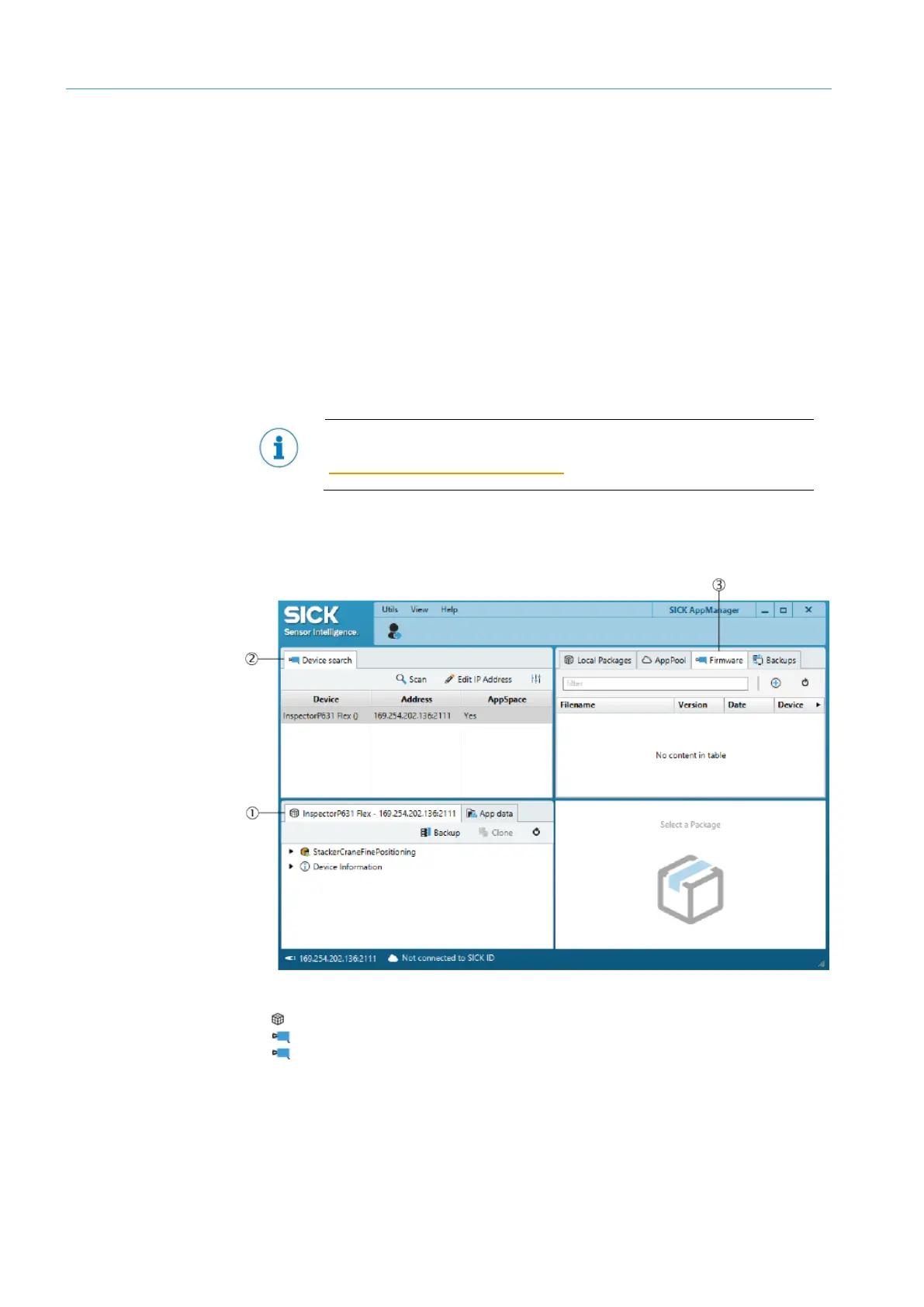
SICK AppManager user interface
(1) Device window (window name changes depending on the connected device)
(2) Device Search window
(3) Firmware window
The current version of SICK AppManager can be downloaded in the Internet at:
www.sick.com/SICK_AppManager
Figure 3: SICK AppManager user interface













 To Next Page