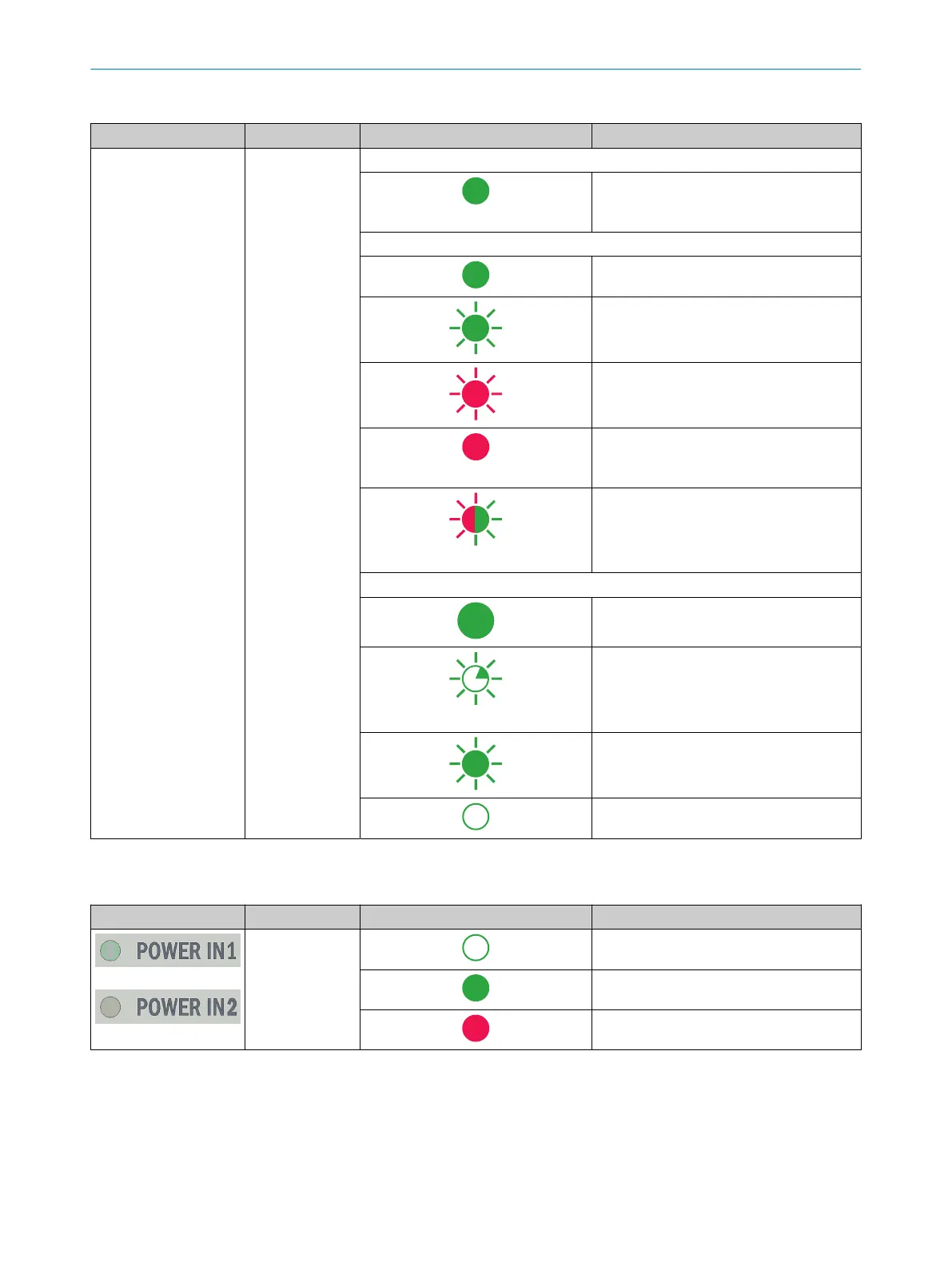
Table 13: Device status indicators
Location Designation LED behavior Description
SF / MS / RUN PROFINET: Group error (SF)
Data exchange via fieldbus
Ethernet-IP: Module status (MS)
Device in operation
Standby/device not configured, no IP
address assigned
Warning, but device still operational or
firmware update
Error, device not operational
Self-test when switching on
EtherCAT: RUN Status
Device has operational status
Device has safe-operational status
Device has pre-operational status
Device has initialization status
POWER IN
Table 14: POWER status LEDs
Location Designation LED behavior Description
POWER IN1
POWER IN2
Voltage not applied to the connection.
Voltage applied.
Under/overvoltage detected.
OPERATION 8
8023297//2021-06-22 | SICK O P E R A T I N G I N S T R U C T I O N S | SIM2000
33
Subject to change without notice








 To Next Page