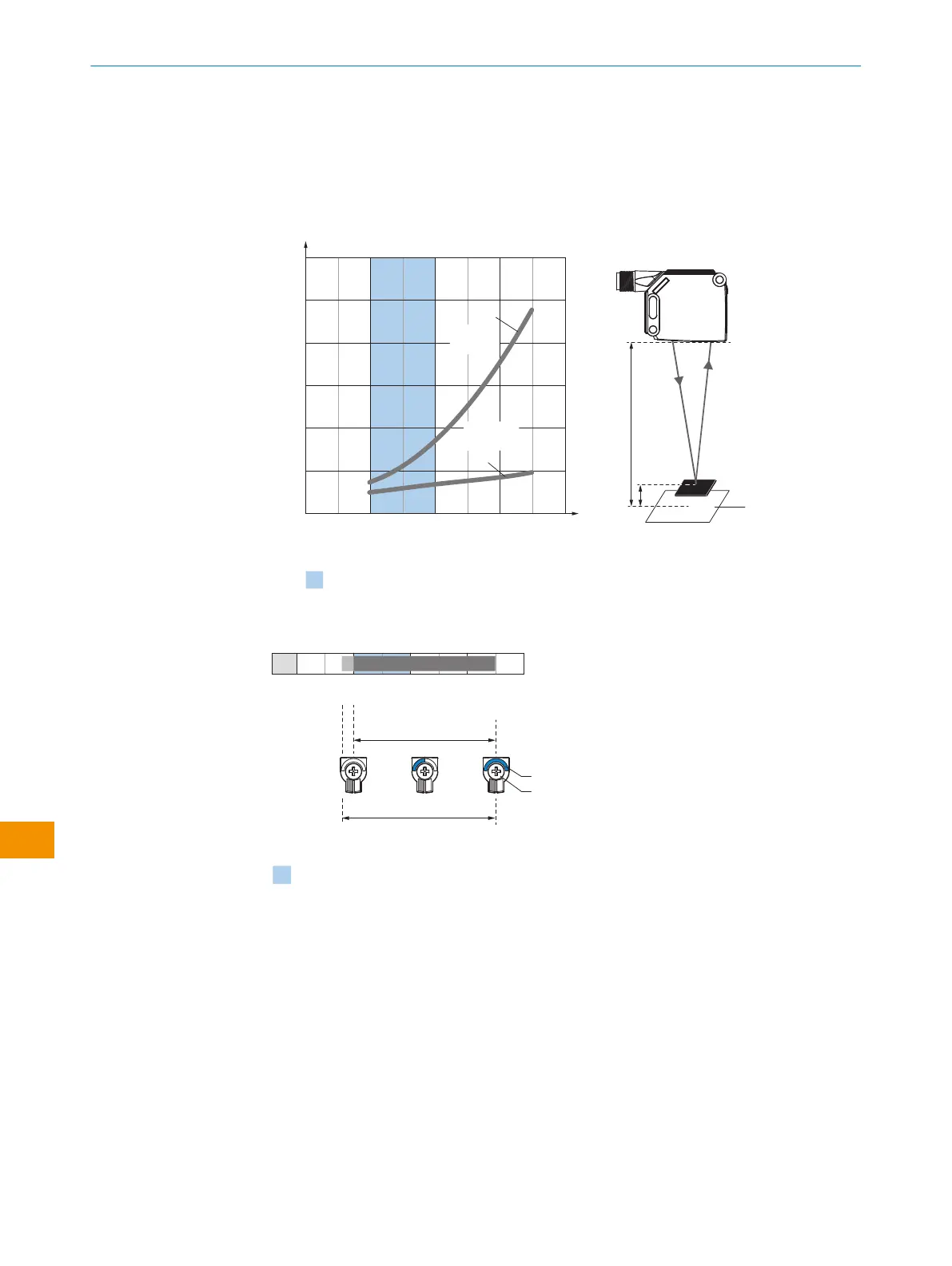
检查使用条件:使用相应图表 (参见 插图 8, 第 218 页 ) 调整传感器与背景之间的
距离、最小物体高度以及背景和物体的反射能力(x = 触发感应距离,y = 最小物体
高度)。反射:6% = 黑色 1,90% = 白色 2(以 DIN 5033 规定的标准白为基
准)。
WTF12L-xxxxx1xx:
0
2
(0.08)
100
(3.94)
200
(7.87)
300
(11.81)
0
y
x
Minimum object height in mm (inch)
Example:
Reliable detection of the object
Background
Distance in mm (inch)
Recommended sensing range for
the best performance
12
(0.47)
10
(0.39)
8
(0.31)
6
(0.24)
4
(0.16)
400
(15.75)
y
x
White background (90 % radiance factor)
Distance of sensor to background x = 150 mm
Required minimum object height y = 1.2 mm
For all objects regardless of their colors
6%/90%
90%/90%
2
1
6%/6%
90%/6%
插图 4: WTF12L-xxxxx1xx
0
Distance in mm (inch)
80 350
100
D
C
A B
BluePilot
E
F
Recommended sensing range for the best performance
100
(3.94)
200
(7.87)
300
(11.81)
400
(15.75)
插图 5: WTF12L-xxxxx1xx
A
最小触发感应距离,单位:mm
B
最大触发感应距离,单位:mm
C
视野
D
前景抑制功能开关阈值的设置范围
E
触发感应距离显示
F
按转元件
蓝色
为实现最佳性能而建议的触发感应距离范围
操作指南
216
操 作 指 南 | WTF12L/WTF12V 8027710/2022-04-12 | SICK
如有更改,恕不另行通知
zh









 To Next Page