SR882 operation manual
~ 48 ~
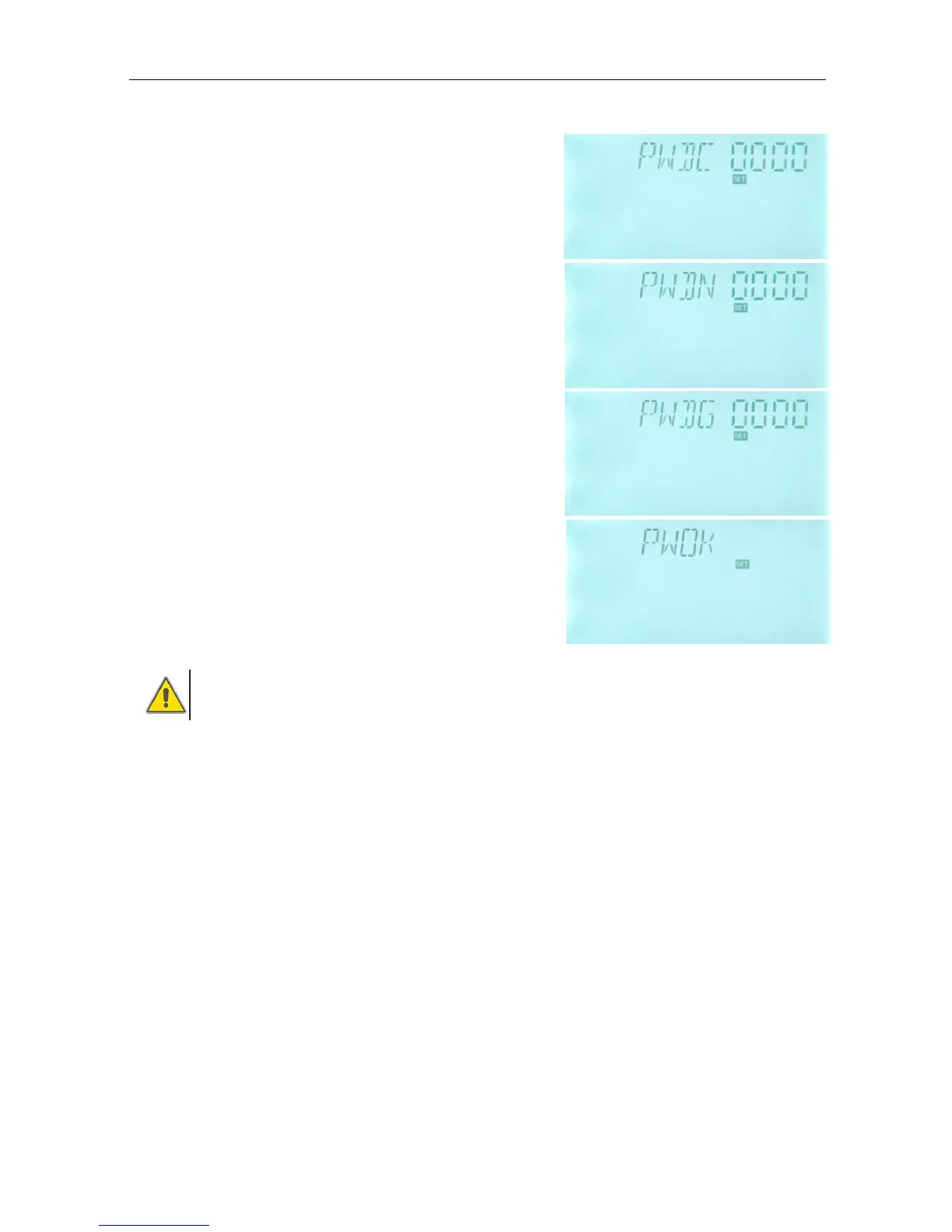
►Press “SET” button, “PWDC 0000” appears, the left digital blinks, ask for entering
current password, factory set is “0000”
►Press “+” “-” button to enter the first digital
►Repress “SET” button, the second digital blinks
►Press “+” “-” button to enter the second digital
►Repress “SET” button, the third digital blinks
►Press “+” “-” button to enter the third digital
►Repress “SET” button, the fourth digital blinks
►Press “+” “-” button to enter the fourth digital
►Press “SET” button, “PWDN 0000” displays on the
screen, ask for entering a new password, doing like
above to enter the new password
►Press “SET” button, “PWDG 0000” displays on the
screen, ask for reentering the new password, doing like
above to reenter the new password, “PWOK” displays
on the screen to indicate reentering password
successfully.
►Press “ESC” button to exit set program or wait for 20
seconds to exit automatically.
Warning
If the password is forgot, it is not possible to recover, but you can recover the
password to factory set, then you can reedit a password like above descript steps,
doing like following to recover to factory set.
►Switch-off the power of controller firstly,
►Press “SET” and hold it down, then reconnect the power supply.
►Buzzer makes “du-----“ 3 times, then release “SET” button. Controller recovers to factory
set( factory set possword is 0000), a new password can be reset now.


 To Next Page