7 Simulation of the Controlled System
Set23_RegSim
Entry ID: 23753479, V2.3.S, 02/2014
© Siemens AG
2014 All rights reserved
7 Simulation of the Controlled System
The default values are rated for the SINAMICS V20 frequency converter and the
motor from chapter 2.3.2. A modification of the default values is only necessary if
the hardware or the parameters of the virtual cooling water system are changed.
The simulated controlled system can be operated and monitored via a KTP600
Basic color PN simulated in the TIA Portal.
Table 7-1
Open the TIA V12 project (files
23753479_Set23_RegSim_V23.ap12, see
Table 4-2)
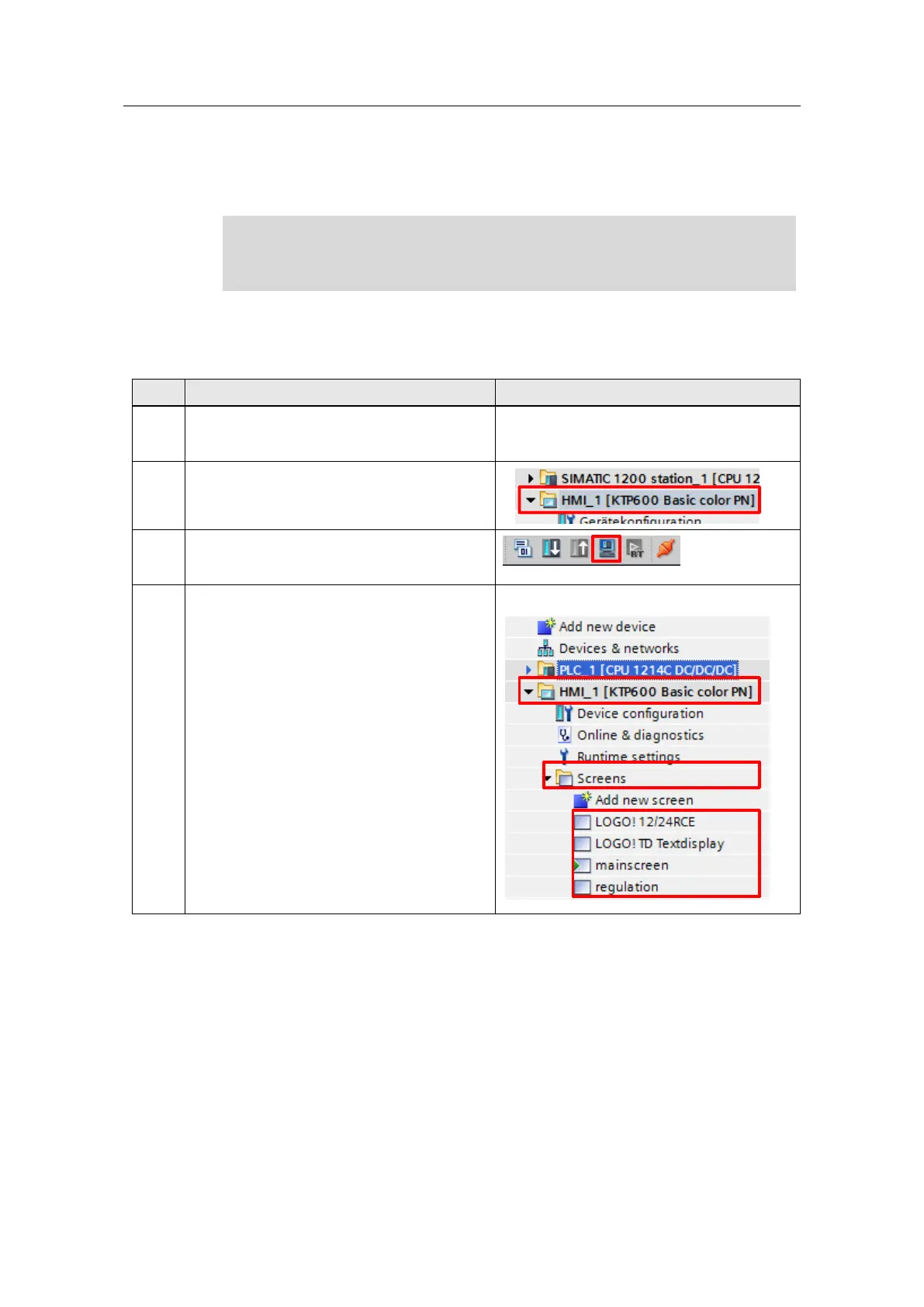
In the project navigation, select the “KTP600
Basic color PN”.
Start the simulation of the KTP600 Basic color
PN. The screen shown in section 7.1
automatically opens up as the “start screen”.
You will find the names of the screens used in
the TIA_Portal under “HMI_1 [KTP600 Basic
color PN] > Screens”.





 To Next Page