7 Simulation of the Controlled System
Set23_RegSim
Entry ID: 23753479, V2.3.S, 02/2014
© Siemens AG
2014 All rights reserved
7.1 Simulation of the consumers
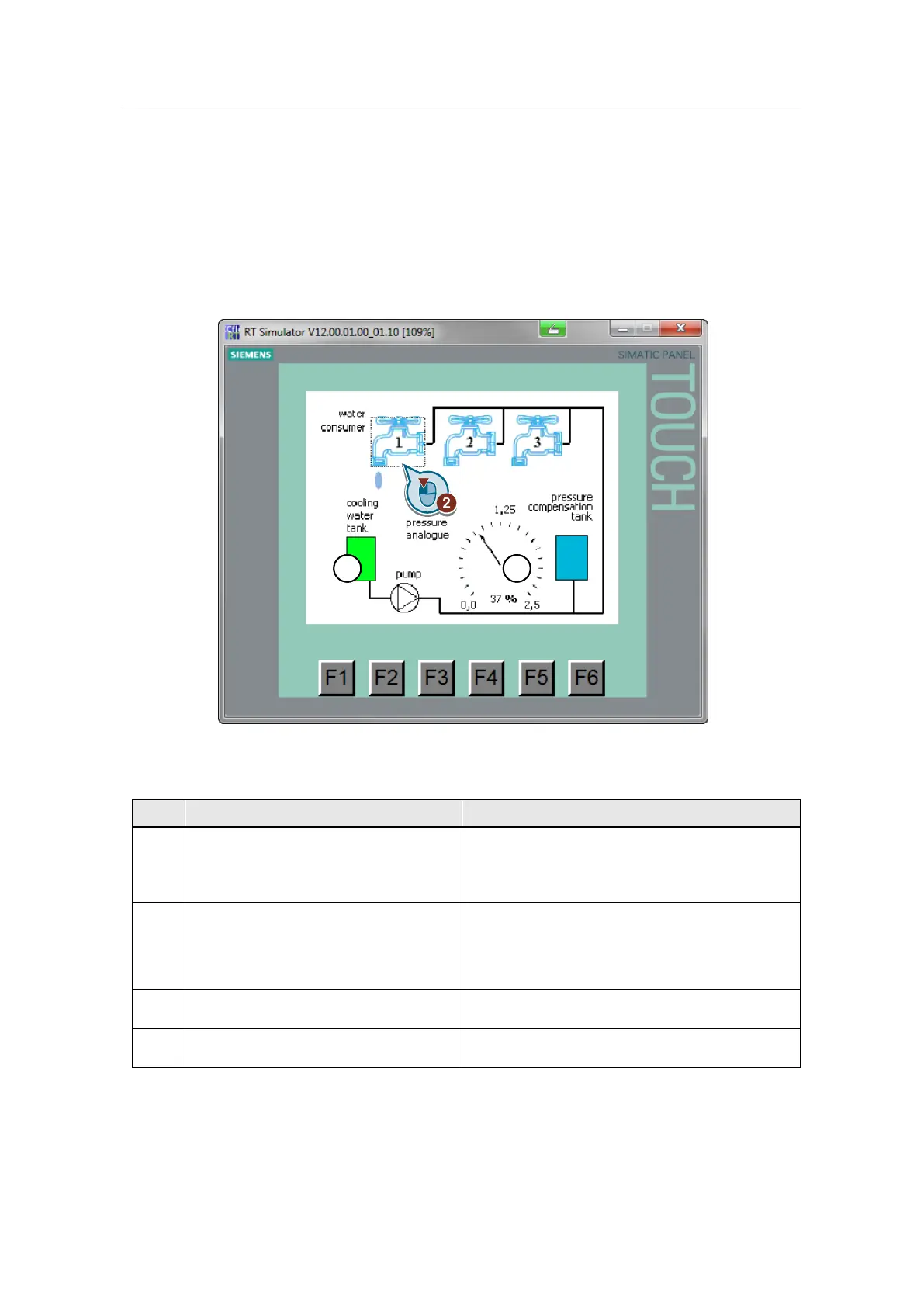
In the “mainscreen” the controlled system is depicted, and the actual pressure is
displayed. You can intervene in the controlled system by the cooling water
consumption, which is defined by the number of active consumers.
Figure 7-1
Make sure that all the electrodes of the
probe for level monitoring are actually in
contact with the water.
If all the electrodes touch the water, the tank (1) is
displayed in green.
If only the MIN electrode does not touch the water,
the tank is displayed in red.
Click on one or more water tap symbols
to switch on consumers.
Under tap (2), a drop of water is displayed
symbolizing an active consumer.
You can observe an upward or downward
movement in the needle in the scale and in the
digital value in the middle of the scale.
Click on the F1 button to navigate to the
screen “LOGO! TD Text display”
Click on the F6 button to navigate to the
screen “regulation”





 To Next Page