5 Configuration and Settings
Set23_RegSim
Entry ID: 23753479, V2.3.S, 02/2014
© Siemens AG
2014 All rights reserved
5.4 Configuring the SINAMICS V20
The cooling water system has been designed for a 0.12kW motor and a
SINAMICS V20 frequency converter, and a supply voltage with a mains
frequency of 50Hz.
If another motor or another frequency converter is to be used, or of the supply
voltage has a different mains frequency than 50Hz, the drive parameters must be
adjusted differently from Table 5-5.
If no SINAMICS V20 is used, the following section can be skipped.
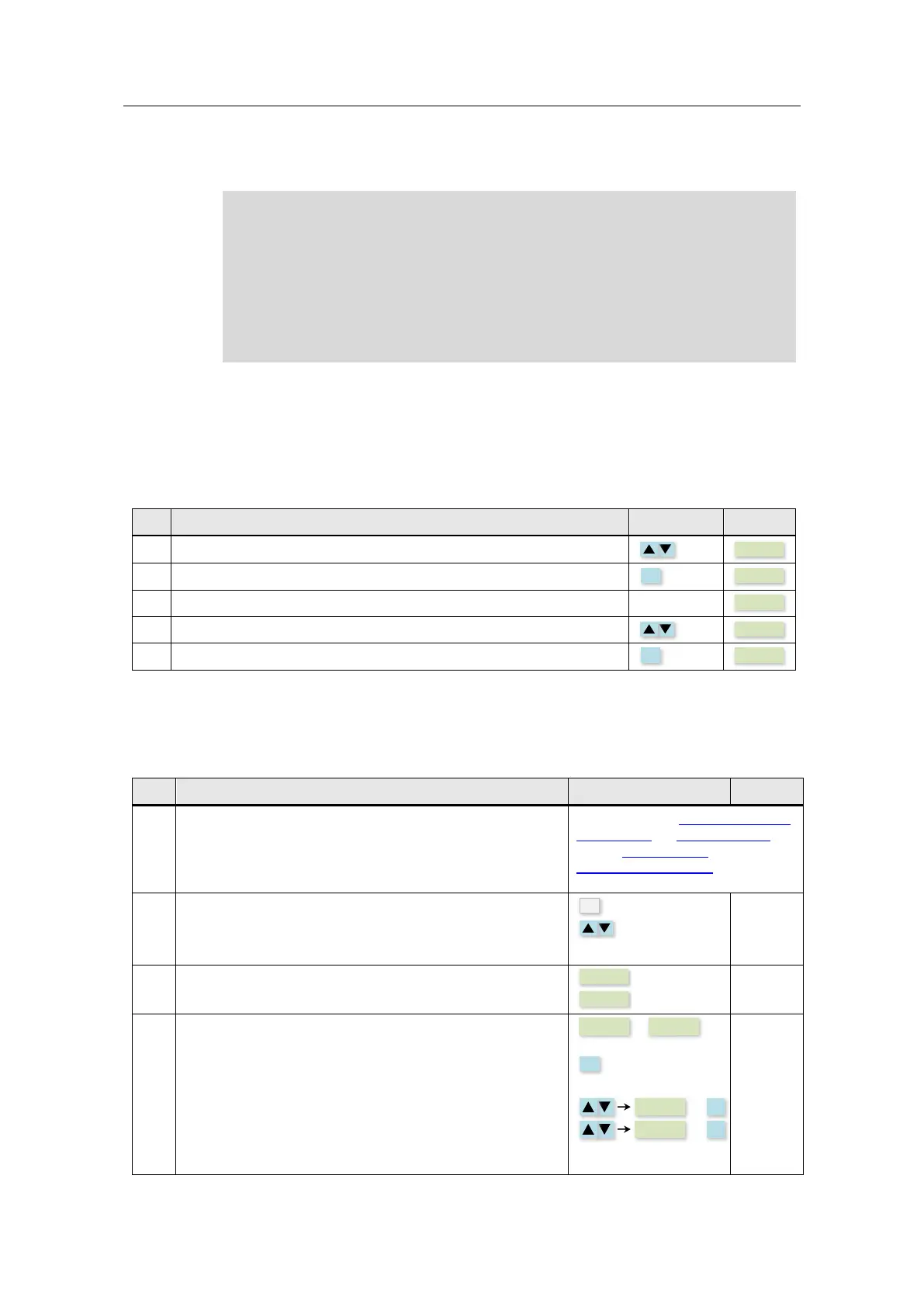
Modifying parameters
The following table shows how to modify and save parameters in the SINAMICS
V20. This operation sequence is generally applicable for the settings of all the
parameters from Table 5-5.
Table 5-4
Use the arrow keys to navigate to the parameter you want to change.
Press the OK button if you wish to adjust a value.
The value is now displayed.
Change the value with the arrow keys.
Save the value with the OK button.
Parameters
This table describes all the parameters of the SINAMICS V20 that are necessary
for the operation of this application.
Table 5-5
Activate the power supply for the SINAMICS V20.
You will find the Introduction to the
built-in BOP, its menu structure
and its Parameter list in the
Operating instructions of the
SINAMICS V20.
Press the multifunction key in the SINAMICS V20 for a short
time (< 2s) to reach the “Parameter menu”.
Use the arrow keys to reach the parameters described in the
following.
Set the SINAMICS V20 to “Factory Settings”.
Then the following will be displayed.
• If the SINAMICS V20 is operated with a mains
frequency of 50Hz, save with OK.
• If the SINAMICS V20 is operated with a mains
frequency of unequal 50Hz, select the correct
frequency with the arrow keys and save them with
OK.
The SINAMICS V20 is now in the setup menu.





 To Next Page