7.2 Simulation of the controller parameters
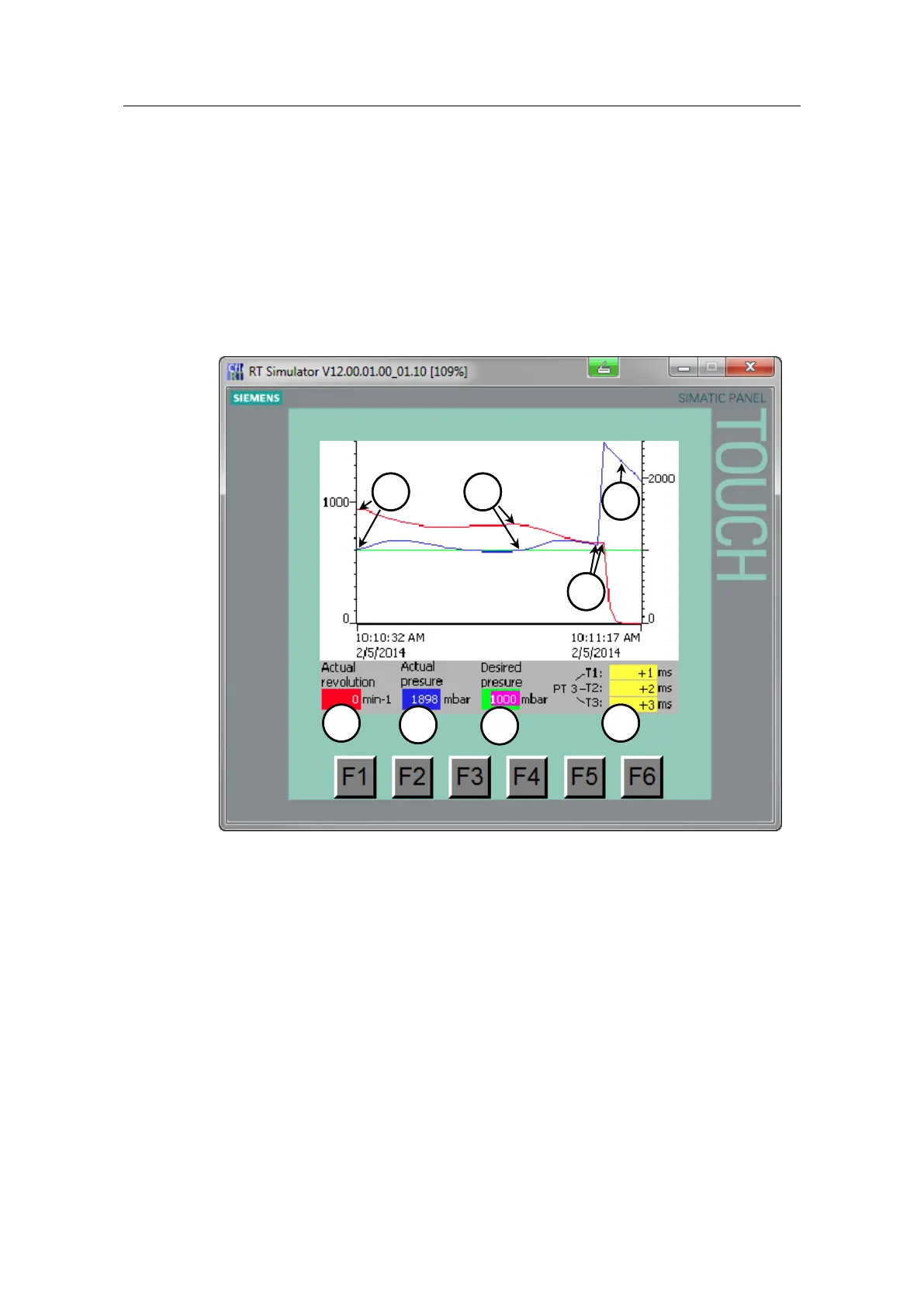
In the “regulation” screen, the desired pressure (7) (green trend) and the actual
pressure (6) (blue trend) and the actual revolution (5) red trend) are displayed.
The setpoint pressure of the ID controller and the dynamics of the simulation (8)
(PT3) can be edited. You can see that from the fact that the background color has
changed.
Figure 7-2
The screen contains the following scenarios:
The consumer switch off one after the other (2, 1):
By reaction, the pressure increases for a short time.
The PI controller reduces the revolutions of the pump, the pressure is controlled
and follows the setpoint value.
Pressure behavior for switched-off consumers (0):
For a short time, the pump pumps against all the closed consumers.
The operation pressure increases to a maximum. The pump switches off.
The pressure decrease follows a discharge curve (e).
In the diagram, the numbers in the circles correspond to the number of active
consumers.



 To Next Page