Chapter 2
Installing the Device
RUGGEDCOM RMC20
Installation Guide
6 Mounting the Device on a DIN Rail
IMPORTANT!
Heat generated by the device is channeled outwards to the enclosure. As such, it is recommended that
2.5 cm (1 in) of space be maintained on all open sides of the device to allow for some convectional
airflow.
Forced airflow is not required. However, any increase in airflow will result in a reduction of ambient
temperature and improve the long-term reliability of all equipment mounted in the rack space.
NOTE
For detailed dimensions of the device with either DIN rail or panel hardware installed, refer to
Chapter5, Dimension Drawings .
CONTENTS
• Section2.1.1, “Mounting the Device on a DIN Rail”
• Section2.1.2, “Mounting the Device to a Panel”
Section2.1.1
Mounting the Device on a DIN Rail
For DIN rail installations, the RMC20 can be equipped with a DIN rail bracket pre-installed on the back of the
chassis. The bracket allows the device to be slid onto a standard 35 mm (1.4 in) DIN rail.
To mount the device to a DIN rail, do the following:
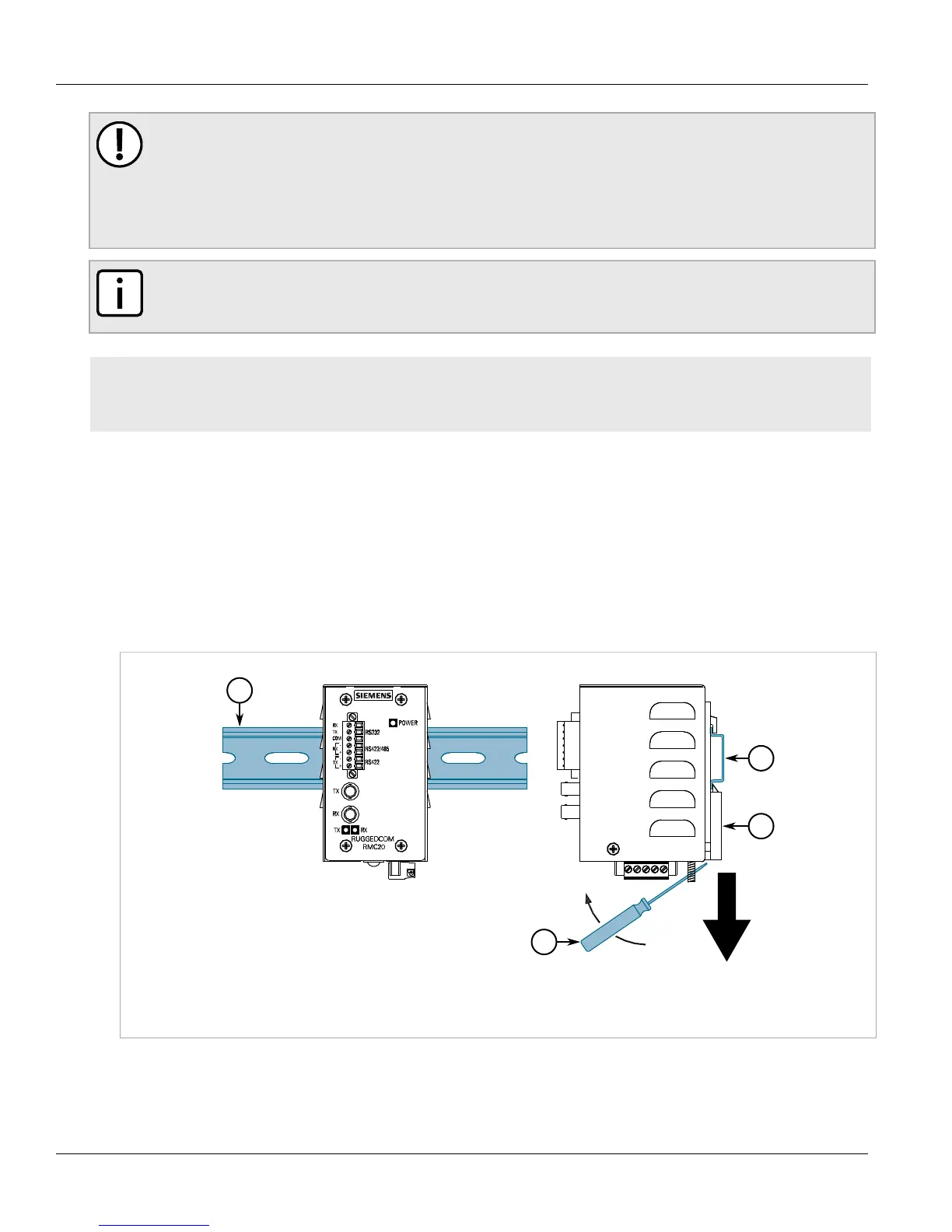
1. Align the slot in the bracket with the DIN rail.
Figure2:DIN Rail Mounting
1.DIN Rail 2.DIN Rail Bracket 3.Screw Driver
2. Pull the release on the bracket down and slide the device onto the DIN rail. If necessary, use a screw driver to
unlock the release. Let go of the release to lock the device in position.


 To Next Page
 Loading...