RUGGEDCOM RX5000
Installation Guide
Chapter 1
Introduction
Description 3
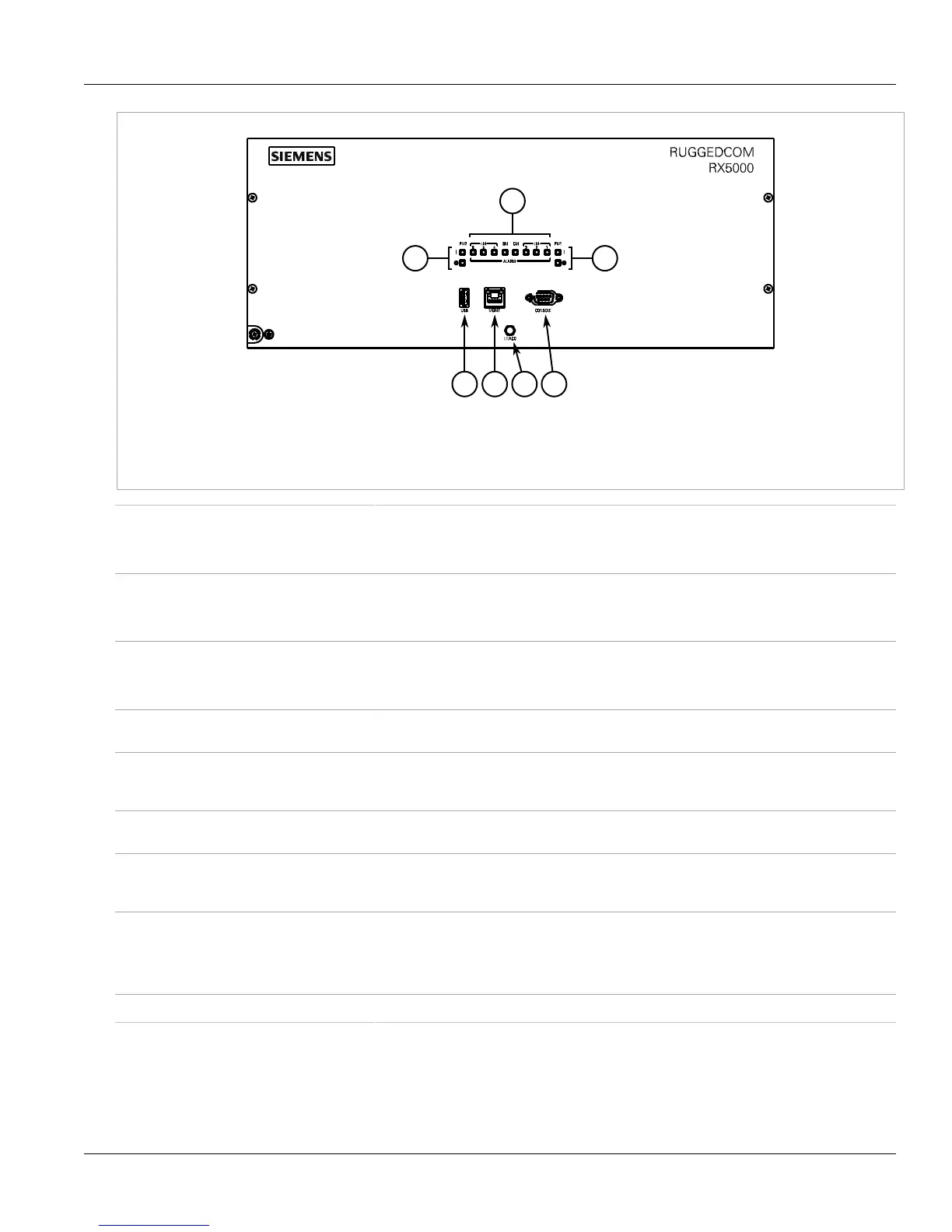
Figure2:Front Panel
1.Power Supply Module Indicator LEDs 2.Alarm Indicator LEDs 3.Utility USB Port 4.Management Ethernet Port 5.Lamp Test/Alarm
Cut-Off (LT/ACO) Button 6.RS232 Serial Console Port (DB9)
Power Supply Module Indicator LEDs Indicate the status of the power modules.
• I = The power supply is receiving power
• O = The power supply is supplying power
Alarm Indicator LED Indicates when an alarm condition exists.
• Green = Alarms cleared/acknowledged
• Red = Alarm
Lamp Test/Alarm Cut-Off (LT/ACO) Button This button performs two functions:
• Press and hold this button to test all indicator LEDs
• Press and release this button to acknowledge an active alarm
Management Port This 10/100Base-T Ethernet port is used for system management that is out-of-band from the
switch fabric.
Utility USB Port Use the USB port to upgrade the ROX II software or install files, such as configuration files
and feature key files. For more information, refer to the RUGGEDCOM ROX II User Guide for
the RUGGEDCOM RX5000.
Compact Flash Card Port Houses the compact flash card, which contains active and backup installations of ROX II,
along with the configuration database and other system data.
RS232 Serial Console Port The serial console port is for interfacing directly with the device and accessing initial
management functions. For information about connecting to the device via the serial
console port, refer to Section2.9, “Connecting to the Device”.
Failsafe Alarm Relay Latches to default state when a power disruption or other alarm condition occurs. For more
information, refer to:
• Section2.7, “Connecting the Failsafe Alarm Relay”
• Section4.1, “Failsafe Relay Specifications”
Power Supply Terminal Block A pluggable terminal block. For more information, refer to Section2.8, “Connecting Power”.



 To Next Page