Chapter 1
Introduction
RUGGEDCOM RX5000
Installation Guide
2 Description
• Universal high voltage ranges: 88-300 VDC or 85-264 VAC
• Terminal blocks for reliable maintenance-free connections
• CSA/UL 60950-1 safety approved to 85 °C (185 °F)
Section1.2
Description
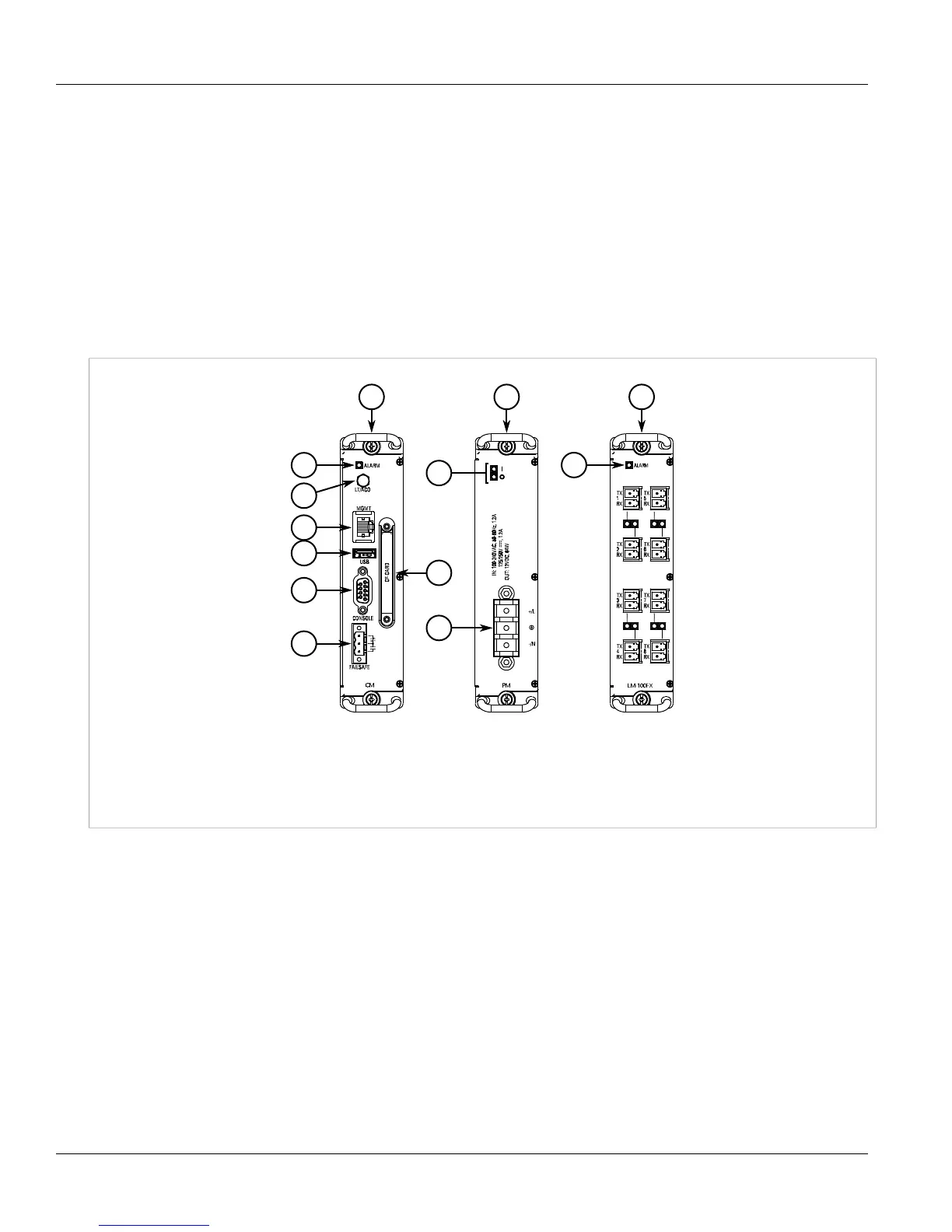
The RUGGEDCOM RX5000 features various ports, controls and indicator LEDs on individual modules and the front
panel for connecting, configuring and troubleshooting the device.
Figure1:RUGGEDCOM RX5000 Modules
1.Control Module 2.Power Supply Module 3.Line Module (Typical) 4.Alarm Indicator LED 5.Lamp Test/Alarm Cut-Off (LT/ACO)
Button 6.Management Ethernet Port 7.Utility USB Port 8.RS232 Serial Console Port (DB9) 9.Failsafe Alarm Relay 10.Compact
Flash Card Port 11.Power Supply Module Indicator LEDs 12.Power Supply Terminal Block
When the RUGGEDCOM RX5000 is configured for rack front mounting, these ports, controls and LEDs are located
on the front panel.



 To Next Page