Assembly
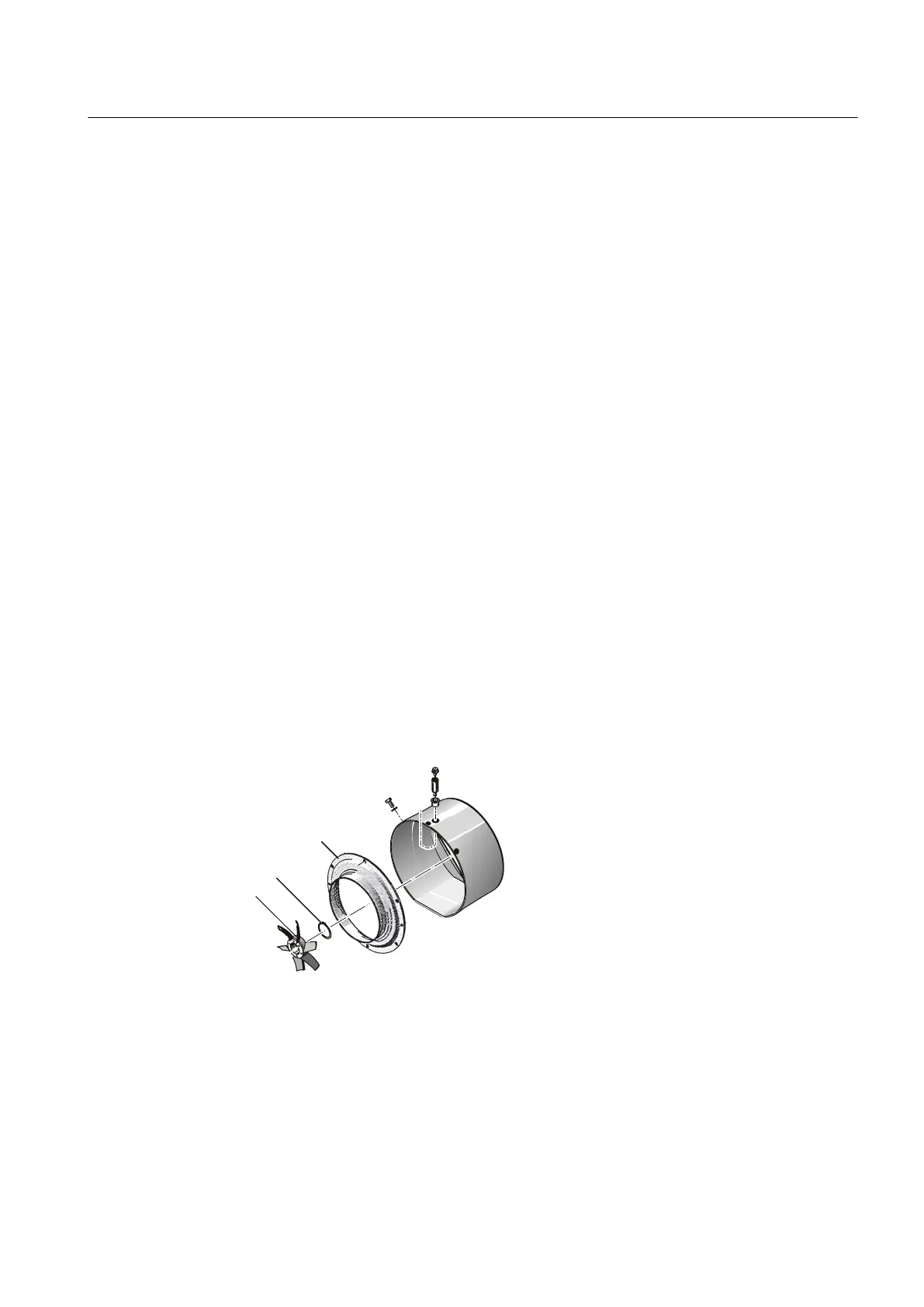
Proceed in the reverse order to assemble the external fan cowl.
1. If a speed sensor is installed:
– Ensure that the cables of the speed sensor are not damaged during the assembly.
– Before attaching the external fan cowl, route the cables of the speed sensor to the
outside between two cooling ribs and affix them temporarily.
2. Position the external fan cowl and tighten the fixing screws.
3. When installing the external fan cowl, make sure that the retaining components are
undamaged and correctly installed.
4. Connect the encoder cable.
9.2.5 External fan made of metal
External metal fans have a keyway connection and are prevented from axially shifting using
a locking ring.
Disassembly
1. The external fan ① is fixed on the shaft with a locking ring ②. Remove the locking ring.
Pliers according to DIN 5254 should preferably be used for this purpose.
2. Use a suitable device to pull off the external fan.
3. Avoid using a hammer.
4. Secure the parallel key from falling out or remove it.
Figure 9-1 Ventilation (schematic diagram with axial fan)
Assembly
1. Remove the parallel key lock or insert it in the keyway.
2. Check the correct seating.
Maintenance
9.2 Corrective Maintenance
SIMOTICS TN Series N-compact 1PQ8
Operating Instructions 11/2018 125



 To Next Page