APOLLO User Manual Page 19
CHANGING PARTITION
In case the system operates in two partitions, you can use a code to
control both partitions from any keypad. The code you use must have the
ability to change partitions.
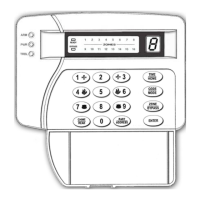
¾ Enter [USER CODE] press [PART] [01] when you are in partition 2
and wish to control partition 1.
¾ Enter [USER CODE] press [PART] [02] when you are in partition 1
and wish to control partition 2.
If the code you use does not have the ability to change partitions, the
keypad buzzer will sound and error message and you will not be able to
control the other partition. Repeat the above mentioned method using a
proper code.
By entering the other partition, on your keypad you will have all the
indications of the new partition, and you will be able to control it (i.e.
arm, disarm, check the events e.t.c.). You will not be able to perform
programming in this partition.
NOTES:
¾ You may return to your previous partition, by repeating the above
mentioned procedure. The keypad will return to its normal
partition after 1 minute if no key is pressed.
¾ To read, which, partition you are in , press the key [PART] for 2
seconds. If you are in Partition 1 the Led 1 will turn on, while if
you are in Partition 2, the Led 2 will turn on.
SELECTIVE ARMING AND DISARMING OF PARTITIONS
To arm or disarm only your partition enter [USER CODE] and press
[ENTER].
In case the system operates in 2 Partitions, you can arm or disarm
any of them or both, at the same time. This is done using the following
methods and a code that has the ability to arm or disarm both partitions.


 To Next Page