APOLLO User Manual Page 9
¾ [TIME] [4] [ENTER], for partition A.
¾ [TIME] [7] [ENTER],
for partition B.
[H] [H] the time and [M] [M] the minutes.
Automatic Disarming:
To program the time the control panel will automatically disarm,
press:
¾ [TIME] [5] [H] [H] [M] [M], for partition A’.
¾ [TIME] [8] [H] [H] [M] [M], for partition B’.
To read auto arming time, press:
¾ [READ] [TIME] [5], for partition A’.
¾ [READ] [TIME] [8],
for partition B’.
To cancel auto arming time, press:
¾ [TIME] [5] [ENTER], for partition A’.
¾ [TIME] [8] [ENTER],
for partition B’.
EXAMPLE: If you wish the partition A to arm every day on 21:30
and disarm every day on 07:45, press:
¾ [TIME] [4] [2] [1] [3] [0], for arming.
¾ [TIME] [5] [0] [7] [4] [5], for disarming.
WEEKLY ARMING OF THE AUTOMATIC DISARMING
User may select the days of the week the system will automatically
disarm at a specific time. The system may disarm automatically in all
days from Monday to Friday, and not in Saturday and Sunday. Automatic
arming is active all days of the week.
To program the days of the week the system will automatically
disarm, press:
¾ [TIME] [6] [D] [D].…[D] [ENTER], for partition A.
¾ [TIME] [9] [D] [D].…[D] [ENTER], for partition B.
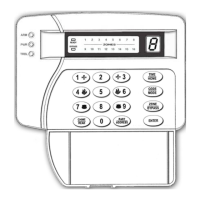
[D] = 1-7, the keys that correspond to the days the system will
automatically disarm. On the LED DISPLAY you will have the letter d
(date) and also the LEDs of the days of the week that the system will
automatically disarm, will turn on. For Sunday the Led 1 will turn on, for
Monday the Led 2, for Tuesday the Led 3, e.t.c. Every time you press a


 To Next Page